
HTML Entity Conversion: 5 Character Encoding Rules
Contents
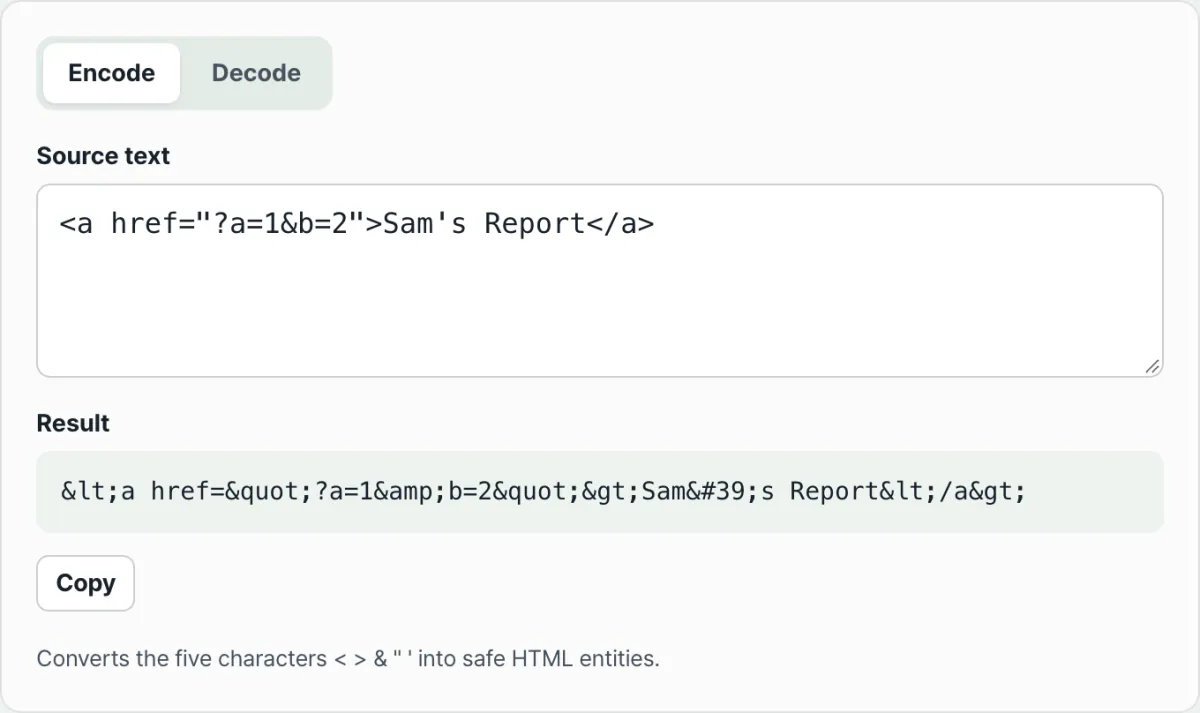
If you've ever pasted text with code or special characters into a post or template and watched it get parsed as a tag or break the layout, the fix is to convert five characters — the angle brackets, the ampersand, and the quotes — into their assigned HTML entities. The other direction works the same way: if entities like ' or … are showing up as literal code, you can turn them back into the original characters by following a fixed set of rules. This article lays out the exact order and rules that encoding and decoding follow.
Quick summary ① Encoding replaces the five characters
&<>"'with&<>"'in that order, and&is always handled first. ② Decoding turns decimal and hexadecimal numeric entities like'and', plus named entities like&and…, back into the original characters. ③ Out-of-range numbers and unregistered names aren't converted — they stay exactly as you typed them.
Why code and special characters break on screen
In an HTML document, the angle brackets (< >) signal the start and end of a tag, and the ampersand (&) signals the start of an entity. When the browser sees these characters, it doesn't print them as-is — it tries to read them as part of a tag or an entity.
This difference shows up the moment you paste code into a blog post or forum thread. If you paste sample code like <p class="box">text</p> as-is, the browser treats it as a real tag instead of showing it as text, so it disappears from the page or wrecks the layout.
Attribute values containing quotes have the same problem, and depending on the editor, the text before and after them can get cut off.
The reverse problem exists too. Text copied from somewhere else can end up showing entities like ' or & as literal code. Those spots should display a single quote or an ampersand, but they stay encoded when the encoded value gets pasted along without being decoded.
How to do the math yourself, without a tool
How encoding is calculated
Encoding is a table lookup that swaps five characters for their assigned entities. Replace them one at a time as shown below and you'll get the same result as the tool.
| Character | Entity | Code point |
|---|---|---|
& | & | U+0026 (decimal 38) |
< | < | U+003C (decimal 60) |
> | > | U+003E (decimal 62) |
" | " | U+0022 (decimal 34) |
' | ' | U+0027 (decimal 39) |
Order matters. You have to convert & first. If you turn < into < first and then process &, the & inside the < you just created gets caught again and turns into &lt;. Handling & first avoids that entirely.
How decoding is calculated
Decoding runs the opposite way: it finds chunks in the string that start with & and end with ;, then restores the original character. A string that starts with & but has no ; after it isn't recognized as an entity pattern at all.
Chunks that start with a number (', ') have the number after the # read as a code point. If there's an x or X in front, it's hexadecimal; if not, it's decimal. For example, decimal 39 and hexadecimal 27 both point to U+0027, the same code point for a single quote.
Chunks written as names (&, …) are looked up in a fixed name table and swapped out. amp (&), lt (<), gt (>), quot ("), apos ('), nbsp (space), copy (©), reg (®), trade (™), hellip (…), mdash (—), ndash (–), middot (·), deg (°), euro (€), won (₩) — these sixteen are the ones you see most often.
The HTML standard defines far more named character references than these, but even a character with no name can always be expressed as a numeric code point. You can look up a specific character's code point in your operating system's character map (Windows Character Map, macOS Character Viewer) or in the official Unicode charts.
The text you enter is never sent to a server. It's converted in your browser instantly, with every keystroke.
Where people get tripped up
The most common mistake is encoding text that's already been turned into entities. Encoding doesn't judge context — it replaces everything starting with &, in order, no questions asked. So if you re-encode text that's already <, the & inside it changes too, and you end up double-encoded: &lt;.
On the decoding side, people often wonder why nothing changed. That's because unregistered names and out-of-range numbers are deliberately left untouched, exactly as they came in.
| Situation | What actually happens |
|---|---|
| Re-encoding text that's already encoded | The & becomes & again, so you get double encoding (for example, < → &lt;) |
A name that isn't in the table (e.g., &foo;) | Not converted — it stays exactly as you typed it |
A number outside the valid range (e.g., �, beyond U+10FFFF) | Can't be converted to a code point, so it stays as-is |
A name written in uppercase (e.g., &) | Name lookup is case-insensitive, so it converts normally |
A string that starts with & but has no ; after it | Not an entity pattern, so it was never a decoding target in the first place |
Encoding output always comes out in lowercase form (& < > " '). Uppercase names (like &) are only recognized during decoding — they're never produced as encoding output.
The bottom line
- Only five characters get encoded:
&<>"'— and&always changes first. - Decoding restores decimal (
') and hexadecimal (') numeric entities, plus named entities from a fixed name table, to their original characters. - Names that aren't in the table and numbers outside the valid range aren't converted — they stay exactly as you typed them.
- Re-encoding text that's already been converted to entities changes the
&again, so you get double encoding. - Everything is calculated in your browser as you type, and nothing is sent to a server.
The text you enter is never sent to a server. It's converted in your browser instantly, with every keystroke.
Frequently asked questions
How many characters get encoded, and which ones?
Five: & < > " '. They're handled in the order & < > " ', with & first. That order is what prevents double encoding, where the & inside a newly created entity would otherwise get replaced again.
Are ' and ' the same thing?
Yes. 39 is decimal and 27 is hexadecimal, and both point to U+0027, the single quote. Only the notation differs — the decoded result is identical.
What happens if I enter an entity name that isn't recognized?
If it isn't in the supported name table (amp, lt, gt, quot, apos, nbsp, copy, reg, trade, hellip, mdash, ndash, middot, deg, euro, won), it isn't converted and stays exactly as you typed it. The tool preserves your input rather than throwing an error.
Is the text I enter sent to a server?
No. All encoding and decoding happens inside your browser, and the text you enter is never sent to or stored on a server. The result recalculates instantly with every keystroke.
This article was adapted from our Korean original. Read the Korean original