
HTML to JS String Escaping: Quote vs Backtick Modes Explained
Contents
When you move an HTML code block into a JavaScript string variable, you need to keep line breaks as data instead of real newlines, and escape only the quote characters that clash with the ones wrapping the string. Then you can paste it in without syntax errors. Doing it by hand means one missed line or one missed quote won't show up until the code actually runs. This article covers why double-quote/single-quote mode and backtick (template literal) mode behave differently, and what to check before you paste the result into your code.
Summary ① Double-quote and single-quote modes cut the string at each line and rejoin it with "\n" and +. A regular string can't hold a real line break inside source code. ② Backtick mode leaves line breaks alone and escapes only the backtick (`) and ${. Template literals were built to hold multiple lines as-is. ③ If you get a syntax error after converting, it's usually because you swapped the wrapping character by hand, or you copied only part of a multi-line result and the semicolon on the last line went missing.
Why this problem actually comes up
It's common to need to hold an entire chunk of HTML markup inside a single JavaScript string variable — a widget script you paste into a static page, email-sending code, a browser extension's content script. This is the situation where a designer or markup publisher hands over an HTML fragment and a developer moves it straight into a code file.
If you just copy the HTML and paste it between quotes, a quote inside a tag attribute like class="box" collides with the quote wrapping the string, and the string ends right there. On top of that, HTML is usually several lines long, and a regular JavaScript string doesn't allow a real line break inside source code.
So you have to handle line breaks and quotes each by its own rule, and those rules depend on which kind of quote you wrap the string in.
How to convert it yourself without a tool
Once you know the principle, you can do it by hand. First, decide what to wrap the string in.
Working in double-quote or single-quote mode
If you chose double quotes (") or single quotes ('), work through these steps in order.
- Split the HTML into separate lines at every line break.
- Within each line, if the original has a backslash (), escape it first as \.
- Within that line, every time the wrapping character appears (a " if you chose double quotes, a ' if you chose single quotes), put a \ in front of it.
- Add a "\n" at the end of the line to stand for the newline, and wrap the whole thing in quotes.
- If it isn't the last line, add the concatenation operator + so it's ready to join the next line's string; on the last line only, use a semicolon ; to finish the statement instead of +.
The reason for splitting lines and rejoining them with + is simple. A regular string wrapped in "..." or '...' that contains a real newline character in the middle of source code is treated as an unterminated string right there, and you get an error.
So you replace the real newline with the character form "\n", and imitate the source-code line breaks by chaining multiple strings with the + operator.
Working in backtick mode
If you chose a backtick (`), it's different. You don't need to split lines — just put the whole HTML between two backticks. Template literals, introduced in ES6, were designed from the start to hold real line breaks inside source code.
In this case there are only two things to escape. If the original has a backtick (), change it to \. If it has ${, the expression symbol that injects variables, change it to ${.
If you leave ${ alone, JavaScript tries to interpret what follows as code, which leads to unexpected behavior or errors. Regular quotes (", '), on the other hand, are plain characters with no meaning in backtick mode, so they don't need to be escaped.
When you work through a long HTML file by hand using these rules, it's easy to miss a backslash or a quote on even one line. The rules are exactly what's above, so all you need is less repetitive work. Check it with our free tool.
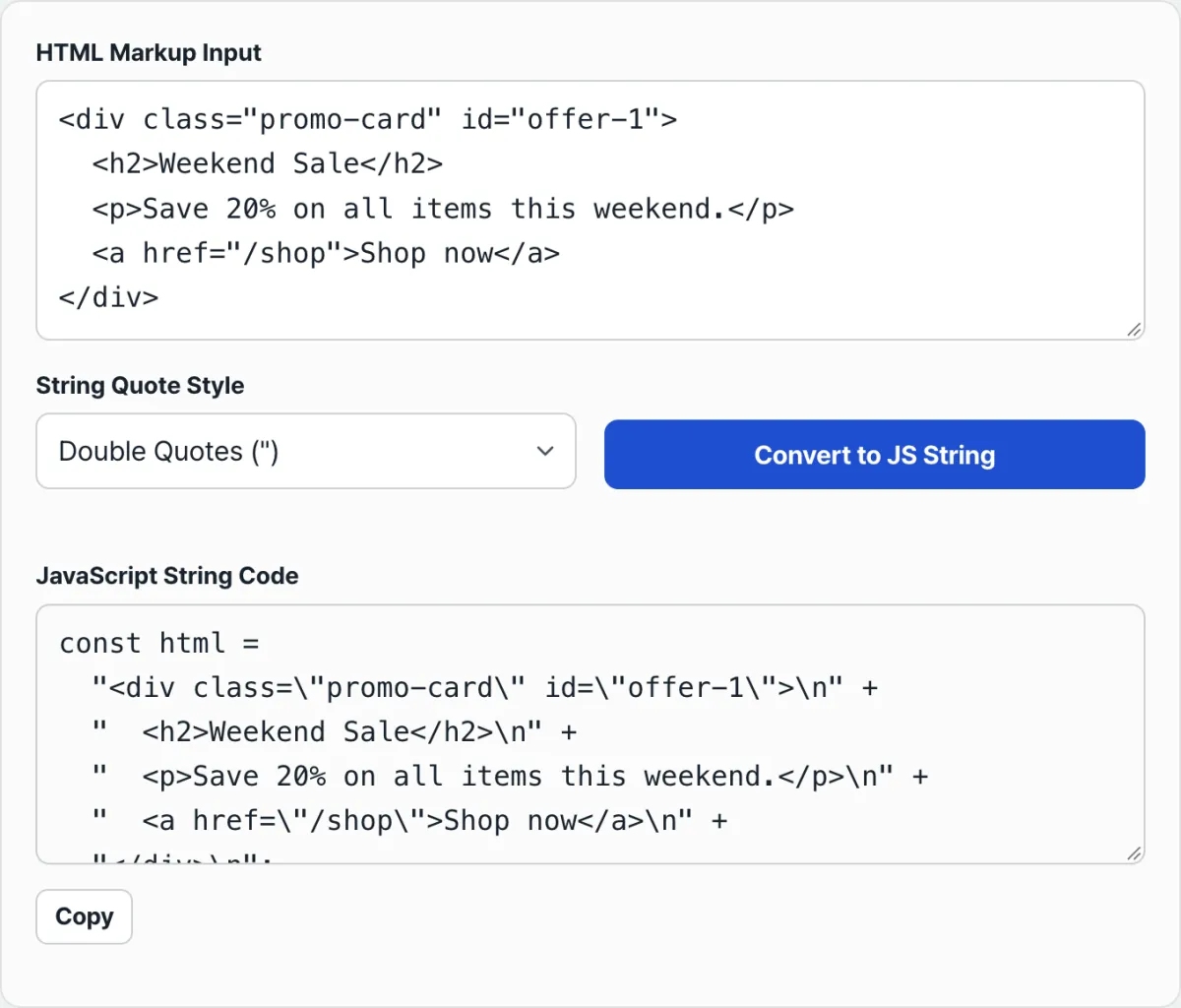
Converts HTML into a JS string declaration in double quote, single quote, or backtick mode. No install or signup required.
Common points of confusion and mistakes
| Mode | Line break handling | What to escape |
|---|---|---|
| Double quote " | Cut each line, join with "\n" + | Double quotes ("), backslash () |
| Single quote ' | Cut each line, join with "\n" + | Single quotes ('), backslash () |
| Backtick ` | Left as-is (lines not split) | Backtick (`), ${ |
The most common mistake is changing only the wrapping character by hand after you get the result. For example, if you convert in backtick mode and later swap just the backticks for double quotes yourself, you'll have a problem.
Backtick mode never escaped " or ' in the first place, so the quotes that were inside HTML attributes are still there, and they cut the string off in the middle. If you need a double-quoted result, select double-quote mode in the tool and convert again.
The second mistake is not pressing the convert button again after you edit the input. This tool doesn't recalculate automatically when the contents of the input field change — the result only updates when you press the "Convert to JS String" button. If you fix the HTML and then copy the old result, your code and what's actually on the page won't match.
The third is copying only part of a result that spans multiple lines. In double-quote and single-quote modes, most lines end with + and only the last line ends with a semicolon. If you leave off the end of the result while copying, you're left with an unfinished statement that ends in + with nothing after it. And if you tack other code onto the end of the result, you get a stray token after a statement that already ended with a semicolon, which throws an error.
Recap
- Regular strings (", ') can't hold real line breaks in source code, so double-quote and single-quote modes split the HTML line by line and rejoin it with "\n" +.
- Backtick template literals are a syntax that holds multiple lines as-is, so you don't split lines — you escape only the backtick and ${.
- Backtick mode doesn't escape regular quotes, so you can't just change the wrapping character by hand after converting.
- Before you paste the result, check that the last line ends with a semicolon and that every line before it is joined with +.
- If you edited the input, press the convert button again to get the current result.
Converts HTML into a JS string declaration in double quote, single quote, or backtick mode. No install or signup required.
Frequently asked questions
Why doesn't backtick mode escape quotes?
Because " and ' aren't delimiters inside a backtick string — they're ordinary characters. The only thing JavaScript reads as the end of the string is the same backtick that started it, so the only things you need to escape are the backtick itself and the expression-injection symbol ${.
I pasted the result and now I'm getting a syntax error. Why?
It's almost always one of two things. Either you edited the HTML and copied the old result without pressing the convert button again, or you copied only part of a multi-line result, so the semicolon on the last line was missing or other code got attached to the end incorrectly. The fastest fix is to copy the entire result panel again from start to finish.
What happens if the original HTML contains backslashes?
In double-quote and single-quote modes, the backslashes on each line are also escaped, so each one appears as \ (twice). When you're dealing with text that contains backslashes, like file paths or regex patterns, it helps to know that seeing two backslashes instead of one in the result is normal.
Can I turn a backtick-mode result into a double-quoted string later?
I don't recommend it. Because backtick mode doesn't escape " or ', changing only the wrapping character by hand leaves the quotes inside HTML attributes in place, and they end the string early. If you need a double-quoted result, it's safer to select double-quote mode in the tool and convert again.
This article was adapted from our Korean original. Read the Korean original