
htpasswd Generator: Create a .htpasswd File Without Installing
Contents
To put Basic auth in front of a site with Apache or Nginx, you need a .htpasswd file containing lines in the form "username:hash". The official command for creating that file is htpasswd, but it's common to find the command missing entirely because the Apache-related packages aren't installed on the server or dev machine.
A single .htpasswd line is just text — a password hashed with SHA-1 or SHA-256, written in a fixed notation. Once you know that notation, you can build the identical line yourself without installing anything.
Summary ① A .htpasswd line has the structure
username:hash, and the colon (:) separates the fields. ②{SHA}is the password hashed with SHA-1 and the resulting bytes base64-encoded, with the algorithm name prefixed to it;{SHA256}does the same with SHA-256. ③ Apache connects the file path to its auth config withAuthUserFile; Nginx usesauth_basic_user_file.
Where this gets stuck
A common case: a staging server before launch, or an admin page that isn't ready for the public yet, and you want to lock it down with Basic auth so only a few teammates can get in for now. With Nginx you just add two auth_basic lines, so turning auth on is the easy part.
The problem is the .htpasswd file that auth needs. The htpasswd command that creates it ships with the Apache distribution (apache2-utils on Debian and Ubuntu, httpd-tools on RHEL-based systems), so it's often missing entirely on servers running only Nginx or on minimal container images.
In that spot, installing a new package means touching your deploy pipeline, which is a burden. All you need is one line in a file, and installing a package to produce that one line is more trouble than it's worth.
How to build a .htpasswd line yourself
An .htpasswd file is a plain text file with one line per account, username:hash, separated by newlines. The colon is the delimiter, so a username can't contain a colon, and spaces usually aren't allowed either.
The {SHA} notation is the password hashed with SHA-1, its raw bytes base64-encoded, with {SHA} in front. If you have openssl, you can compute it yourself with a single command.
printf '%s' 'test1234' | openssl dgst -sha1 -binary | openssl base64
# m8NFSdVl2VBbKH3gzSCsd74dPyw=
Put {SHA} in front of that value and join it to the username with a colon, and you get admin:{SHA}m8NFSdVl2VBbKH3gzSCsd74dPyw=. Running the same password through the -s option (SHA-1 hashing) in Apache's htpasswd command gives you exactly the same value.
{SHA256} works the same way — just change the digest algorithm to sha256.
printf '%s' 'test1234' | openssl dgst -sha256 -binary | openssl base64
# k36NX7tIvUlJU2zWW401xCa4DS+DDFwwjizexCKuIkQ=
{SHA256} and the -2 option are different notations
The htpasswd command's -2 option is named "SHA-256 hashing", but what it actually produces isn't the {SHA256} notation — it's the system crypt() function's SHA-256 format (a string starting with $5$). Same name, different output format; they're separate notations.
So whether a line built with {SHA256} actually authenticates on your server can depend on the Apache or Nginx version and how its modules are configured.
bcrypt is a separate scheme
The bcrypt method (strings starting with $2y$) is an entirely different scheme. The salt is embedded in the hash, so the same password produces a different string every time you compute it.
The browser's Web Crypto API has no bcrypt operation, so you can't compute it there. It has to be made with a server-side tool such as htpasswd -B or openssl passwd -bcrypt.
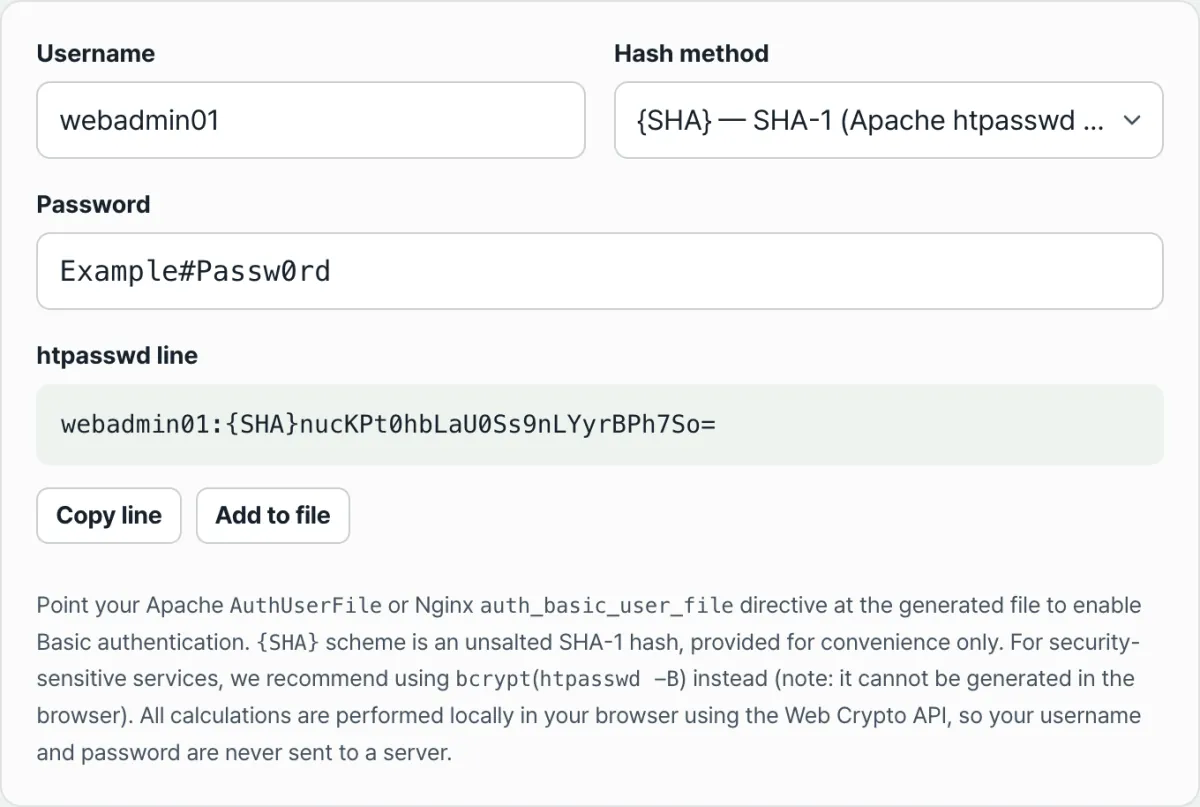
Check it with our free tool.
Enter a username and password to compute a {SHA} or {SHA256} hash htpasswd line right in your browser. Everything runs through Web Crypto, so nothing is sent to a server.
Common mistakes
The three most common mistakes look like this.
| Mistake | Result |
|---|---|
| Spaces or colons in the username | The colon collides with the field delimiter, so file parsing breaks or the intended username isn't recognized |
| Deploying {SHA} or {SHA256} in a state the server can't recognize | Even if the hash value itself is computed correctly, auth always fails if the server can't read that notation |
| Assuming bcrypt and the {SHA} family are the same thing | bcrypt embeds a salt in the hash, so it produces a different string every time; you can't "convert" an existing {SHA} hash to bcrypt — you have to hash the password again from scratch |
The second one is the hardest to spot. If authentication fails even though you computed the hash correctly, it's usually the server not reading the prefix notation. In that case, rebuild the line with the more thoroughly proven {SHA} notation, and if it still fails, check the server-side auth module logs — that order helps you pin down the cause.
Recap
- A .htpasswd line is
username:hash, and because the colon is the delimiter, a username can't contain spaces or colons. {SHA}is the raw bytes of a SHA-1 digest base64-encoded with the algorithm name prefixed;{SHA256}is the same for a SHA-256 digest.- Apache htpasswd's
-soption produces the same result as{SHA}, but the "SHA-256" that-2creates is a crypt() format that differs from the{SHA256}notation. - Apache connects the file path to its auth config with
AuthUserFile; Nginx usesauth_basic_user_file. - bcrypt is a separate format with a built-in salt, so it can't be converted to or from the {SHA} family.
Enter a username and password to compute a {SHA} or {SHA256} hash htpasswd line right in your browser. Everything runs through Web Crypto, so nothing is sent to a server.
Frequently asked questions
What's the difference between {SHA} and {SHA256}?
The algorithm used to hash the password is different. {SHA} base64-encodes a SHA-1 digest (20 bytes) and prefixes the algorithm name; {SHA256} does the same with a SHA-256 digest (32 bytes). Neither uses a salt, so the same password always produces the same hash.
Can I create one with bcrypt?
Our tool computes hashes with the browser's built-in Web Crypto API (crypto.subtle.digest), and that API doesn't include bcrypt. So it offers only two methods: SHA-1 ({SHA}) and SHA-256 ({SHA256}). If you need bcrypt, you have to use a server-side tool such as htpasswd -B or openssl passwd -bcrypt.
Is the password I enter sent to a server?
No. All hash computation happens inside your browser, and the username and password are never sent anywhere or stored.
How do I connect the .htpasswd file to my server?
For Apache, add AuthType Basic, AuthUserFile /path/.htpasswd, and Require valid-user to your config. For Nginx, auth_basic "text"; sets the text shown in the auth prompt, and auth_basic_user_file /path/.htpasswd; sets the file path. In both cases, every line in the file must be in username:hash form.
This article was adapted from our Korean original. Read the Korean original