
JSON Array to Table: How Columns, Sorting, and Search Work
Contents
A JSON array from an API response or a text file comes as one solid block of square and curly brackets, so it's hard to scan how many items it has or which fields it contains.
This post explains exactly how columns are built when you turn an array of JSON objects into a table, and how sorting and search compare values. It also covers how to check this yourself in a browser without any tool.
Summary ① Column headers are built by combining the keys of every item in the array, so even when items have different fields, they all go into one table. ② Sorting compares numeric columns by numeric value and everything else by lowercase string order. Rows with no value always get pushed to the bottom. ③ The search box converts every cell value to a string and checks for case-insensitive partial matches. Nested object and array values appear only as their converted strings.
When you need to see a JSON array as a table
When you query a user list or an order list from a REST API, the result often comes back as an array of JSON objects. With dozens to hundreds of items, it's hard to tell from text alone which value belongs to which item.
It gets more confusing when some users have fields like phone or address and others don't. Comparing an array where one object has 5 fields and another has 7 by eye takes time, especially when you're trying to find the missing fields.
The same goes for data with numeric fields like price or stock quantity. When you want to see the largest values first or filter down to items that contain a certain keyword, raw text gives you no way to sort or search.
How to view a JSON array as a table without a tool
The browser developer tools console already has a built-in console.table feature that draws arrays as tables. With no installation, you can reproduce the table, sorting, and search with this feature alone.
Viewing it as a table
Press F12 (Cmd+Option+I on a Mac) to open developer tools and go to the Console tab. Paste the raw JSON array text after console.table( and close it with ), then run it. This draws a table that uses the combined keys of every object in the array as columns.
Cells that contain nested objects or arrays show up as expandable references rather than being flattened into strings. This is different from how the tool below displays them, so keep that distinction in mind.
Reproducing sorting
After storing the array in a variable in the console (const data = 붙여넣은_배열), you can compare a numeric field in ascending order by writing data.slice().sort((a, b) => (a.가격 ?? Infinity) - (b.가격 ?? Infinity)).
For a text field, lowercase both values before comparing, then filter out items with no value and append them to the end of the array to get the same result.
Reproducing search
Running data.filter(row => Object.values(row).some(v => String(v).toLowerCase().includes('찾을단어'))) keeps only the results where every field value has been converted to a string and checked for a lowercase partial match.
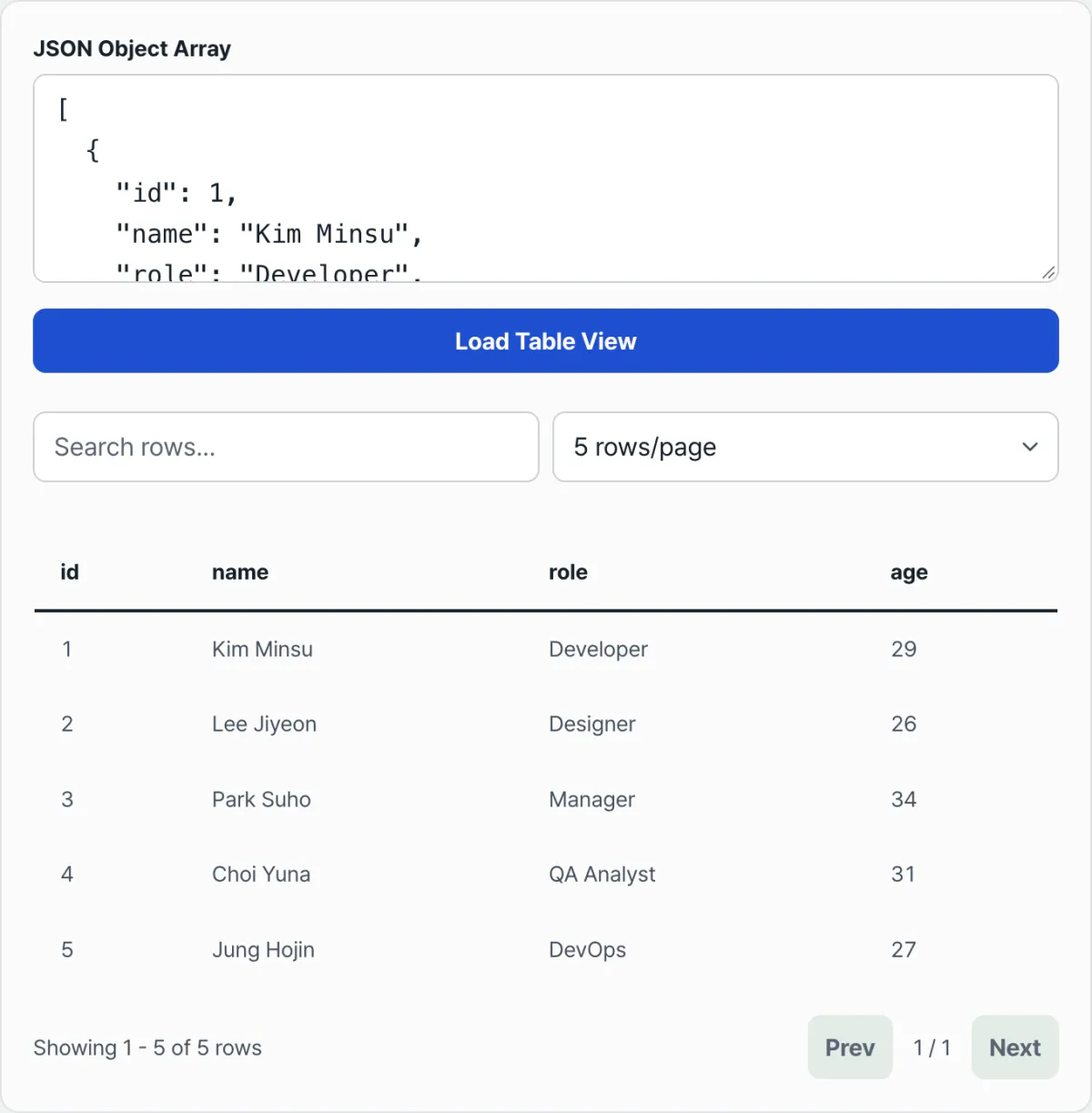
Instead of typing this process into the console every time, the tool below has the same logic built into buttons and an input field.
Try it with our tool.
Everything runs in your browser. It turns a JSON array into a table with no install and no sign-up.
Common points of confusion
When the table doesn't render or looks different from what you expected, it's usually one of these four things.
| Situation | What actually happens |
|---|---|
You paste a single object { } instead of a top-level array | JSON.parse succeeds, but it's not an array, so you get only an error message and no table |
The API response wraps the array in an object, such as { "data": [ ... ] } | Because the top level is an object, you get the same error as above. You need to cut out and paste only the inner array |
| A value contains a nested object or array | The cell shows only the result of JavaScript string conversion (objects become [object Object], arrays become comma-separated text), so you can't see the details |
| Items have different sets of fields | You get one table with the keys from every item combined, with no error, and missing fields appear as empty cells |
Sorting results are another common source of confusion. If one column mixes numbers and text, each item may be compared by a different rule. Rows with empty values (null or undefined) always go to the bottom of the table, whether the sort is ascending or descending.
Summary
- Column headers are built by combining the keys of every item in the array. Even when items have different fields, you get one table with no errors.
- Sorting compares numbers by numeric value and everything else by lowercase string order. Rows with no value always get pushed to the bottom.
- The search box converts every cell value to a string and checks for case-insensitive partial matches.
- If the top level isn't an array (a single object, or an object wrapping an array), you get an error and no table.
- Nested object and array values appear only as strings, so you can't see their details directly in the table.
Everything runs in your browser. It turns a JSON array into a table with no install and no sign-up.
Frequently asked questions
What happens when a sort column mixes numbers and text?
Values recognized as numbers are compared by numeric value. Values that aren't recognized as numbers are compared by lowercase string order. If a column mixes numbers and text, the comparison rules are mixed, so the order may not be what you expect.
I typed a value I know is there into the search box, but it doesn't match. Why?
Search checks for partial matches against each cell value after converting it to a string. Nested object or array values show the string conversion result (for example, [object Object]) rather than their original content, so searching for an actual value inside one won't match it.
Where do rows with missing values go when I sort?
Rows where the sort column value is null or undefined always appear at the bottom of the table, whether the sort is ascending or descending.
I pasted JSON text, but I only get an error and no table.
The top-level structure is a single object ({ }) instead of an array ([ ]), or the JSON syntax itself is invalid. If the API response wraps the array, such as { "data": [...] }, paste only the inner array.
This article was adapted from our Korean original. Read the Korean original