
Convert Inline Styles to CSS Classes: How It Works
Contents
If you've ever worked with a document where every HTML tag carries its own style="..." attribute and CSS feels impossible to manage in one place, a tool that automatically pulls inline styles out into separate CSS class rules can help.
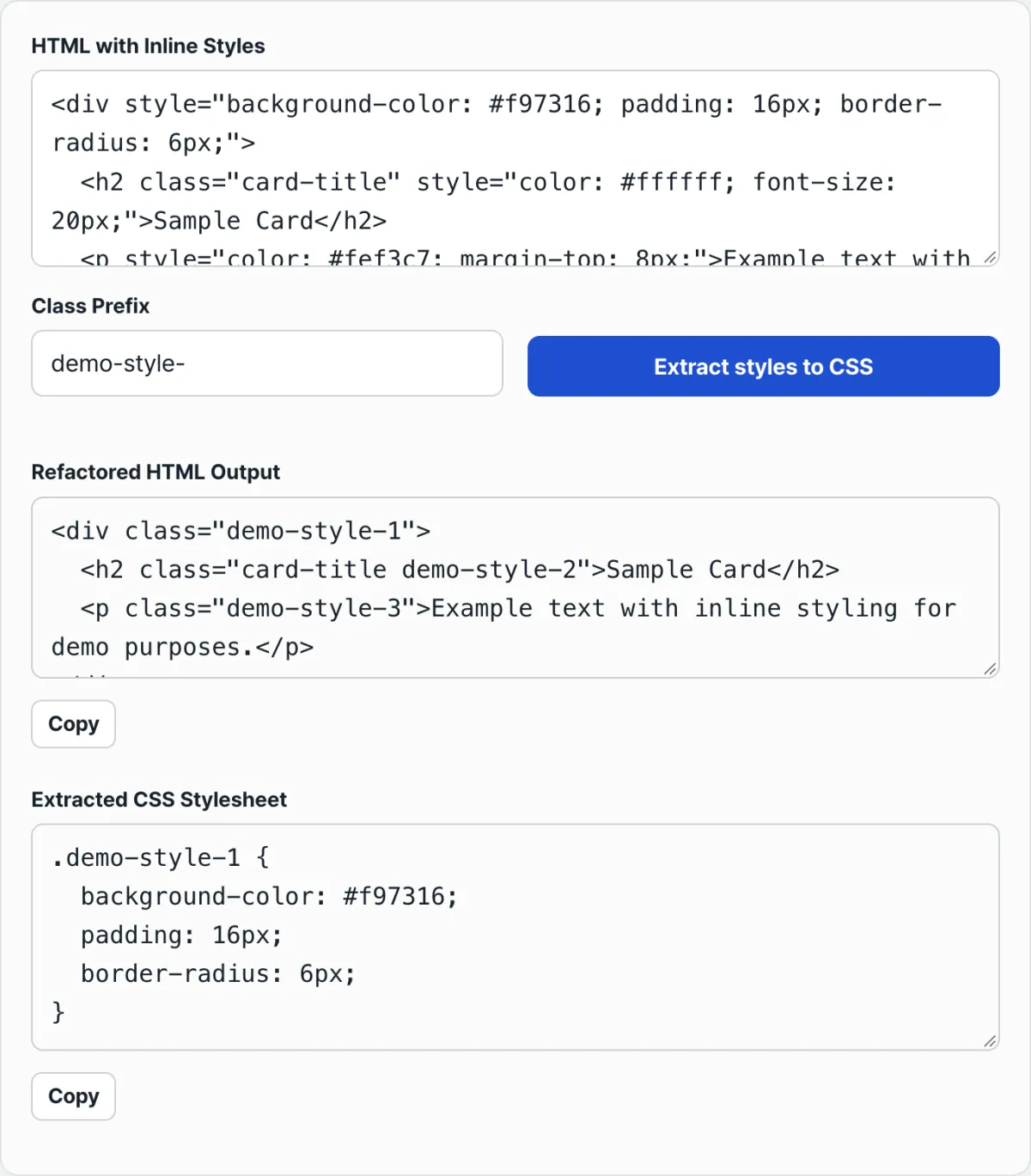
This post explains exactly how that conversion works: the order class names are numbered in, how style declarations get split up, and what happens to existing class attributes and to elements that share identical style values.
Summary ① Class names take the form prefix + number, and the number is counted across every element with a style attribute, in DOM document order. ② Style values are split on semicolons, each piece is trimmed, and empty pieces are dropped — so a trailing semicolon never produces an empty CSS rule. ③ Existing class attributes are not removed. The new class name is simply appended after the existing value.
How inline styles pile up in the first place
When you export a document from Notion as HTML, or copy and paste a layout built in an email newsletter builder, it's common for every paragraph, list item, and table cell to carry its own attribute like style="color:#333; font-size:14px;".
Move that document into a static page or a CMS post, and later, when you want to change a color or size all at once, you can't just edit one CSS file. You have to hunt down the style attribute baked into each tag and fix them one at a time.
And when inline styles and class-based CSS are mixed together, just figuring out which rule is actually being applied on screen becomes a chore.
How to split them yourself, without a tool
You can do this by hand. The rules go in this order.
- Find the elements in the HTML document that have a
style="..."attribute, in the order they appear in the document (top to bottom, walking the tree from outer elements to inner ones). - Pick a prefix (for example,
c). Starting with the first styled element you find, number themc1,c2,c3, and so on. The numbering ignores tag type — div, span, p, whatever — and counts straight through every element that has a style attribute. - If an element already has a class attribute, don't remove it. Add a space after the existing class value and append the new class name. If the element had no class attribute, create one.
- Split the value of the style attribute on semicolons (
;). Trim the whitespace around each piece, and drop any piece that ends up as an empty string. This is where the empty piece left over from a trailing semicolon gets filtered out. - Join the remaining declarations in order and build a single CSS rule in the form
.classname {\n declaration1;\n declaration2;\n}. - Remove the original style attribute itself.
- Repeat steps 2–6 for every styled element in the document, then collect all the generated CSS rules into one stylesheet.
There's a part of this that gets especially tedious by hand: these rules never compare style values to merge them.
In other words, even if two elements have style values that match down to the last character, following the rules exactly means giving each element its own newly numbered class and its own separate CSS rule.
As the number of elements grows, just keeping the numbering in sequence without skipping anything becomes an error-prone job.
Check your work with our tool.
It converts right in your browser. No install or sign-up needed.
Easy places to get confused when reading the results
When you first look at the output, these five points are especially easy to misread.
| Confusing point | What actually happens |
|---|---|
| What the class numbers are based on | A single count in DOM order across every element with a style attribute, regardless of tag type |
| A semicolon at the end of the style value | Pieces that become empty strings after trimming are dropped, so no empty CSS rule appears |
| The original class attribute | Not removed — the new class name is appended after the existing value, separated by a space |
| Two elements with identical style values | Not merged. Each gets its own numbered class and its own CSS rule |
| Input with broken structure, such as an unclosed tag | The browser's DOMParser corrects and parses it automatically, so the output HTML structure may differ subtly from the original text |
That last one is often the reason a result "looks weird." This tool doesn't treat your input as plain text. It reads it with the same parser a browser uses when interpreting an actual HTML document (DOMParser).
So if there are mismatched tags or bad nesting — anything malformed — the parser repairs the structure according to its own rules, and then classes are assigned and styles extracted based on that repaired structure.
It isn't a case of pulling styles out while leaving the original text untouched character for character. The document structure as the parser understands it becomes the basis for the output.
It's also easy to assume class numbers are assigned separately per tag type.
For example, if the styled elements in a document appear as <div>, <span>, <div>, the numbers aren't div1, span1, div2 by tag. They're c1, c2, c3 in the order they were found.
Recap
- Class names take the form "prefix + number," and the number is a single count across every element with a style attribute, in DOM document order.
- Style values are split on semicolons, each piece is trimmed, and empty pieces are dropped — so a trailing semicolon never produces an empty CSS rule.
- Existing class attributes aren't deleted. The new class name is added after them, so they're preserved.
- Even elements with identical style values aren't merged automatically. Each element gets its own class and its own CSS rule.
- Input is parsed with the browser's DOMParser, so if you paste HTML with broken tag structure, the parser's corrected structure is what the output is based on.
It converts right in your browser. No install or sign-up needed.
Frequently asked questions
Do elements with identical style values get merged into one class?
No. The tool doesn't compare values to remove duplicates. Every element with a style attribute gets its own newly numbered class, even if the values match, and a separate CSS rule is generated for each element.
Does the class attribute that was already there disappear after conversion?
No. The existing class value stays exactly as it was, and the newly generated class name is appended after it with a space. It doesn't remove the existing class and replace it with the new one.
Does a trailing semicolon in a style attribute create an empty CSS rule?
No. The style string is split on semicolons, the whitespace around each piece is removed, and any piece that becomes an empty string is dropped. So style="color:red;" with a trailing semicolon leaves no empty rule in the CSS.
If I paste HTML with broken tags, does the output match the original exactly?
Not exactly. The tool parses input with the browser's native DOMParser, and DOMParser automatically corrects malformed parts — like unclosed tags — according to its own rules. So the output HTML structure can differ subtly from your original text.
This article was adapted from our Korean original. Read the Korean original