
HTML Special Character Escape: Convert &, <, >, and Quotes
Contents
HTML special character escaping is the job of turning five characters — <, >, &, ", and ' — into character entity codes like < and &. The point is to keep the browser from misreading those characters as tags or attribute separators, so it shows them as plain text on the screen exactly as written.
This covers two problems: showing HTML code examples as-is in a blog post, and going the other way to turn already-escaped code back into the original characters.
Summary ①
&<>"'are the five characters the HTML parser reads as tag and attribute delimiters, which causes conflicts. ② Escaping replaces these five characters 1:1 with the codes&<>"'. ③ Unescaping turns those codes back into the original characters, and you verify the result by checking that no code remains.
Why your tags disappear or break when you post a code example
If you paste HTML code like <div class="box"> into a blog post or a message board, sometimes the characters don't show up at all — you just get an empty box, or the layout breaks.
The cause is that the browser or editor reads the pasted text as real HTML markup rather than a code sample. When you write <div>, the parser doesn't think "these are the four letters d-i-v." It thinks "a div element starts here."
The same problem happens in the other direction. If you copy text from somewhere and it's already escaped as <div>, the screen shows those literal characters instead of code. This time you need to unescape it back into a real tag.
How to convert by hand without a tool: mapping table and order
There are exactly five characters the HTML parser treats specially. Here's why each one causes trouble and what it turns into.
| Original character | What the parser reads it as | Escaped code |
|---|---|---|
& (ampersand) | The start of a character reference (entity) | & |
< (left angle bracket) | The start of a tag | < |
> (right angle bracket) | The close of a tag | > |
" (double quote) | The delimiter around an attribute value | " |
' (single quote) | The delimiter around an attribute value | ' |
Replacement order: why you have to start with &
When you replace these five by hand, order matters. You have to do & first.
If you change < to < first and then change & to &, the & you just created in < gets replaced again, and you end up with the double-escaped result &lt;. That's why the standard order is & → < → > → " → '.
The whole conversion, step by step with an example
Say you want to convert <div class="box">A & B's</div> by hand. First you replace every & with &, then < and > with < and >, and finally the double and single quotes with " and '.
The result is <div class="box">A & B's</div>.
Unescaping and checking the result
Unescaping, the reverse process, goes in the opposite direction. You just change each entity code back to the original character.
Checking the result is easy. Look at the restored text and confirm two things: no code-shaped characters like < > & " ' are left, and the original < > & " ' characters are back.
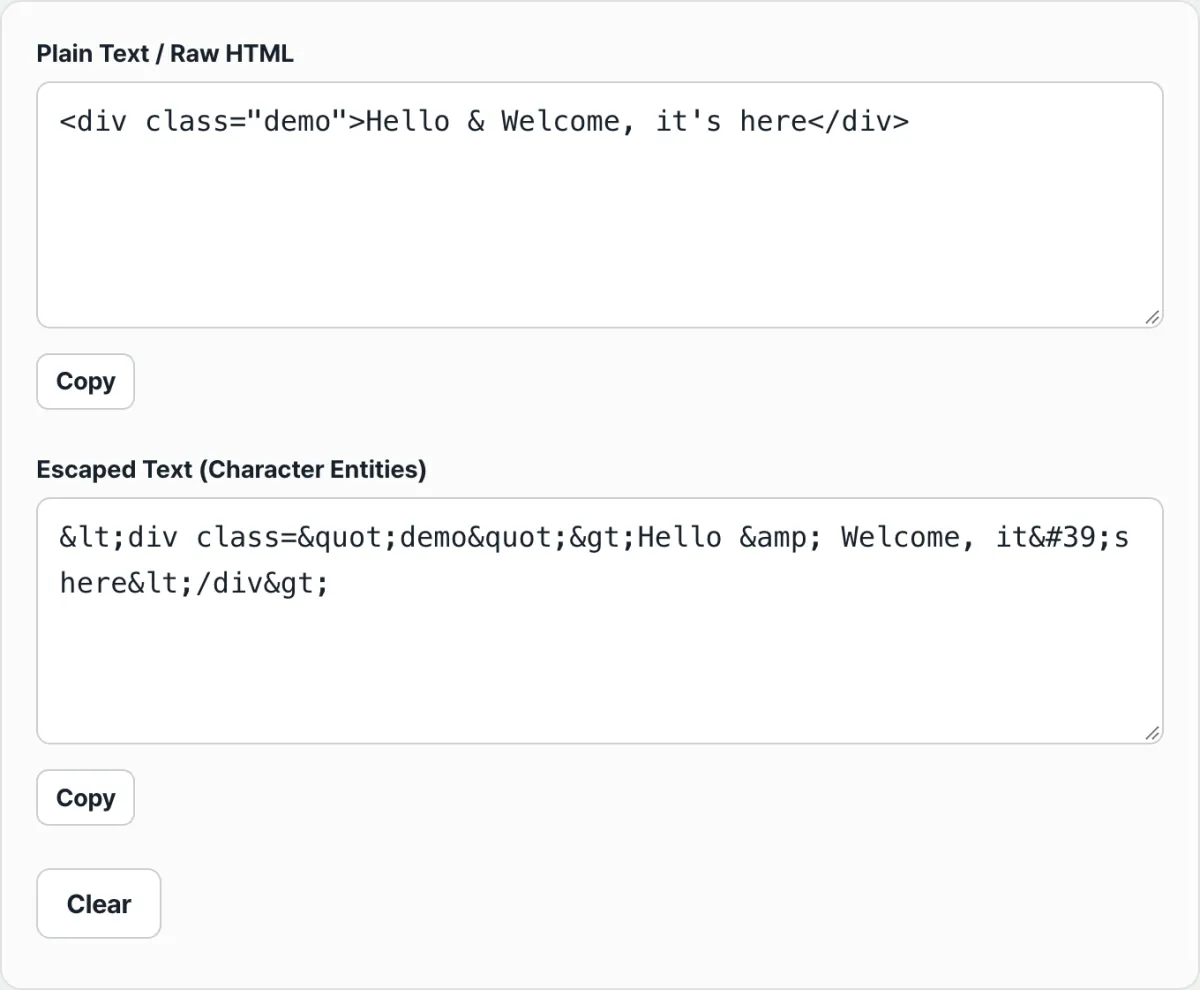
Instead of replacing characters one at a time, you can paste your text into the tool below and the same conversion happens in real time. Try it with our free HTML Special Character Escape tool.
Type in either the left or the right box and the converted result shows up in the other one in real time. Free to use, with no install and no login.
Common points of confusion
Escaping text that's already escaped stacks the codes. For example, if you put already-converted text like <div> into the source input, the & inside it gets replaced again and you get &lt;div&gt;.
The first thing to check is whether the text you're about to paste is the original or already-converted code.
A single quote can show up as two different codes. When you escape, you get the numeric code '. When you unescape, both ' and the named code ' are recognized as a single quote.
| Case | ' | ' |
|---|---|---|
| Produced by escaping | Yes | No |
| Read as a single quote when unescaping | Yes | Yes |
HTML entities and URL encoding are different systems. As an HTML entity, < becomes <. With URL encoding, the same character becomes %3C. They're separate rules used in different places (document body vs. URL string), and you can't swap one for the other.
Recap
- Only the five characters
&<>"'conflict with the HTML parser and need escaping. Nothing else changes. - Each one is replaced 1:1 with
&<>"'. - When doing it by hand, replace
&first to avoid double-escaping. - To check the restored result, look for any leftover code-shaped characters.
- Unescaping recognizes both
'and'as a single quote.
Type in either the left or the right box and the converted result shows up in the other one in real time. Free to use, with no install and no login.
Frequently asked questions
Why do I have to replace & first?
If you replace another character like < or " first, the & in the newly created < or " gets replaced again. That gives you a double-escaped result like &lt;. Doing & first prevents the problem.
Are ' and ' the same thing?
Both are codes for a single quote ('). When you escape, you get the numeric code '. ' is a named code, so escaping doesn't produce it directly, but when you unescape, it's recognized as a single quote just like '.
Is escaping the same as URL encoding?
No. HTML escaping turns < into an entity code like <, while URL encoding turns the same character into a percent code like %3C. The two systems are used in different places and their rules aren't interchangeable.
Does unescaping give me back exactly what I started with?
For the five characters that get changed (& < > " '), yes — they come back exactly as they were.
But this conversion only handles entities tied to those five characters. If your source already contained some other kind of entity (say, a code for a space), that part isn't covered by this conversion.
This article was adapted from our Korean original. Read the Korean original