
HEX vs RGB vs HSL: Why the Same Color Has Three Codes
Contents
The same blue shows up as #3B82F6 in a design file, rgb(59, 130, 246) in CSS, and hsl(217, 91%, 60%) in a design tool, and you've probably wondered why. Here's the short answer: all three values are the same color.
What differs isn't the color. It's how you write it down. All three describe how much red, green, and blue light the screen emits. HEX just writes those amounts in base 16, RGB writes them as numbers from 0 to 255, and HSL rewrites them as an angle on the color wheel plus two percentages.
Summary ①
#3B82F6=rgb(59, 130, 246)=hsl(217, 91%, 60%)— the same color, written three ways. ② Read HEX in two-digit pairs as base 16 and you get RGB directly.3Bis 59,82is 130, andF6is 246. ③ HSL is hue (0–360 degrees), saturation (%), and lightness (%), which makes tweaks like "same color, a little lighter" easy. ④ In an 8-digit HEX value (#RRGGBBAA), the last two digits aren't color. They're opacity.
Why Is One Color Written Three Ways?
The classic case: the design file gives you a single value, #3B82F6, but the CSS the developer sends back says rgb(59, 130, 246). Your eyes can't confirm whether those are the same color.
It gets worse when the color panel in your design tool throws in a third notation, like hsl(217, 91%, 60%). That "91% saturation" number doesn't appear anywhere in the HEX value.
These three notations are different names for the same color in different coordinate systems. None is more accurate or more modern than the others. Each is just easier to use in different situations.
What Each Notation Actually Represents
HEX: Light Intensity in Two-Digit Base-16 Pairs
#3B82F6 is read by splitting the six characters after # into three pairs. From left to right they are red (3B), green (82), and blue (F6).
Each pair is a base-16 number representing 256 levels, from 00 (0) to FF (255). So HEX carries exactly the same information as RGB.
You'll also often see three-digit values like #39F. That's a shorthand where each digit is repeated, so it's the same color as #3399FF.
RGB: The Same Values in Base 10
rgb(59, 130, 246) is just those base-16 values converted to base 10. Each channel runs from 0 to 255. All three at 0 is black; all three at 255 is white.
Modern CSS also lets you drop the commas and write rgb(59 130 246). Different notation, same color.
HSL: Hue Angle, Saturation, Lightness
In hsl(217, 91%, 60%), the first number is hue (H), an angle on the color wheel. 0 degrees is red, 120 degrees is green, and 240 degrees is close to blue, so 217 tells you it's in the blue family just by looking at the number.
The second number, saturation (S), is how vivid the color is. At 0% it turns gray; the closer to 100%, the punchier it gets.
The third number, lightness (L), runs from 0% (black) to 100% (white), and colors look most intense around 50%. Because of that structure, an adjustment like "keep the color but bump lightness up 10%" means changing one number in HSL.
How to Convert by Hand
HEX → RGB: Read Each Pair as Base 16
The value of a two-digit base-16 pair is first digit × 16 + second digit. Count A as 10, B as 11, and so on up to F as 15.
3B  →  3 × 16 + 11 = 59
82  →  8 × 16 +  2 = 130
F6  →  15 × 16 + 6 = 246
So #3B82F6 is rgb(59, 130, 246). Going the other way, divide each number by 16 and write the quotient and remainder as one base-16 digit each (59 ÷ 16 = 3 … 11 → 3B).
RGB → HSL: All You Need Is the Max and Min
Divide all three channels by 255 to get values from 0 to 1, then work from the maximum (max), the minimum (min), and their difference (d).
L = (max + min) / 2
S = d / (1 - |2L - 1|)        (if d is 0, S = 0)
H = 60 × ((G-B)/d mod 6)      when max is R
H = 60 × ((B-R)/d + 2)        when max is G
H = 60 × ((R-G)/d + 4)        when max is B
Running rgb(59, 130, 246) through it by hand looks like this. The channels are 0.231 (R), 0.510 (G), and 0.965 (B), so max is 0.965, min is 0.231, and d is 0.734.
- L = (0.965 + 0.231) / 2 = 0.598 → 60%
- S = 0.734 ÷ (1 − |2×0.598 − 1|) = 0.734 ÷ 0.804 = 0.912 → 91%
- Since max is B, H = 60 × ((0.231 − 0.510)/0.734 + 4) = 60 × 3.620 → 217 degrees
The math works, but doing three divisions every time you want to check one color gets old. In the Styles panel of Chrome or Edge DevTools, Shift+clicking the color swatch cycles through HEX, RGB, and HSL notation — but only for a color that's already applied to the page.
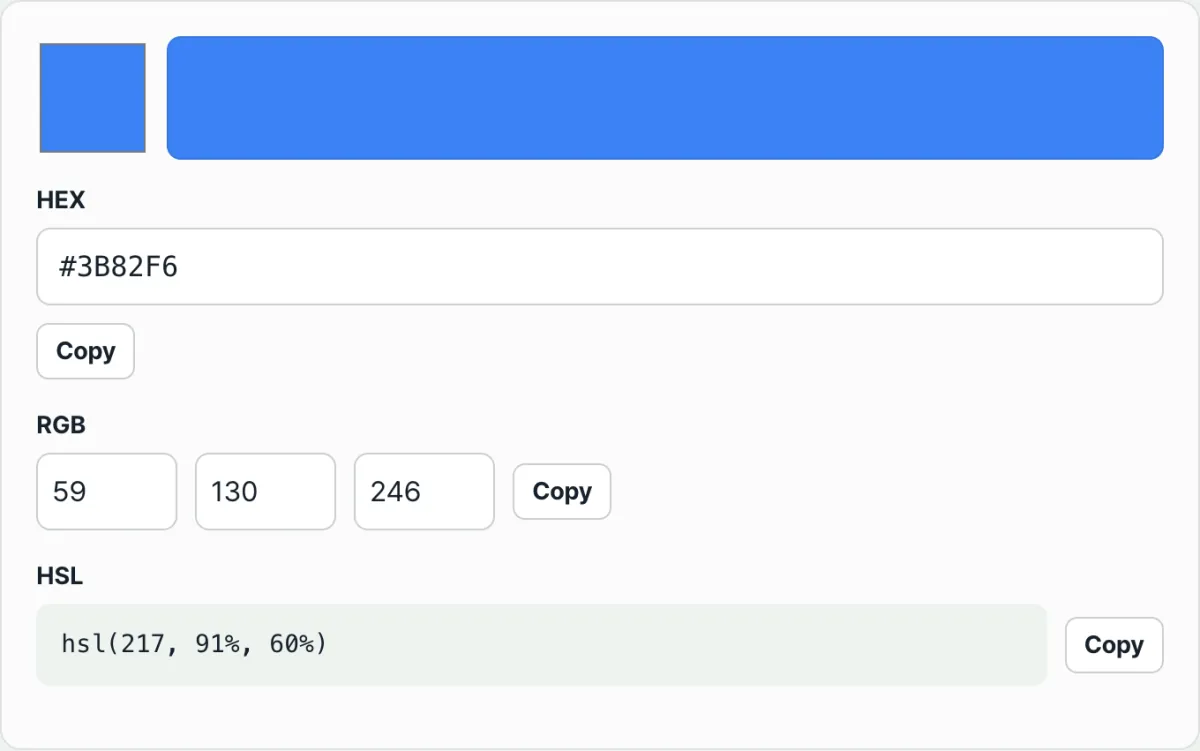
Check it with our tool. Paste a value into the HEX field and the three RGB fields and the HSL line fill in at the same time, with the actual color showing in the preview strip above. Edit the RGB numbers instead and the rest follow along.
It converts right in your browser, with no install or sign-up, and the color values you enter are never sent to a server.
Click the "Copy" button to the right of any line and it copies in exactly that form: #3B82F6, rgb(59, 130, 246), or hsl(217, 91%, 60%).
8-Digit HEX: The Last Two Digits Aren't Color
A value like #3B82F680 looks like it holds an extra color, but the last two digits aren't color at all. They're alpha (opacity). The first six digits are still plain #3B82F6.
You read them the same way as any other channel. 00 is fully transparent, FF is fully opaque, and everything between is that value divided by 255. 80 is 128 ÷ 255 ≈ 0.50, and CC is 204 ÷ 255 = 0.80.
Going the other way, to write a target opacity as two digits, multiply by 255, round, and convert to base 16. 0.5 × 255 = 127.5 → 128 → 80. The four-digit shorthand #RGBA follows the same rule, repeating each digit.
So when you want to match an 8-digit value against the three notations, drop the last two digits and use only the first six. Opacity isn't a color coordinate — it's a blend ratio — so it rides along separately whichever notation you convert to.
Where People Get Stuck
| Situation | What's actually going on |
|---|---|
Three digits like #39F | Each digit is doubled → same color as #3399FF |
| Converting HSL back to RGB | Integer rounding can put you off by about 1 from the original |
The #80FF0000 form | Depending on the environment, alpha may come first, in #AARRGGBB order |
rgb(59 130 246) | Newer comma-free CSS notation. Same color as the comma version |
The second one comes up most. HSL values are often displayed rounded to integers, so converting hsl(217, 91%, 60%) back to RGB can land a unit or two away from 59, 130, 246. When you're storing a color for good, it's safer to treat the HEX or RGB original as the source of truth.
The third one deserves caution too. On the web (CSS), the standard puts alpha at the end, as #RRGGBBAA, but some environments — Android app development, for example — put alpha first, so the same eight digits can be in a different order.
The Short Version
#3B82F6,rgb(59, 130, 246), andhsl(217, 91%, 60%)are the same color written three ways.- Read HEX in two-digit base-16 pairs and you get RGB (
3B=59,82=130,F6=246). - HSL is hue angle (0–360), saturation (%), and lightness (%), which makes it good for adjusting brightness while keeping the color.
- The last two digits of an 8-digit HEX value are opacity. Judge the color by the first six.
- HSL is a rounded display, so round-tripping can be off by about 1. Keep originals in HEX or RGB.
It converts right in your browser, with no install or sign-up, and the color values you enter are never sent to a server.
Frequently Asked Questions
Are #3B82F6 and rgb(59, 130, 246) really the same color?
Yes. HEX just writes each color channel as two hexadecimal digits, and RGB writes the same values in decimal. 3B is 3×16+11, which is 59; 82 is 8×16+2, which is 130; F6 is 15×16+6, which is 246. Since they hold the same information, the color you see on screen is the same too.
When is HSL the easier choice?
When you want to adjust only the lightness or saturation within the same color family. With HEX or RGB, you have to recalculate all three numbers. With HSL, you lock in the hue (H) and change just the lightness (L) or saturation (S). This comes up a lot when you're matching a button's default and hover colors to the same family.
How do you write 50% transparency in 8-digit HEX?
Multiply 0.5 by 255, which gives 127.5, and rounding gives 128, so the hexadecimal value is 80. That means making #3B82F6 half transparent gives you #3B82F680. 0.8 is 204, so that's CC, fully opaque is FF, and fully transparent is 00.
I put the HSL value from the converter back in and the RGB is off by 1.
That's rounding. The three HSL values are usually shown as whole numbers (degrees, whole percent), but the actual computed values are decimals like 217.2 degrees or 59.8%. The decimals cut off during display aren't restored when you convert back, so you end up a unit or two off. Managing the color definition from the HEX or RGB side as the source of truth makes this problem go away.
This article was adapted from our Korean original. Read the Korean original