
Sitemap priority and changefreq are ignored: what lastmod means
Contents
This post is for anyone who added <priority>1.0</priority> to a sitemap, saw nothing change, and searched for answers. Here's the short version: Google's official documentation states that it ignores priority and changefreq values.
A sitemap isn't a file that boosts rankings. It's a list that tells search engines, "These URLs exist." The values that actually get read are, in practice, only <loc> and a <lastmod> that meets the conditions.
Summary
- Google's official documentation states: "Google ignores
<priority>and<changefreq>values." Bing has also said it mostly ignores both fields.- By spec, priority is only the relative importance of URLs within the same site, and its default is 0.5. It is not a value compared across sites.
- lastmod is used only when it is consistently accurate against the page's actual modification date. Filling every URL with today's date actually loses trust.
Why raising priority does nothing
Run a sitemap generator, and it usually gives every URL the same changefreq and the same priority. Setting only your important pages to 1.0 might seem like a way to get them crawled first, but that behavior has never been documented.
The spec itself calls changefreq "a hint, not a command." The original text says outright that a crawler may take it into account or ignore it.
The same goes for priority. The spec pins this value down as a way to compare URLs within your own site and adds that it is not a value compared with pages on other sites. So if you fill every entry with 1.0, the relative order information disappears and the value becomes completely meaningless.
How to make sitemap.xml yourself, without a tool
sitemap.xml isn't a file that requires special software. It's just a text file. Write the format below in Notepad and save it.
<?xml version="1.0" encoding="UTF-8"?>
<urlset xmlns="http://www.sitemaps.org/schemas/sitemap/0.9">
  <url>
    <loc>https://example.com/</loc>
    <lastmod>2026-07-01</lastmod>
  </url>
  <url>
    <loc>https://example.com/guide/sitemap-xml</loc>
    <lastmod>2026-07-14</lastmod>
  </url>
</urlset>
Here's what the spec defines for each tag.
| Tag | Required | What the spec defines |
|---|---|---|
loc | Required | The full URL, starting with the protocol such as https://. Under 2,048 characters |
lastmod | Optional | W3C Datetime format. A date alone, such as 2026-07-01, is fine |
changefreq | Optional | One of: always, hourly, daily, weekly, monthly, yearly, never. A hint, not a command |
priority | Optional | 0.0–1.0. The default is 0.5, and it is relative only within the same site |
There are only two rules about the file itself to remember. One file can hold up to 50,000 URLs and 50MB uncompressed (gzip compression is allowed). If you go over, split the file and group the pieces with a sitemap index.
Also, where you place the sitemap determines the range of URLs it can include. https://example.com/catalog/sitemap.xml can include only URLs that start with https://example.com/catalog/. That's why sitemaps usually go at the site root.
Once you've uploaded the file to your server, add one line to robots.txt to announce it. The format is Sitemap: https://example.com/sitemap.xml, and you can list more than one regardless of the user-agent line.
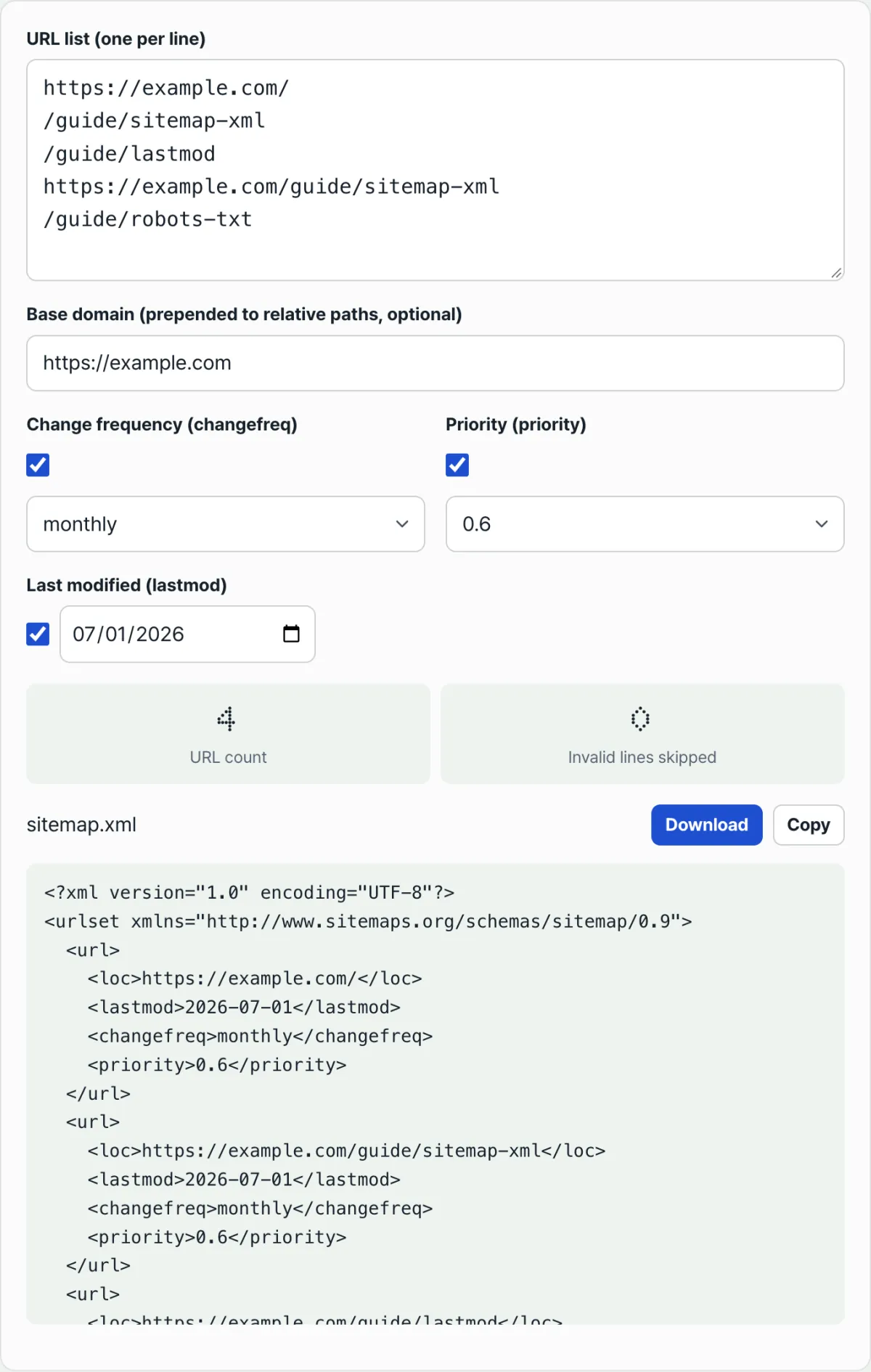
Check your work with our free Sitemap (XML) Generator. When you have dozens of URLs, typing out <url> blocks by hand gets tedious fast. Paste your URLs one per line and the XML is generated right away. Duplicate URLs are kept only once, and lines that aren't valid URLs are shown as a skipped count.
The XML is generated right in your browser, with no install and no sign-up, and the URL list you paste is never sent to a server.
If you enter https://example.com in the base domain field, relative paths such as /guide/sitemap-xml are filled in as full URLs. You can toggle changefreq, priority, and lastmod on and off with the checkbox to the left of each one, so any tag you choose not to include is left out of the output entirely.
lastmod: the only value that actually gets used
Google takes a different stance on lastmod. It states that it uses the value when it is consistently accurate and verifiable against the page's actual last modification.
The documentation also defines what counts as a "change." Changes to the body content, structured data, or links count as meaningful changes. A change such as only the copyright year being updated does not.
Bing makes the same point. Its official blog says that if lastmod values are continually filled with the current date, it may question whether the dates are valid and ignore them.
The problem is that many generators put "the date the sitemap was created" into lastmod for every URL. If the date updates every day even though you haven't touched the page, you're damaging the one signal that was actually being used.
Our tool has only one lastmod field, so the date you select is applied to every URL. If your pages have different modification dates, it's more accurate to uncheck the box and leave lastmod out, or to edit the date for each URL in the generated XML.
A sitemap does not guarantee indexing
This is the expectation that most often goes wrong. Google states that submitting a sitemap is only a hint and does not guarantee that it will download the sitemap or crawl the URLs in it.
In other words, a sitemap's role is to "help with discovery." It's valuable for new pages that have few links pointing to them and for large sites, and adding more tags to pages that are already crawled well won't change anything.
You check in two places. Open the sitemap file URL directly in a browser to see whether the XML appears as expected, then check the sitemaps report in Search Console to see whether the read status and number of discovered URLs match your list.
Common sticking points
| Situation | What actually happens |
|---|---|
| Setting priority to 1.0 only on important pages | Google doesn't read the value at all. By spec, it is only a relative value within the same site |
| Changing changefreq to always to encourage crawling | Crawl frequency is not determined by this tag. The spec also describes it only as a hint |
| Every URL has today's date as lastmod | Search engines may question the validity of the values and ignore them |
| A sitemap in a subfolder lists URLs from a different path | By spec, that sitemap can contain only URLs under the path where it is located |
| More than 50,000 URLs or 50MB | Split the file, then group the files with a sitemap index file |
| A URL is in the sitemap but not indexed | A sitemap is a hint that helps discovery, and indexing is determined separately |
Bottom line
- Google's official documentation states that it ignores
<priority>and<changefreq>, and Bing says it mostly ignores both fields. - By spec, priority ranges from 0.0 to 1.0, defaults to 0.5, and is relative only within the same site.
- changefreq has seven values: always, hourly, daily, weekly, monthly, yearly, and never. The spec itself defines it as a hint.
- Only lastmod is actually used, and only when it consistently matches the page's actual modification date. If you fill every entry with today's date, it may be ignored.
- A single file can hold up to 50,000 URLs and 50MB uncompressed, and the sitemap's location limits which URLs it can include.
- Submitting a sitemap is a hint, not a guarantee of indexing.
The XML is generated right in your browser, with no install and no sign-up, and the URL list you paste is never sent to a server.
Frequently asked questions
Is it bad to set every priority to 1.0?
Your rankings won't go up, and you won't get a penalty either. Google has said it doesn't read this value, and by spec it only compares URLs within the same site, so if every value is the same, the comparison carries no information. It's a tag you can remove. If you keep it, just know that the default is 0.5.
Will setting changefreq to always get my new posts crawled faster?
No. The spec defines changefreq as a hint and notes that crawlers may ignore it, and Google has said it doesn't use the value at all. If you want crawling to happen sooner, the paths you can verify are an accurate lastmod with the real modification date, internal links, and URL Inspection in Search Console — not the tag.
Do I need to include the time in lastmod?
The spec requires the W3C Datetime format and allows a date-only form like 2026-07-01 with the time part omitted. This tool outputs dates as well. If your system knows the exact modification time, you can include the time and time zone, but an accurate date is better than stamping a fresh but inaccurate time every time.
Is the list of URLs I enter sent to a server?
No. This tool builds the XML string in your browser from the list you paste, and the download saves that string to a file in your browser. The addresses you enter are never sent to or stored on a server, so even if the list includes paths you haven't published yet, they don't leave your machine.
This article was adapted from our Korean original. Read the Korean original