
Tip Calculator: How to Split the Tip and Per-Person Amount
Contents
This post is for anyone who has just finished a meal with a group and needs to figure out how much everyone should chip in for the tip.
With just three things — the bill amount, the number of people, and the tip rate — you can work out the tip amount, the total to pay, and the amount per person, in that order.
The math here is nothing more than a few multiplications and divisions, and the formulas are spelled out below.
Summary ① The tip amount is "bill amount × (tip rate ÷ 100)," and the total to pay is that tip amount plus the bill amount. ② The per-person amounts are the tip amount and the total to pay, each divided by the number of people. The number of people is treated as at least 1, so there's no divide-by-zero error. ③ Whether you apply the tip rate to the pre-tax or post-tax amount depends on how the receipt is laid out. The calculator simply multiplies whatever amount you enter.
Why splitting a tip gets confusing with a group
When four people eat together and split the bill with a tip added at the rate they want, mental math easily drifts off. That's especially true when the bill has cents in it or the number of people doesn't divide evenly.
There's one more variable. When a receipt shows a pre-tax amount and a post-tax (tax-included) total separately, where you're supposed to apply the tip rate differs from store to store and country to country.
Some receipts even print suggested amounts for common tip rates right next to the pre-tax subtotal.
What you really need is a calculation structure that lets you verify for yourself which amount the rate was applied to. Below, we lay that structure out in full.
How to do it by hand, without a tool
The calculation takes four steps. The formulas the calculator uses internally are the same.
- Tip amount = bill amount × (tip rate ÷ 100)
- Total to pay = bill amount + tip amount
- Tip per person = tip amount ÷ number of people
- Total per person = total to pay ÷ number of people
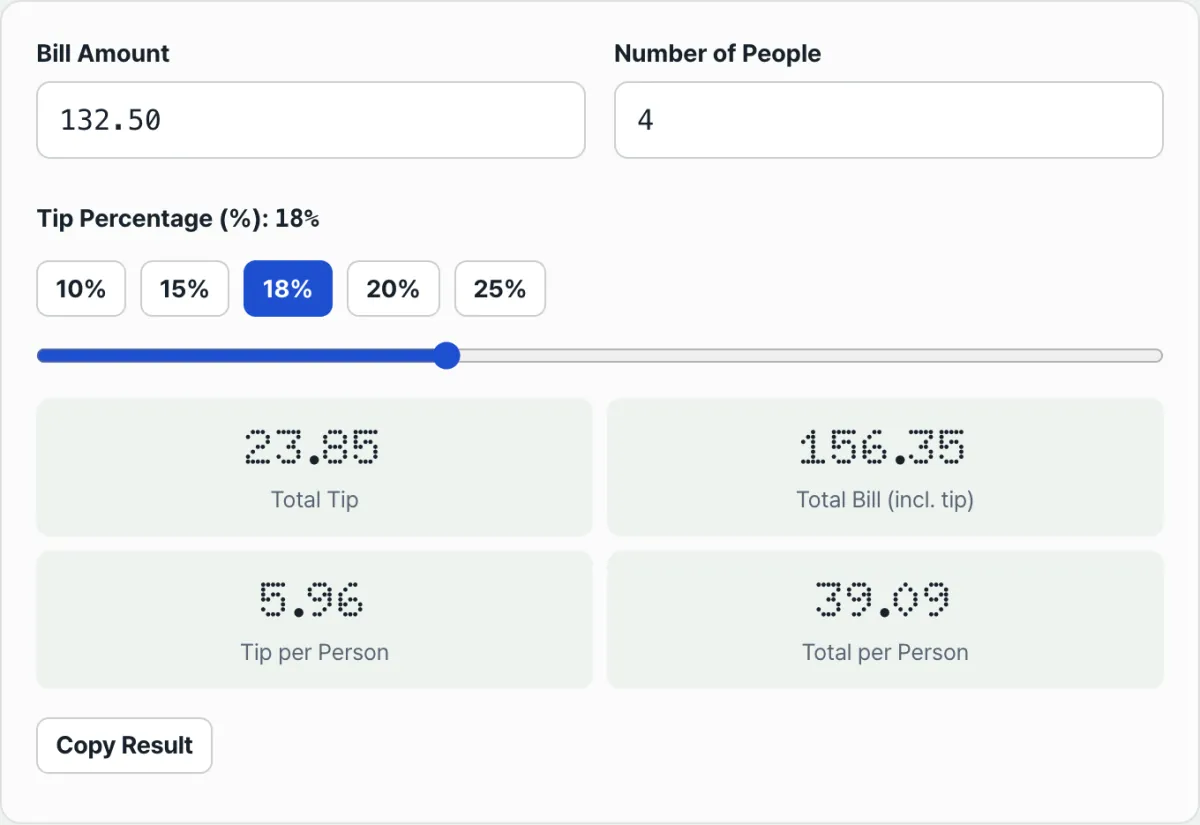
For example, with a bill of 100, a tip rate of 18%, and 4 people, you get a tip amount of 18, a total to pay of 118, a tip of 4.5 per person, and a total of 29.5 per person.
The amount you apply the tip rate to depends on how the receipt is laid out. The number of people is treated as at least 1, so a value is always shown with no divide-by-zero error.
Check it with our tool.
Just enter the bill amount, party size, and tip rate, and it works out the tip and the per-person amount right away. Your input is never sent to a server.
Points people often get wrong
| Item | Details |
|---|---|
| Base amount for the tip rate | Whether the rate applies to the pre-tax or post-tax amount depends on the receipt. The calculator simply multiplies whatever amount you enter. |
| Receipts with a service charge | If a service charge is already added to the bill, applying the tip rate on top of that is, from the calculator's point of view, just multiplying your input as entered — it doesn't automatically detect the difference. |
| When the per-person card appears | The tip-per-person and total-per-person cards only appear when the number of people is 2 or more. With 1 person, only the total tip and total to pay are shown. |
| Tip rate input range | The preset buttons are 10, 15, 18, 20, and 25%, and the slider lets you set any value from 0 to 50%. |
| Minimum number of people | Even if you enter less than 1, the calculation uses a minimum of 1 person, so results still show without an error. |
The short version
- Tip amount = bill amount × (tip rate ÷ 100), and total to pay = bill amount + tip amount.
- Tip per person and total per person are the tip amount and total to pay divided by the number of people.
- The number of people is treated as at least 1, so a divide-by-zero error never happens.
- Whether the tip rate applies to the pre-tax or post-tax amount depends on the receipt, and the calculation uses the amount you enter.
- The bill amount, number of people, and tip rate you enter are calculated only in your browser and are never sent to a server.
Just enter the bill amount, party size, and tip rate, and it works out the tip and the per-person amount right away. Your input is never sent to a server.
Frequently asked questions
Do I apply the tip rate to the amount with tax or the amount before tax?
The calculator multiplies the bill amount you enter by the tip rate exactly as entered. If you enter the pre-tax amount, it calculates on a pre-tax basis; if you enter the post-tax amount, it calculates on a post-tax basis.
The basis follows whatever amount you put in.
Does the calculation break if I enter 0 people?
No. The number of people is handled internally as a minimum of 1, so a value always shows without a divide-by-zero error.
That said, if you enter a number that doesn't match the actual party size, the per-person amounts will be off by that much.
How many people do I need before the tip-per-person and total-per-person amounts show up?
The tip-per-person and total-per-person cards only appear on screen when the number of people is 2 or more. With 1 person, only the total tip and total to pay are shown.
Are the amounts I enter saved on a server?
No. Everything — including the bill amount, number of people, and tip rate — is processed only in your browser, and no information is sent to a server.
This article was adapted from our Korean original. Read the Korean original