
URL Normalization: Remove utm Parameters and Get Canonical Links
Contents
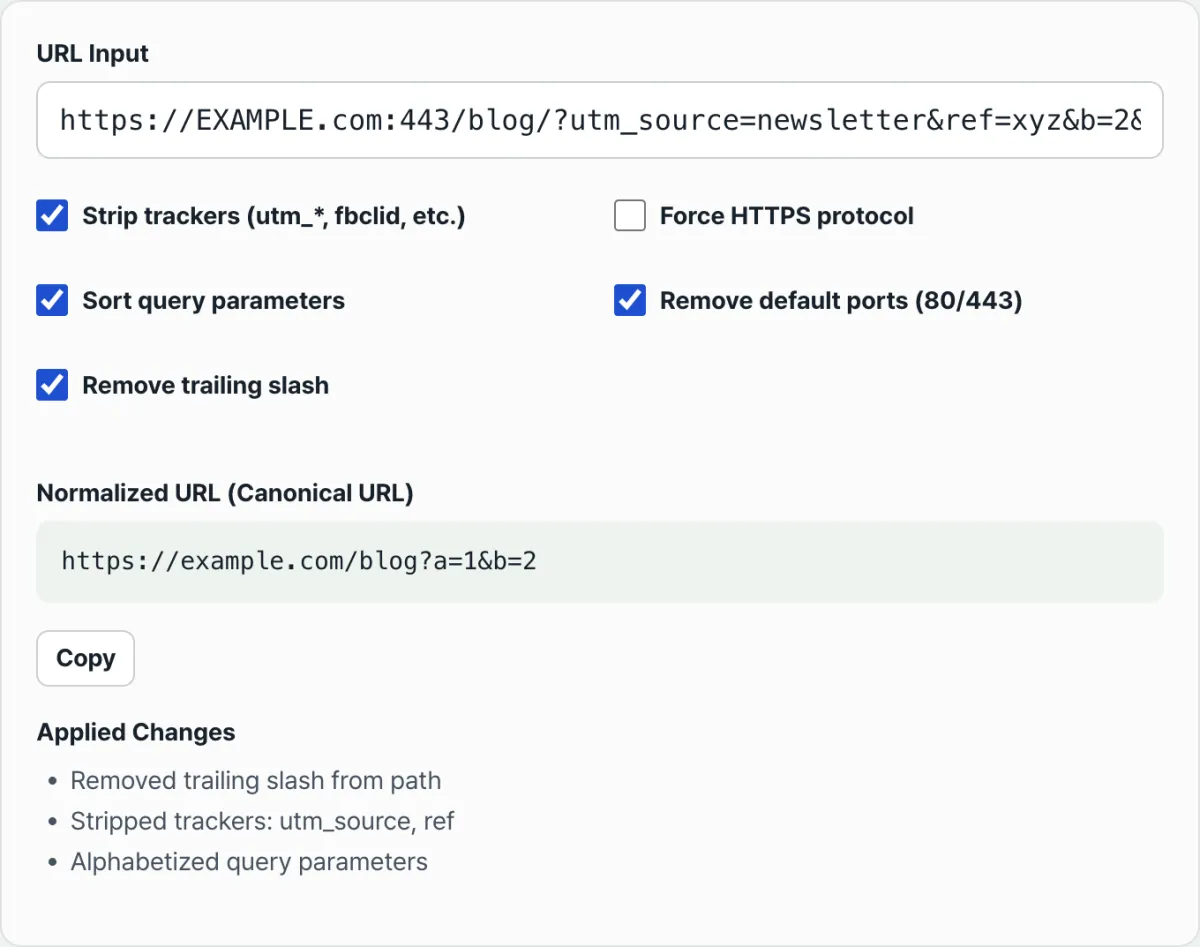
When the link you copied to share is covered in tags like utm_source, fbclid, and ref, this tool removes them according to fixed rules and reduces the address to a single canonical URL. The key point is that "what gets removed and what stays" is hard-coded. So you can predict the result before you run it.
This post takes those rules apart one by one and explains how to read the "Applied changes" list that shows up on the results screen. It's not about which URL you should use — it's only about how the result is computed and how to read it.
Summary ① The tracking parameters that get removed are fixed: anything starting with
utm_, plusfbclid,gclid,msclkid,yclid,affiliate, andref(exact match only). ② Force HTTPS is off by default, so unless you check it, an http link stays http. ③ The parameter sorting item only appears under "Applied changes" when two or more parameters remain.
Why one link looks like several different addresses
When you copy the address of a page you clicked from a newsletter or an ad and paste it into a messenger app such as KakaoTalk or WhatsApp, or into a document, the long tags like ?utm_source=newsletter&utm_medium=email&fbclid=... come along with it. Those parameters exist only to track where the click came from; they have nothing to do with the page's content.
The problem is that links with different tags look like different addresses — both to people and to machines. The same article with ?utm_source=a on it and the same article with nothing on it can end up treated as two separate pages.
So before you share a link or clean it up for your archives, you need to strip the tracking parameters and line up whatever's left in a consistent order to produce one "standard form." That's URL normalization.
How to normalize a URL by hand
You can do all of it manually. Once you know the rules, just follow this order.
- Check the protocol — If the address doesn't start with
http://orhttps://, start by addinghttp://.example.com/foois treated ashttp://example.com/foo. - Clean up the host — Lowercase the domain part after
://, and drop default ports like:80(http) or:443(https) if they're there. Keep non-default ports like:8080as they are. - Clean up the trailing slash — If there's a path, remove the single trailing slash at the end. The root slash right after the domain (
example.com/) stays. - Remove tracking parameters — Split everything after
?on&, then delete any item whose key starts withutm_or exactly equals one offbclid,gclid,msclkid,yclid,affiliate,ref. Keep the rest. - Sort the remaining parameters — Sort alphabetically by key and join them back together with
&.
Using the URL API in your browser's developer tools console lets the parser handle steps 2 and 3 for you. That's the same approach this tool uses internally.
const u = new URL("https://example.com/blog/?utm_source=news&ref=xyz&b=2&a=1");
[...u.searchParams.keys()].forEach(k => {
  if (/^utm_/.test(k) || ["fbclid","gclid","msclkid","yclid","affiliate","ref"].includes(k))
    u.searchParams.delete(k);
});
u.searchParams.sort();
if (u.pathname !== "/") u.pathname = u.pathname.replace(/\/$/, "");
u.toString();  // => https://example.com/blog?a=1&b=2
The result of this procedure matches exactly what the tool below produces for the same input. Check it with our tool.
It's a free tool that runs entirely in your browser. The URLs you enter are never sent to a server, and there's no sign-up.
What confuses people when reading "Applied changes"
The most common misunderstanding is the scope of what counts as a "tracker." utm_ is a prefix rule — anything that starts with it gets deleted. The rest are exact-match rules — the name has to match in full. On top of that, matching is case-sensitive.
| Example parameter | Result | Why |
|---|---|---|
utm_source, utm_id | Removed | Starts with utm_ |
ref | Removed | Exactly ref |
referrer, referral, ref_src | Kept | Not exactly ref |
affiliate | Removed | Exactly affiliate |
affiliate_id | Kept | Not affiliate |
UTM_Source, Ref | Kept | Case has to match too |
There are a few more spots that often trip people up when reading the result.
- Force HTTPS is off by default. So even if you enter an address starting with
http://, the result stayshttp://unless you turn the checkbox on. When an address has no protocol, the one added automatically ishttp://too. To get https, you have to turn that option on yourself. - The parameter sorting item only appears in the list when two or more parameters remain. If only one parameter is left after the trackers are stripped, there's nothing to sort, so it isn't shown. And if things were already in alphabetical order, nothing changes, so it isn't shown either.
- Lowercasing the hostname and removing default ports (80/443) are always reflected in the result, but they rarely show up in the change list. That's because the browser's URL parser already lowercases the host and drops the default port while reading the address. So if you enter an uppercase domain or
:443, the result URL is already cleaned up — and there's no reason to list it. - The trailing slash rule removes only the one slash at the end of a path, and only when a path exists. If there's just the root slash after the domain, like
example.com/, it's left alone.
The short version
Here's the core of it.
- The trackers that get removed are fixed: the
utm_prefix plus exact matches forfbclid,gclid,msclkid,yclid,affiliate, andref. Case has to match too. - If the name differs even slightly, like
referrer,ref_src, oraffiliate_id, it stays. - Force HTTPS is off by default, so unless you turn it on, http links stay http.
- The parameter sorting note appears only when two or more parameters remain and the order actually changes.
- Lowercasing the host and removing default ports are always reflected in the result, but since the parser handles them first, they seldom appear in the change list.
Know these rules and you can explain on the spot why a result URL and its "Applied changes" list came out the way they did.
It's a free tool that runs entirely in your browser. The URLs you enter are never sent to a server, and there's no sign-up.
Frequently asked questions
Why does ref get removed but referrer stays?
ref is on the exact-match list, so it's removed only when the name is exactly ref. referrer, referral, and ref_src have extra characters, so they aren't exactly ref and stay as they are. Matching is case-sensitive too, so Ref (capital R) stays. The only parameter removed by a prefix rule is utm_.
I entered an http address and it didn't change to https.
That's because Force HTTPS is off by default. Only when you turn that option on does the http: protocol become https:. Addresses without a protocol get http:// added automatically, so turn the option on yourself if you want an https result.
I only have one parameter, and the "sorting" note doesn't show up.
The sorting item appears under "Applied changes" only when two or more parameters remain. If only one is left, there's nothing to sort. And if there are several but they're already alphabetical, nothing changes, so it isn't shown. The result URL is still built correctly either way.
Is the URL I enter sent to a server?
No. All normalization happens in JavaScript inside your browser, and the URL you enter is never sent anywhere. If you enter something that isn't a valid address, you'll see an error message instead of a result.
This article was adapted from our Korean original. Read the Korean original