
Extract URL Path Segments and Convert Them to Routes
Contents
This post is for anyone who copies a long URL from the address bar or a log and tries to turn it into a route — and can't tell where the path ends and the query begins, or which pieces become variables. Here's the short answer: breaking down a URL comes down to a few rules.
Only the path pieces split by slashes get an index. The query after ? doesn't count as a path segment, and whether a segment becomes a variable is decided by one fixed condition. This post covers exactly how that calculation works and how to read the result.
Summary ① A URL splits into protocol (https:), hostname, path segments, and query. Only the path pieces split by slashes get an index, in the order /0, /1. ② The query after
?is not counted as a path segment. It goes into a separate key-value table, and empty pieces created by repeated slashes or a trailing slash are filtered out automatically. ③ A segment is replaced with a dynamic parameter (:variable / [variable]) if it is numbers only or nine characters or longer. Anything else stays as written.
Miscounting pieces when moving a long URL into a route
Say you want to turn a URL like https://shop.example.com/products/948213/reviews/?sort=recent into a route.
Three things usually trip people up here. Is ?sort=recent a path piece of its own? Does the trailing slash create an extra empty piece and push the indexes off by one? And should only values that look like 948213 be treated as variables?
If you handle these three by feel, your route will easily drift from the actual request. Fortunately, all of these decisions follow mechanical rules, so once you know the logic you get the same answer every time.
Breaking a URL down in the browser, no tools needed
You can reproduce this calculation exactly with the URL API built into the browser. Paste the following into the developer tools (F12) console.
const u = new URL("https://shop.example.com/products/948213/reviews/?sort=recent");
u.protocol;                            // "https:"
u.hostname;                            // "shop.example.com"
u.pathname;                            // "/products/948213/reviews/"
u.pathname.split("/").filter(Boolean); // ["products", "948213", "reviews"]
[...u.searchParams];                   // [["sort", "recent"]]
Here's the step-by-step order.
protocolandhostnamecome out first, as the protocol and host.- Split
pathnameon slashes (/) and filter out empty strings. The empty piece from the leading slash, repeated slashes, and the trailing slash all disappear here. - Number the remaining pieces from the front: 0, 1, 2. So the example above gives three pieces:
products(/0),948213(/1), andreviews(/2). - The query after
?is read separately throughsearchParamsas key-value pairs. It doesn't count toward the number of path pieces.
Finally, decide whether each piece is a variable. The rule is simple. If a piece is numbers only, or its length is over eight characters (nine or more), it gets replaced with a variable. Otherwise it stays as written. In the example above, only 948213 is numbers, so it becomes a variable, while products and reviews stay as they are.
Check it with our tool.
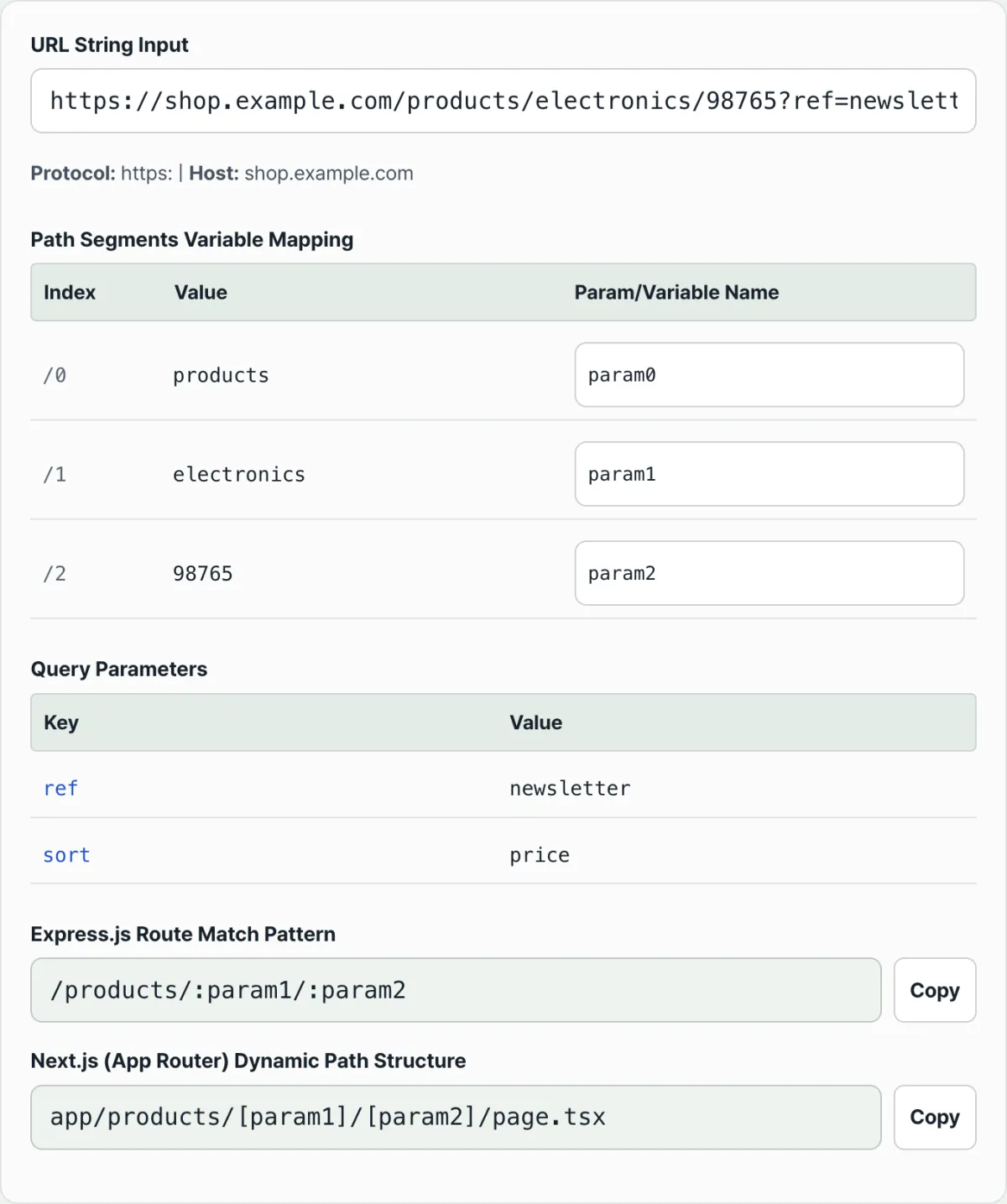
Paste a URL and it instantly computes path segments, query keys, and Express and Next.js route patterns. Free, no install, no sign-in.
Common misreadings of the result
The most common mistake is counting query parameters as path segments. ?sort=recent isn't a segment — it goes into the query table separately — so it doesn't continue on to /3 after the index /2.
The second is the idea that a trailing slash pushes the indexes over by one. Empty pieces get filtered out, so /reviews and /reviews/ produce the same segments.
The third is expecting that "any value that looks like an id becomes a variable." The decision looks at shape only — whether it's numeric and how long it is — not at what the value means. So a short string id like abc stays as written, and if you need it as a variable, you can type a name into the variable name field to convert it.
Here's how the same segments are written in the two frameworks, using the tool's default example https://example.com/users/123/posts/abc.
| Segment (index) | Decision | Express.js | Next.js App Router |
|---|---|---|---|
users (/0) | String, eight characters or fewer | users | users |
123 (/1) | Numbers only | :param1 | [param1] |
posts (/2) | String, eight characters or fewer | posts | posts |
abc (/3) | String, eight characters or fewer | abc | abc |
So the finished route is /users/:param1/posts/abc in Express and app/users/[param1]/posts/abc/page.tsx in Next.js App Router.
Default variable names are assigned automatically by index, like param0 and param1. Until you rename it, you get :param1, not :userId. Type the name you want into the field, and it changes in both places at once: :userId (Express) and [userId] (Next.js). A piece like introduction, which is nine characters or longer, hits the condition and becomes a variable even though it isn't numeric.
Recap
- A URL splits into protocol, host, path, and query. Only the path pieces split by slashes get a /0, /1 index.
- The query after
?isn't a path segment. It's read as separate key-value pairs and isn't included in the segment count. - Empty pieces from repeated slashes or a trailing slash are filtered out automatically, so the indexes don't shift.
- A segment becomes a variable when it is numbers only or nine characters or longer. The rest stay as written. If you type a name yourself, it becomes a variable regardless of the condition.
- The same segment is written as
:variablein Express and as a[variable]folder in Next.js App Router.
Paste a URL and it instantly computes path segments, query keys, and Express and Next.js route patterns. Free, no install, no sign-in.
Frequently asked questions
Does the query parameter (after ?) count as a path segment?
No. The query after ? is a query string, not a path, so it isn't part of the segments split by slashes. It's read separately through searchParams and shown as a key-value table, and it doesn't continue from the path segment indexes (/0, /1, …).
Does a trailing slash shift the segment indexes by one?
No. The path is split on slashes and empty strings are filtered out, so empty pieces from a trailing slash or repeated slashes in the middle disappear. That means /a/b/, /a/b, and /a//b all produce the same segments.
What decides which pieces become variables and which don't?
A piece is replaced with a variable if it meets either of two conditions: the segment is numbers only, or its length is over eight characters (nine or more). The decision looks only at shape, not at what the value means. Even if it doesn't meet the condition, typing a name into the variable name field turns that piece into a variable.
Can I enter just a path without the protocol (http/https)?
Yes. Input that doesn't start with https:// is parsed with a temporary host attached, so a path-only input like /users/123/posts/abc still gets broken into segments. Unusual input that standard parsing can't handle falls back to splitting manually on ? and /.
This article was adapted from our Korean original. Read the Korean original