
XML to JSON: Why Arrays and Attributes Get Rewritten
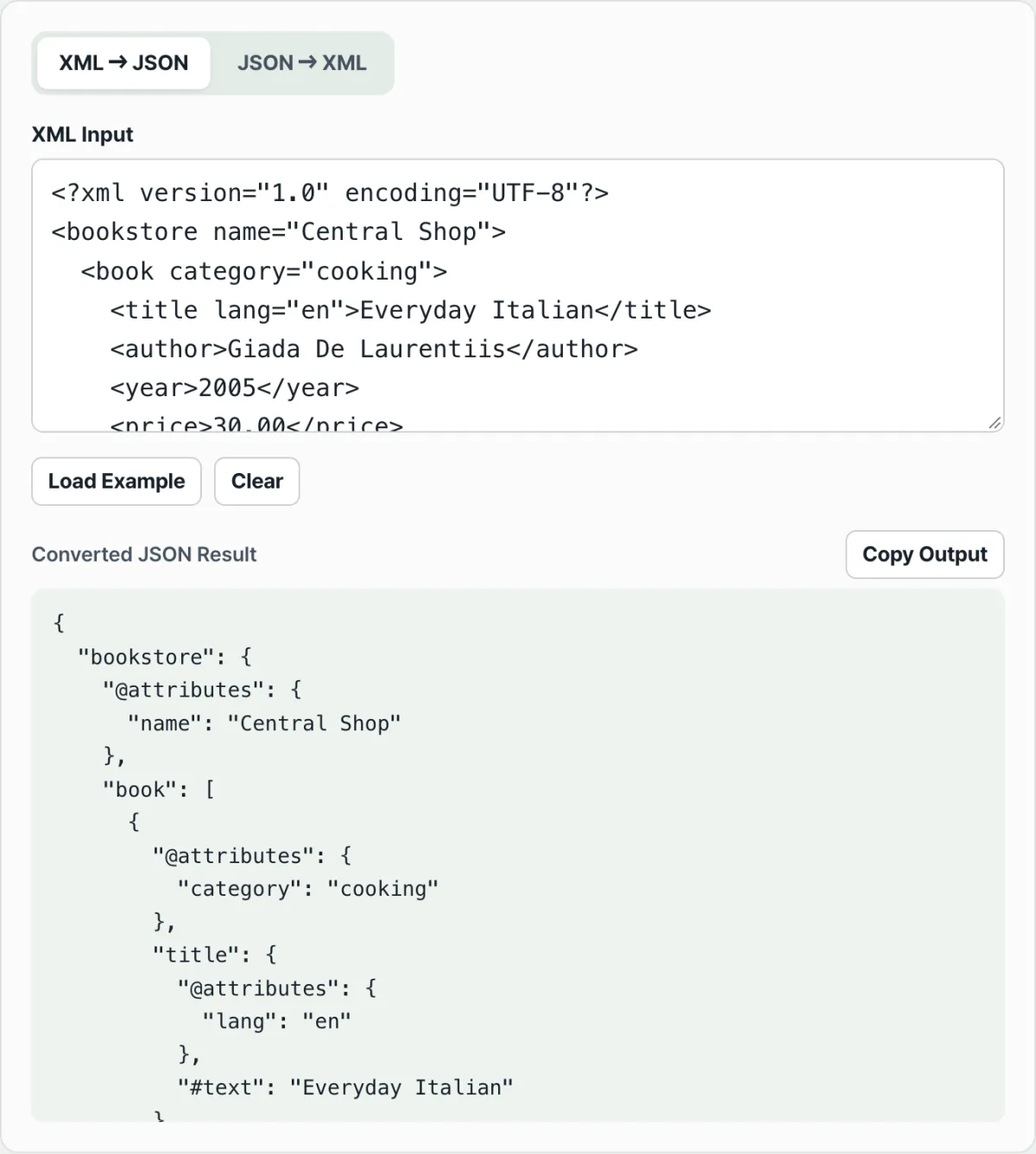
When you convert a JSON array to XML, no new tag appears to wrap the array. Instead, the same tag just repeats side by side once for each item. Go the other way and an XML attribute doesn't get mixed in with the other values: it lands under its own separate key like @attributes. Neither one is a bug. Both happen because XML and JSON are built to hold different shapes of information in the first place.
The short version ① JSON arrays have no equivalent in XML, so instead of a wrapping tag you get the same tag repeated once per item. ② An XML element can carry attributes, child elements, and text all at the same time, but a JSON object has no way to tell those apart, so converters park the attributes under a separate key like @attributes. ③ This notation isn't a rule set by the XML or JSON standards. It's a convention the converter chooses, so different tools can produce slightly different JSON.
The problem
When you convert incoming XML to JSON and start using it in code, you hit two walls. The first: "The same tag appears more than once, so it should be an array: why does it come back as a single object when there's only one?" The second: "Why is an attribute like category="cooking" not sitting next to fields like title and author, but tucked inside a strange key called @attributes?"
The other direction has the same issue. When you need to export JSON array data as valid XML, no wrapping tag appears automatically. You just get the same tag repeated once per item. The first time you see that, it looks like the array structure vanished.
Neither result is the converter doing something wrong. Both are unavoidable, because XML and JSON can express different shapes of information.
The fix
Once you turn both directions into rules, you can predict the output shape without even opening a tool.
JSON array → XML: why the tag repeats
XML has no array data type. All it has is the element, and an element can appear many times in a row with the same name. So when you move a JSON "book": [ {...}, {...} ] into XML, instead of creating a new tag to wrap the array, the converter repeats a <book> tag once per item inside it. Two items means <book> twice; five items means five times.
XML attribute → JSON: why it gets split into @attributes
A single XML element can hold three things at once: attributes (for example category="cooking"), child elements (for example <title>), and text (the characters between the tags). A JSON object, on the other hand, only has key-value pairs. There's no syntax for saying "this value is an attribute and that one is a child element." So the distinction doesn't get lost, the converter gathers attributes under a separate key called @attributes, keeping them apart from child elements and text. If an element has both attributes and text, the text goes into its own key called #text.
No attributes, no child elements: just a string
Going the other way, if an element has only text and no attributes or child elements (for example <author>Giada De Laurentiis</author>), there's no reason to wrap it in an object. The converter hands back the value itself as a string. That's why you get something as simple as {"author": "Giada De Laurentiis"}.
Multiple top-level JSON keys means a wrapper tag appears automatically
XML must have exactly one top-level element. So if the JSON you're converting has just one key at the top, that key name becomes the root tag. If it has two or more keys, there's nothing to wrap them, so the converter invents a tag called <root> and puts every key inside it as a child.
These four rules explain most of the structures you'll see going between XML and JSON. Try it yourself with a real example in our tool.
Paste XML to get JSON, or paste JSON to get XML. It converts both ways instantly so you can check the result yourself.
Common sticking points
| Situation | Why it happens |
|---|---|
| A single child with the same name comes back as an object, not an array | The rule only switches to an array from the second occurrence of the same name onward, so your code can behave differently with one item versus two or more |
| A number-like value comes back as a quoted string | XML text has no type concept, so values like 2005 or 30.00 all convert to strings |
| Attributes, child elements, and text are mixed in one tag | Attributes go under @attributes, child elements under their own tag names, and leftover text under the #text key |
| Multiple keys at the top level of the JSON | There's no tag to wrap them, so the converter automatically creates a root tag around everything |
| A JSON value is null | It becomes an empty self-closing tag (<tag/>) |
The takeaway
- JSON arrays have no equivalent in XML, so instead of a wrapping tag you get the same tag repeated once per item.
- An XML element can carry attributes, child elements, and text at the same time, but a JSON object can't tell them apart, so the converter splits attributes into @attributes and leftover text into #text.
- An element with only text and no attributes or child elements isn't wrapped in an object: you get the string value directly.
- XML requires exactly one top-level element, so if the JSON has multiple top-level keys, the converter automatically creates a root tag to wrap them.
- This notation isn't a rule set by the XML or JSON standards. It's a convention the converter chooses, so converting with a different tool may give you different key names.
Paste XML to get JSON, or paste JSON to get XML. It converts both ways instantly so you can check the result yourself.
Frequently asked questions
Can I make a single child element come out as an array?
The current rule only switches to an array from the second element with the same name onward, so a lone element comes back as a single object. If you always want to treat it as an array regardless of item count, add a step in your code after you receive the JSON that wraps a non-array value in a one-item array.
Are @attributes and #text official standard names?
There's no official standard that enforces these names between XML and JSON. @attributes and #text are the notation this converter uses to keep attributes and text separate from everything else. Other libraries and tools do it differently, for example by putting an @ directly in front of the attribute name. So before you hand converted JSON to another system, it's safer to check that it expects the same notation.
Can I choose the root tag name when converting JSON to XML?
If the JSON has exactly one top-level key, that key name becomes the root tag, so just name that key whatever you want the root to be. If there are multiple top-level keys, there's no tag to wrap them and the name root is applied automatically. To use your own name in that case, wrap the JSON once before converting, like { "desiredName": { ...rest of keys } }.
This article was adapted from our Korean original. Read the Korean original