
Well-Formed XML vs HTML: Strict Parsing Rules Explained
Contents
Open an HTML document with a missing tag in your browser address bar, and the page usually still comes up fine. Make the same mistake in an XML document, and the browser shows you nothing but a red parsing error instead of the result.
That's not because XML is a broken format. It's because HTML and XML make completely different contracts with the parser about "what to do when you hit an error." That contract is called well-formedness.
Summary ① Browsers fix tag errors in HTML on their own and render the page, but XML parsers don't fix errors — they reject the whole document. ② This standard is called well-formed, and it comes down to a few rules: one root element, closed tags, nesting order, quoted attribute values, and escaping special characters. ③ This strictness is also why XML is used as a data exchange format between systems — the rules eliminate any room for ambiguous interpretation.
Why HTML Tolerates Most Errors
The HTML5 spec spells out exactly how browsers should recover when a tag closes wrong or appears out of order. If there's an opening tag with no closing tag, the browser treats it as closed at the next matching tag or at the end of the document.
If a <p> contains another <p>, the browser automatically closes the first <p> and starts a new paragraph. Thanks to these recovery rules, HTML that doesn't follow perfect syntax still renders roughly the same way across browsers.
In other words, an error in HTML isn't a signal to stop rendering — it's more like a blank the parser is expected to fill in.
Why XML Rejects the Whole Document Over One Error
XML takes the opposite stance. If a document breaks even one well-formedness condition, the parser is designed to stop and not attempt recovery. That's why opening an XML file directly in a web browser shows only the error location instead of the content.
The criteria for well-formedness come down to a few rules.
| Rule | Detail |
|---|---|
| Root element | There must be exactly one top-level element |
| Tag closure | Every opening tag needs a closing tag (or must be self-closing />) |
| Nesting order | The most recently opened tag must close first (a child can't close after its parent) |
| Case sensitivity | Tag names are case-sensitive (<Book> and </book> are treated as different tags) |
| Attribute values | Attribute values must be wrapped in quotes |
| Special characters | < and & can't appear raw in text and must be escaped |
If any one of these is off, the parser excludes the entire document from processing, no matter how sound the rest of it is. One wrong character doesn't produce "partial success" — it produces total failure.
Why This Strictness Is Actually a Benefit
A lenient parser is convenient, but it comes at a cost. If each browser recovers from errors slightly differently, the same code can be interpreted differently depending on the situation.
XML was designed from the start as a format for systems to exchange data with each other, not as something a person reads on a screen. If two systems interpret the same document differently, that alone is an outage. So XML chose the strictness of "reject it entirely if the conditions aren't met" over the leniency of "guess and show something anyway."
Because of this, you can be confident that an XML document which passes well-formedness checks will be interpreted the same way by any parser. Any room for ambiguous interpretation is blocked in advance by the rules.
The problem is that these rules aren't easy to verify by eye. Figuring out where a tag went unclosed or where an attribute value lost its quotes means comparing line by line through a long XML document — and it gets tiring fast.
Paste in your XML to line up the indentation, minify it, and check for well-formedness (structural errors) all at once.
How the Tool Reports Well-Formedness Violations
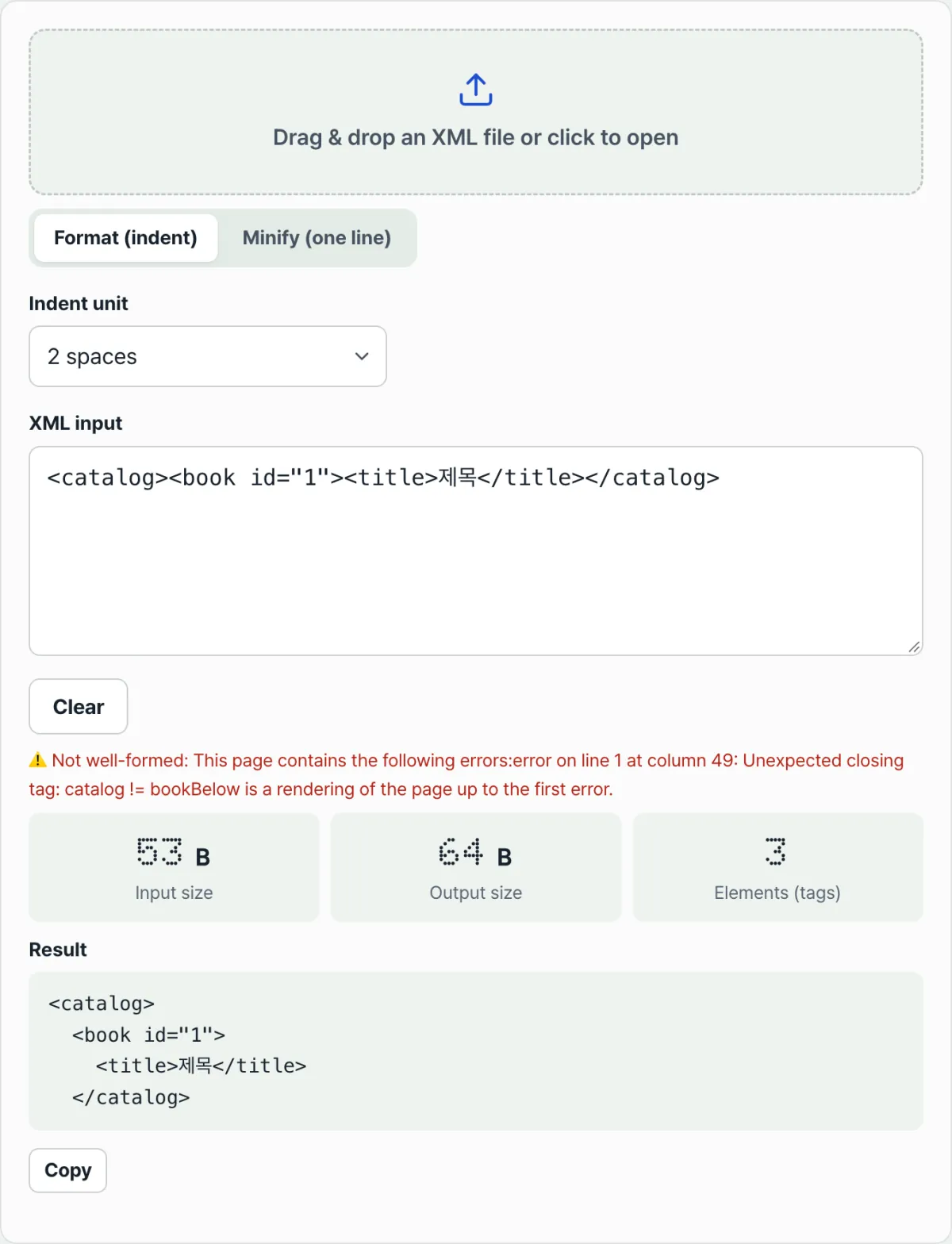
As soon as you paste XML into the input field, the XML Formatter checks well-formedness with the browser's own XML parser. If every condition is met, it shows "well-formed: no structural errors." If anything is off, it shows "not well-formed" along with the specific error the parser identified.
Separately from that verdict, the formatting (indentation) and minifying (single line) results still try to recognize as many tags as possible. You can check where the problem is from the error message while also seeing how your input is currently being read structurally.
The results panel also shows input size, output size, and element (tag) count, so you can see right away how much the size changed before and after formatting.
Input Methods and Options
You can paste XML directly into the input field, or drag and drop or click to load a file with a .xml, .svg, .rss, or .xsl extension. In format mode, you can pick the indent unit from 2 spaces, 4 spaces, or a tab. Minify mode removes all whitespace and puts everything on one line.
You can copy the result with the copy button, and clear the input with the clear button when you want to start over.
Takeaways
- Browsers fix tag errors in HTML on their own and render the page, but XML parsers don't fix errors — they reject the whole document.
- This standard is called well-formed, and it's defined by rules: one root element, closed tags, nesting order, case sensitivity, quoted attribute values, and escaped special characters.
- Even a single error means the whole document fails — not "partial success."
- This strictness is a design choice that ensures different systems interpret the same document identically, and it removes any room for ambiguous interpretation.
- Paste into the XML Formatter to instantly check well-formedness and the specific error, and to see the formatted and minified results.
Paste in your XML to line up the indentation, minify it, and check for well-formedness (structural errors) all at once.
Frequently Asked Questions
Is there no such thing as well-formedness in HTML?
Plain HTML5 documents have no separate well-formedness requirement. Instead, parsing rules define how browsers recover from errors. There is also a way of writing HTML under XML rules — XHTML — and in that case you have to meet the same well-formedness conditions as XML, or the page won't render.
I got an XML error message but I can't find where the problem is.
It's usually one of these: an unclosed tag, an attribute value missing quotes, more than one top-level element, or a raw < or & in text. If you paste it straight into the XML Formatter, the screen shows the specific error the browser parser identified, so you can use that message as a clue to track down the spot.
Why not make XML as lenient as HTML?
There's a reason it isn't. Lenient parsers can recover in slightly different ways across browsers, which leaves room for the same document to be interpreted differently depending on the situation. XML isn't a screen for people to look at — it's a format for different systems to exchange data — so those interpretation differences can't exist at all. That's why it chose strictness over leniency.
Do I need to run well-formedness checks again on the minified (single-line) result?
Formatting and minifying don't change the tag structure of the original XML, so if the original was well-formed, the minified result is well-formed too. The XML Formatter's well-formedness check runs against the original input and works independently of switching between format and minify modes.
This article was adapted from our Korean original. Read the Korean original