
URL Encoding Explained: Percent Encoding and Why Text Breaks
Contents
- The characters a URL grammar allows are fixed
- Why Korean characters stretch out so long in %XX
- Why encodeURI and encodeURIComponent produce different results
- How the tool shows the difference between encodeURI and encodeURIComponent on screen
- See at a glance which characters changed
- Recap
- Frequently asked questions
You've probably searched for something in Korean and watched the address bar fill up with characters like %EC%9D%B4. The reverse happens too: you paste Korean text or a space straight into a link you built, and the page won't open, or the server chops the request in the wrong place.
A URL is a grammar with a fixed set of allowed characters. Anything outside that grammar — spaces, Korean, emoji, some special symbols — has to be converted to percent encoding in %XX form before browsers and servers can pass the exact same string back and forth.
Summary ① The characters a URL grammar allows are fixed, and anything outside them (spaces, Korean, special characters) must be converted to percent encoding in %XX form so browsers and servers read it as the same string. ② encodeURI leaves reserved characters like /, ?, :, &, and = alone so the overall URL structure stays intact, while encodeURIComponent assumes it's handling a single value and converts even those reserved characters to %XX. ③ If a value going into a query string (a search term, for example) contains & or =, encode it with encodeURIComponent rather than encodeURI so the character isn't mistaken for a parameter separator.
The characters a URL grammar allows are fixed
URL (strictly speaking, URI) grammar splits usable characters into two groups. "Unreserved characters" — letters, digits, and a few symbols (- _ . ~) — can be used as they are. "Reserved characters" like :, /, ?, #, [, ], @, !, $, &, ', (, ), *, +, ,, ;, and = serve as delimiters that separate the parts of an address (scheme, host, path, query, fragment).
Characters outside both groups — non-ASCII characters such as spaces and Korean — aren't defined in URL grammar at all. From a browser's or server's point of view, if those characters come in as-is, there's no basis for deciding where a value ends and where the address stops. So these characters get converted to UTF-8 bytes, then each byte is expressed in %XX form.
Why Korean characters stretch out so long in %XX
A single Korean character usually takes 3 bytes when encoded in UTF-8. Percent encoding works byte by byte, so one Korean character becomes three %XX sequences in a row, like %EC%95%88. Two characters like "안녕" means six %XX repetitions.
English letters are 1 byte in UTF-8, so they finish in one %XX or need no encoding at all. Korean is structurally bound to produce longer encoded output. That's not a flaw in your tool or browser — it's a property of the character encoding itself.
Why encodeURI and encodeURIComponent produce different results
JavaScript gives you two encoding functions. encodeURI assumes it's working on "a complete URL" and leaves delimiters like :, /, ?, &, and = untouched, because encoding those would break the address structure itself.
encodeURIComponent, on the other hand, assumes it's working on "a single value to be inserted into a URL." If that value happens to contain & or =, it must not be mistaken for a delimiter, so this function converts every character that could act as one to %XX.
Take a search term a user typed that contains &. Encode it with encodeURI and the & stays as-is, indistinguishable from an actual query parameter separator. Encode it with encodeURIComponent and that & becomes %26, preserving the fact that it's part of the value.
To check this difference yourself, you'd open the browser developer tools console, pass the same string to encodeURI and encodeURIComponent, and compare the results. Opening the console, retyping the functions, and eyeballing the output every single time gets tedious fast when all you want is to check one value.
Our free RFC 3986 URL Encoder + Character Map tool encodes and decodes any URL string instantly with encodeURI, encodeURIComponent, and strict RFC 3986.
How the tool shows the difference between encodeURI and encodeURIComponent on screen
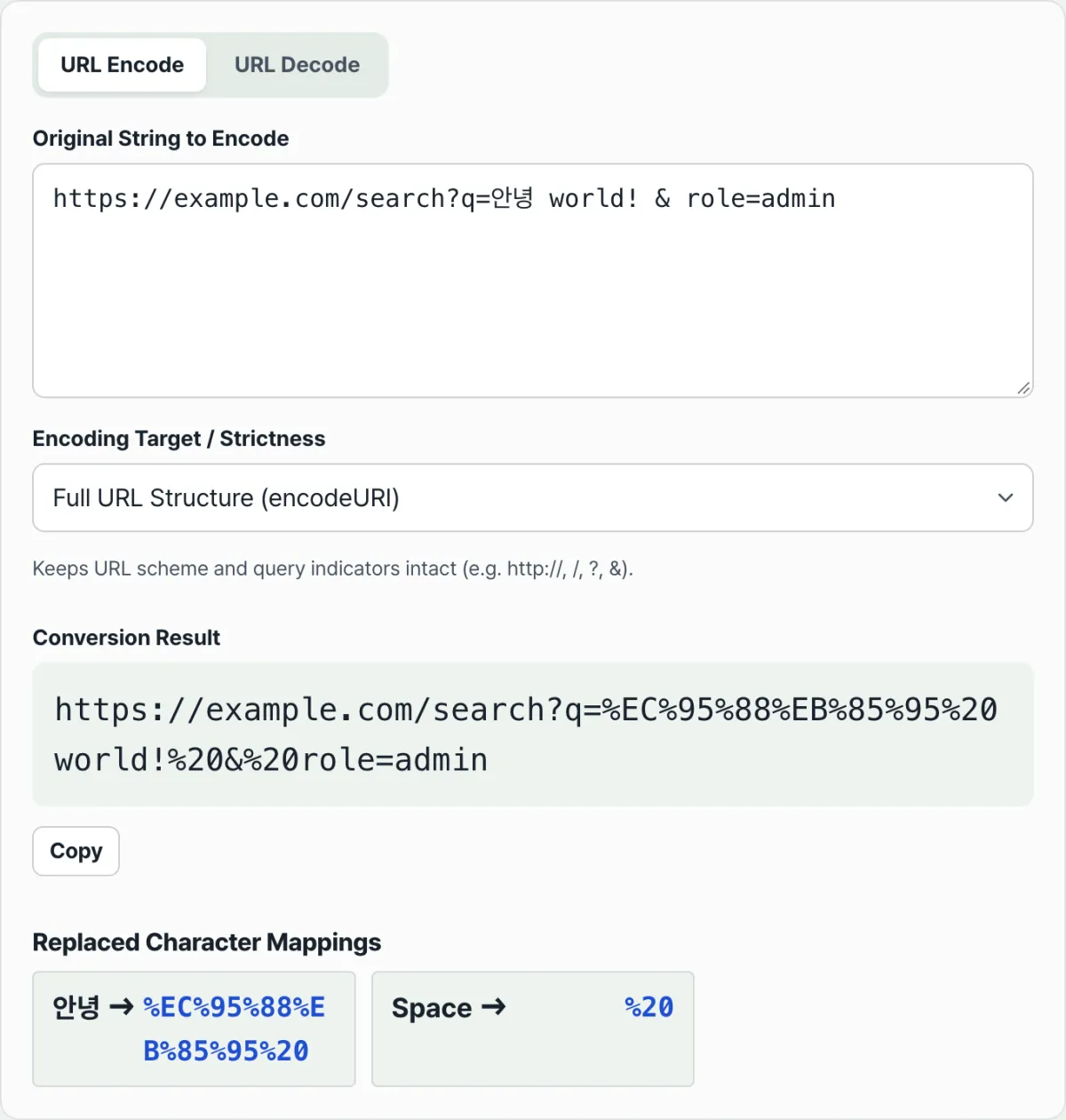
The RFC 3986 URL Encoder + Character Map has two tabs, "URL Encoding (Encode)" and "URL Decoding (Decode)," and the encoding tab has an "Encoding method (scope)" menu. From that menu you can pick one of three options: "Query parameter value (encodeURIComponent)," "Keep full URL structure (encodeURI)," or "RFC 3986 strict mode."
Leave the input the same and switch only that menu, and the difference described above shows up right in front of you. Choose "Keep full URL structure" and only the Korean and spaces change while &, =, :, and / stay put. Choose "Query parameter value" and those delimiters all turn into %XX too — you can compare both on the same screen.
See at a glance which characters changed
Below the result, a table called "Detailed mapping of replaced characters" appears, listing item by item which character in the original string became which %XX code. You don't have to reverse-engineer why a character was encoded from the result string alone.
Going the other way — when you want to turn a %XX string left in server logs or a URL back into the original characters — switch to the "URL Decoding" tab. If malformed percent encoding is mixed in, it reports an error instead of forcing an interpretation, which keeps you from mistaking a broken value for the original text.
Recap
- The characters a URL grammar allows (letters, digits, a few symbols) are fixed, and spaces, Korean, and special characters outside that set must be converted to percent encoding in %XX form.
- Korean takes 3 bytes per character in UTF-8, so encoding it stretches into three %XX sequences in a row.
- encodeURI leaves reserved characters like :, /, ?, &, and = untouched to preserve a complete URL structure.
- encodeURIComponent assumes it's handling a single value and encodes even those reserved characters, so use it for query parameter values to keep & or = inside a value from being mistaken for a delimiter.
- When you're not sure which method to pick, the fastest path is to switch encoding methods in the tool and compare the results for the same input side by side.
Our free RFC 3986 URL Encoder + Character Map tool encodes and decodes any URL string instantly with encodeURI, encodeURIComponent, and strict RFC 3986.
Frequently asked questions
Should I use encodeURI or encodeURIComponent?
If you're dealing with a complete URL that already includes the scheme, path, and query delimiters, use encodeURI. If you're dealing with a single value to drop into a query parameter slot (a search term, user input, and so on), use encodeURIComponent so that & or = inside the value doesn't accidentally collide with a delimiter.
Why is a space in a URL a problem?
A space isn't a character defined by URL grammar. Browsers and servers have no way to use a space as a marker for where one value ends and the address stops, so spaces must be converted to percent encoding like %20.
Why does a Korean URL come out as long strings like %EC%95%88%EB%85%95?
Korean usually takes 3 bytes per character in UTF-8. Percent encoding maps each byte to one %XX, so encoding a single Korean character appears as three %XX sequences in a row.
Why do I get an error when decoding?
Decoding throws an error when a string doesn't follow the %XX format, or when concatenating the %XX bytes doesn't produce a valid UTF-8 character. When that happens, suspect that the original string was already corrupted or that encoding was applied twice.
This article was adapted from our Korean original. Read the Korean original