
Business Card Sizes by Country: mm and Inches Explained
Contents
The problem: it's hard to know what to base your business card size on
Search for business card dimensions on a design template site and you'll get a jumble of different numbers: "90×50," "85×55," "3.5×2 in." Pick one at random without knowing which is right and send it off to print, and you'll get back a card that feels unusually large in your wallet or won't fit well in a card case.
If you plan to hand your card to overseas clients in particular, it's safer to know up front how the size commonly used at home differs from the size used in the other country. If the card is for domestic use, though, matching that one common domestic size exactly is enough.
The fix: start with the size table by country and the card wallet standard
Business card sizes aren't set by law. They're sizes that printing industries in each region have used by convention for a long time. Below is a table of the sizes commonly used in various countries.
Region
Common size
Inches
Korea
90 × 50mm
about 3.54 × 1.97 in
United States and Canada
88.9 × 50.8mm (3.5 × 2 in)
3.5 × 2 in
Japan
91 × 55mm
about 3.58 × 2.17 in
Much of Europe
85 × 55mm
about 3.35 × 2.17 in
Card wallet standard (ISO/IEC 7810 ID-1)
85.60 × 53.98mm
about 3.37 × 2.13 in
The bottom row of the table is the key. Cards you slide into a wallet — credit cards, debit cards, transit cards, ID cards — follow an international standard size called ISO/IEC 7810 ID-1. Because of that standard, a card from any country fits the same card terminal or wallet slot.
Business cards, by contrast, have no worldwide standard like that. So cards from countries that use a size slightly larger than ID-1 — Korea (90×50mm), Japan (91×55mm), the United States (89×51mm) — can fit tightly with no room to spare, or stick out a little at the corners, when you put them into a slim card wallet cut to ID-1 dimensions.
The formula for setting the canvas size yourself in a design program
If you're using a program that takes millimeter values directly, like Photoshop, Illustrator, or Canva, just enter the numbers from the table above as your new document size. If your program only supports pixels (px), convert them with the formula below.
pixels = mm × (resolution in DPI ÷ 25.4)For example, converting the Korean standard (90×50mm) at a print resolution of 300dpi gives you about 1063px wide (90 × 300 ÷ 25.4) and about 591px tall (50 × 300 ÷ 25.4). Once you know this formula, you can set the canvas size yourself for any country's size in any program.
Run that calculation, set up a canvas in your own editing program, and place the name, title, company, and contact details, and you can finish a card by hand. The hassle is doing it every time: pulling out a calculator to convert mm to px and lining up the layout and font sizes by hand.
If you'd like to make a card image in the Korean standard proportions right now, try our tool.
Free · No sign-up · Save a PNG right in your browser at the Korean standard ratio (90×50mm)
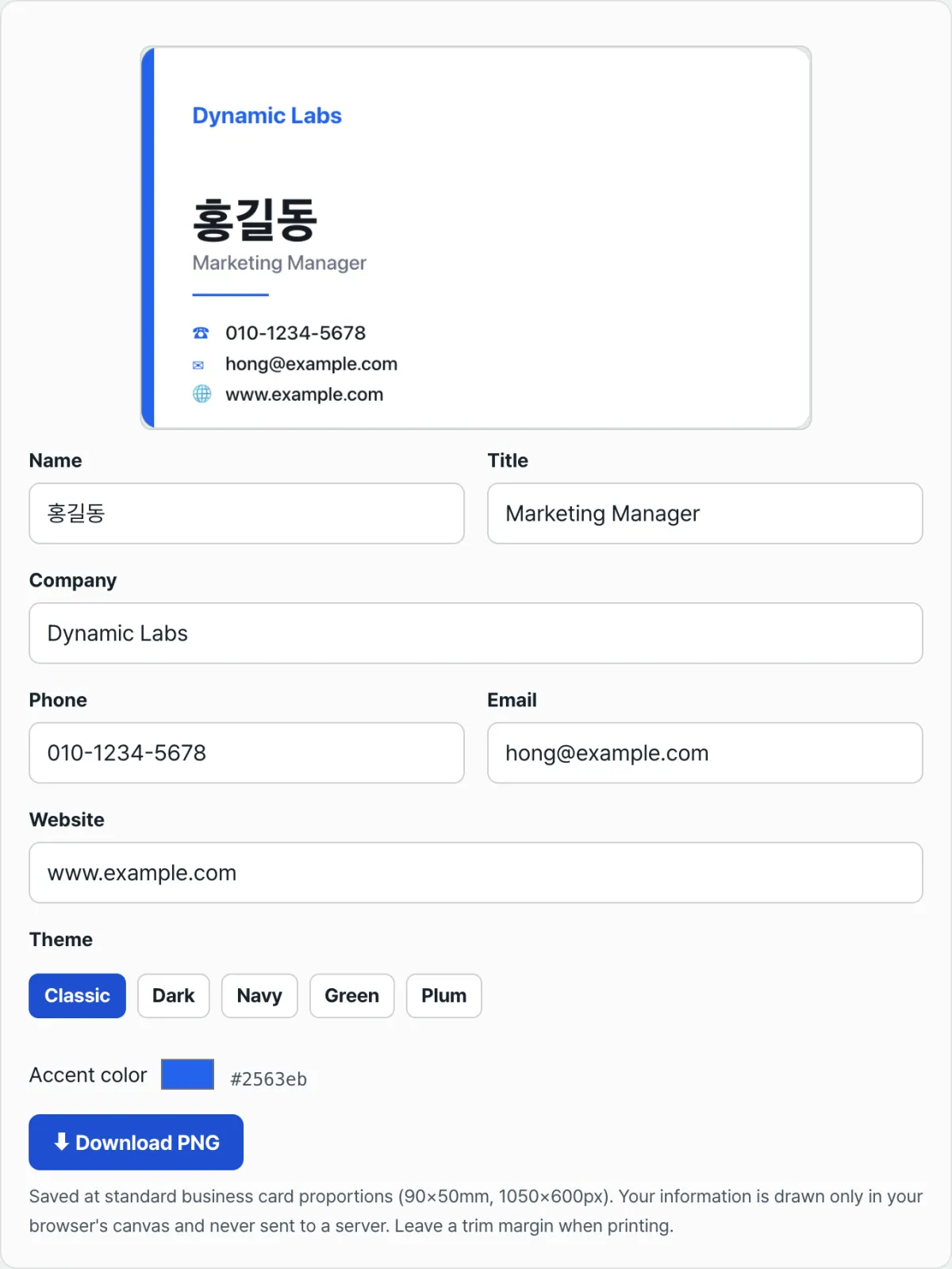
This tool draws your card directly onto a canvas sized to the Korean standard card proportions (90×50mm, 1050×600px). Here's how to use it.
- Fill in the name, title, company, phone, email, and website fields. Any field you leave blank won't appear at all.
- Click one of the five theme buttons — Classic, Dark, Navy, Green, Plum — to choose a background and accent color combination.
- If you want to change the accent color yourself, pick one with the color picker (but only do this after the last time you click a theme button).
- When the preview looks the way you want, click the "Download PNG" button to save it as an image file.
Your information is drawn onto the canvas only inside your browser and is never sent to a server. The image this tool saves is the finished design itself, though, and doesn't include the bleed margins a print shop asks for, so you'll need to account for that margin separately before you actually print.
Common sticking points
Situation
Cause
Fix
You sent a card for an overseas client to print at the domestic size (90×50mm)
You didn't check the size differences by country first
Check the other country's size in the table above (the United States, for example, is 89×51mm) and specify the trim size again
The card fits tightly in a slim card wallet slot or the corners poke out
Card wallet slots are cut to the credit card standard (ID-1, 85.60×53.98mm)
Consider a roomier soft case or a clip-style card case instead of a slim slot
You picked an accent color yourself, but it went back to the original color
Clicking a theme button again resets the accent color to that theme's default
Choose the theme first, and customize the accent color last
The name or company name looks crammed against the right edge of the card
The text was long, so it shrank down to the minimum size
Shorten the title or company name, or use abbreviations
The bottom line
Business card sizes differ from country to country, and that difference isn't a mistake — it's a difference in regional printing conventions. Remember that the only internationally unified standard covers wallet cards like credit cards (ISO/IEC 7810 ID-1), not business cards. That explains why some cards fit a card wallet perfectly and others stick out a little.
If you want to make a card for domestic use quickly, there's no need to convert mm to px by hand or open a design program. Just enter your information in your browser and save it as a PNG.
Free · No sign-up · Save a PNG right in your browser at the Korean standard ratio (90×50mm)
Frequently asked questions
Can I give a card printed in Korea to an overseas partner as is?
The differences between Korea (90×50mm), the United States (89×51mm), and Japan (91×55mm) are only about 1–2mm each, so handing cards back and forth is no problem in most cases. If you want to print exactly to the other country's standard, though, refer to the size table above and specify the trim size separately to the printer.
Can I hand a PNG made with this tool straight to a print shop?
The tool only saves a finished design in 90×50mm proportions as a PNG image. It doesn't include the trim lines or margins that print shops ask for. Before you send it off to print, it's safest to check the margin specs that the shop provides.
What order should I set the theme and the accent color in?
Clicking a theme button changes the background, the text color, and that theme's default accent color all at once. If you adjust the accent color with the color picker and then click a theme button again, the color you just picked reverts to the theme default. So we recommend locking in the theme first and adjusting the accent color last.
The country-by-country business card sizes in this post are conventional figures widely used in each country's printing industry. They are not a single legally mandated international standard. Only ISO/IEC 7810 ID-1 is an officially defined international standard for cards. Exact trim margin requirements differ from printer to printer, so be sure to confirm before you place an order.
This article was adapted from our Korean original. Read the Korean original