
Free Handwriting Fonts for Commercial Use: License Guide
Contents
When you're making a blog thumbnail, designing an Instagram card-news series, or typing subtitles for a YouTube video, swapping the stiff serif or sans-serif look for a warm, distinctive handwriting or calligraphy font can noticeably boost the feeling and clarity of your content.
But downloading a pretty font you found floating around the internet just because you liked it, then using it in commercial promotional material, can land you in a copyright lawsuit and a huge fine. This guide lays out the license rules for free handwriting fonts that are fully cleared for commercial use, plus browser rendering optimization tips and styling formulas — all in one place.
Summary ① Free for commercial use: fonts you can use permanently and without copyright worry for profit-driven purposes like corporate marketing, video subtitles, and printed materials (selling the font file itself for money is strictly prohibited, though). ② Most trusted font families: Nanum Pen, Nanum Brush, Gamja Flower, and Cute Font are the best-known free handwriting fonts distributed as Google web fonts, and each one has its own personality in stroke length and curvature. ③ CSS rendering formula: when loading web fonts, map the lightweight
WOFF2format first to optimize page load speed. ④ With the free handwriting font tester, you can type in your promotional copy, pick a font, then just move the font size slider and adjust the letter spacing (px) and line height (ratio) values to see the visual layout result immediately.
1. Font License Guide: The Legal Limits of "Free for Commercial Use"
The heart of font licensing — and the part most people get wrong — is the difference between "free for personal use" and "free for commercial use."
- Whether print, publishing, and web design are allowed: Commercially free fonts usually permit use in printed materials, banners, ads, and video subtitles, but license terms differ from font to font (embedding, logo use, redistribution, and so on), so check the usage scope at the source you downloaded from.
- Embedding and BI/CI restrictions:
- Even with some free fonts, registering the typeface as a company logo (Brand Identity) or bundling the font file inside a mobile app or e-book program — that is, "embedding" it — is often treated as a license violation, so be careful.
- Before you download a font, cross-checking the details of the license file (OFL: Open Font License) helps reduce the risk of a copyright dispute.
2. Web Browser Font Rendering Formula: Size Optimization
Here's the efficiency formula for loading handwriting fonts as web fonts and rendering them when you build a website.
Compression comparison by font file format: WOFF2 (highest compression) < WOFF (standard) < TTF/OTF (original) (WOFF2 compresses better than the original TTF, so the file size drops noticeably, which helps you save traffic.)
CSS web font rendering optimization code formula:
@font-face {
  font-family: 'HandwritingFont';
  src: url('/fonts/handwriting.woff2') format('woff2'),
       url('/fonts/handwriting.woff') format('woff');
  font-display: swap; /* Show text in the fallback font first before the font loads (prevents CLS) */
}
How to Use the Free Handwriting Font Tester
If it's a hassle to open heavy Photoshop, download and install fonts over and over, and manually compare design fonts one-to-one to find the one that fits, try a real-time web styling tester instead.
Free · switch between 4 handwriting fonts in real time · adjust size, letter spacing, line height, and color with instant preview
Here's how to use the tool.
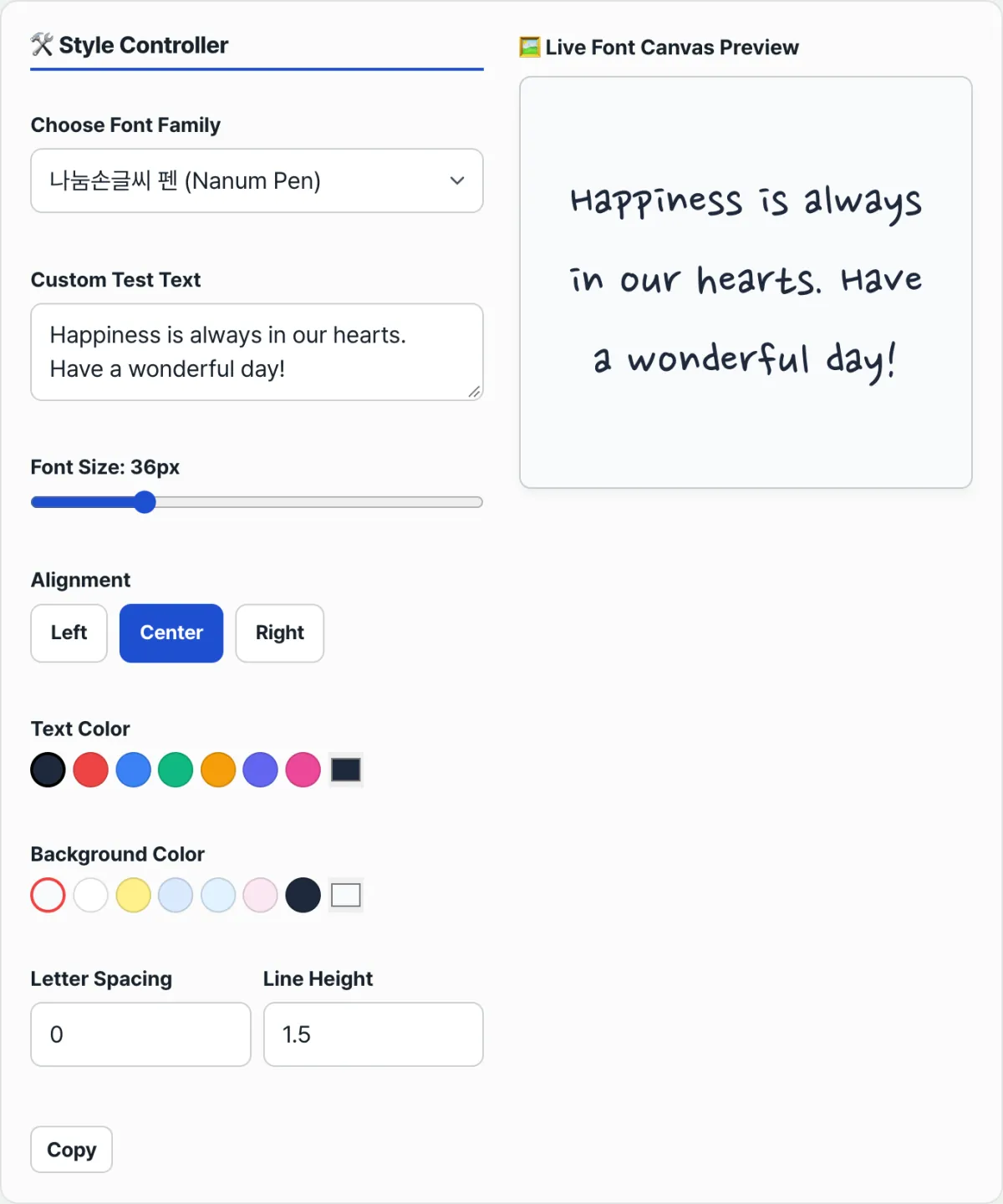
- Pick a font and enter your text: choose one of Nanum Pen, Nanum Brush, Gamja Flower, or Cute Font from the dropdown at the top, then type the sign copy or card-news headline you want to test into the text box.
- Adjust the styling: drag the Font Size slider (px), change the numbers in the Letter Spacing (px) and Line Height (ratio) fields, and click the alignment buttons (left/center/right) and the text and background color chips to change values.
- Every time you change a value, the real-time styling result for that one selected font renders instantly on the canvas on the right (on mobile, at the bottom).
- Press the copy button at the bottom and the current style settings — font name, size, alignment, colors, and so on — are copied to your clipboard as a summary text.
Wrap-Up
Handwriting and calligraphy fonts are design resources that add an analog feel and brand value to digital content. Running your actual copy through several fonts in the font tester lets you compare them side by side, which helps you pick a typeface that fits your brand image without license worries. Keep in mind that the final design result can vary depending on conditions like copy length and color combinations.
Free · switch between 4 handwriting fonts in real time · adjust size, letter spacing, line height, and color with instant preview
Frequently Asked Questions
Why is there such a huge file size difference between English fonts and Korean handwriting fonts?
Korean fonts have an enormous character-combination structure, so they are dozens of times larger than English fonts.
- English fonts: you only need to design roughly around 100 characters or so, including uppercase and lowercase letters and symbols (file sizes in the tens of KB).
- Korean fonts: the standard precomposed Hangul combinations built from initial, medial, and final consonants total 11,172 characters. A designer has to draw more than ten thousand character strokes by hand, so the design period is long and file sizes run from several MB to tens of MB — which makes web optimization essential to protect loading speed.
What should I do if I get a copyright lawsuit warning letter about a font?
These are the basics for when you get caught up in a settlement shakedown, where some agencies use copyright enforcement as a pretext to pressure you into buying an expensive font package.
- Figure out the situation: first distinguish whether you copied and installed the font program file itself through an unauthorized channel, or whether a typeface was simply used inside a finished image file (JPG, PNG) delivered by an outsourced designer. The two cases can be treated differently under copyright law.
- Rather than judging the facts yourself and paying the settlement right away, it's safer to explain your specific situation to a public copyright consultation service such as the Korea Copyright Commission, or to a free legal aid organization, and get guidance.
This article was adapted from our Korean original. Read the Korean original