
Regex to Extract Emails and URLs from Text: 5 Patterns
Contents
When you need to pull only the strings that follow a set format — email addresses, URLs, phone numbers — out of a big pile of text like web server logs, forum comments, or a customer support inbox, scanning and copy-pasting by eye hits a wall as soon as the data gets even slightly large.
That's where writing a pattern with a regular expression (regex) and collecting matches one per line comes in. This post covers five extraction patterns you'll use often, plus how to use capture groups to pull out just the part of a match you care about.
Summary ① Email addresses, URLs, IPs, phone numbers, and numbers can mostly be extracted with one fixed regex pattern each. ② To find every match in a document, you must turn on the
g(global) flag. ③ If you only want part of a match, wrap it in parentheses to make a capture group and extract just that piece.
Five Common Extraction Patterns
You don't need to write a new regex every time you want to pull out a certain format. These five are the basic versions you'll reach for most often.
이메일    [a-zA-Z0-9._%+-]+@[a-zA-Z0-9.-]+\.[a-zA-Z]{2,}
URL      https?:\/\/(?:www\.)?[-a-zA-Z0-9@:%._\+~#=]{1,256}\.[a-zA-Z0-9()]{1,6}\b(?:[-a-zA-Z0-9()@:%_\+.~#?&\/=]*)
IP(v4)   \b(?:(?:25[0-5]|2[0-4][0-9]|[01]?[0-9][0-9]?)\.){3}(?:25[0-5]|2[0-4][0-9]|[01]?[0-9][0-9]?)\b
전화번호   \+?\b[0-9]{2,4}[-.\s]?[0-9]{2,4}[-.\s]?[0-9]{3,4}[-.\s]?[0-9]{3,4}\b
숫자      \b\d+(?:\.\d+)?\b
A few things to watch out for. The phone number pattern is not limited to Korean mobile numbers (010 and so on). It's a general-purpose pattern that catches any number made of groups of 2–4 digits separated by hyphens, dots, or spaces — so it will also match numbers that include country or area codes. The number pattern catches decimals (like 3.14) as well as integers. If you only want whole numbers, drop the decimal part and use \b\d+\b instead.
If you remove the parentheses and the capture groups along with them, you can paste in any pattern you build yourself.
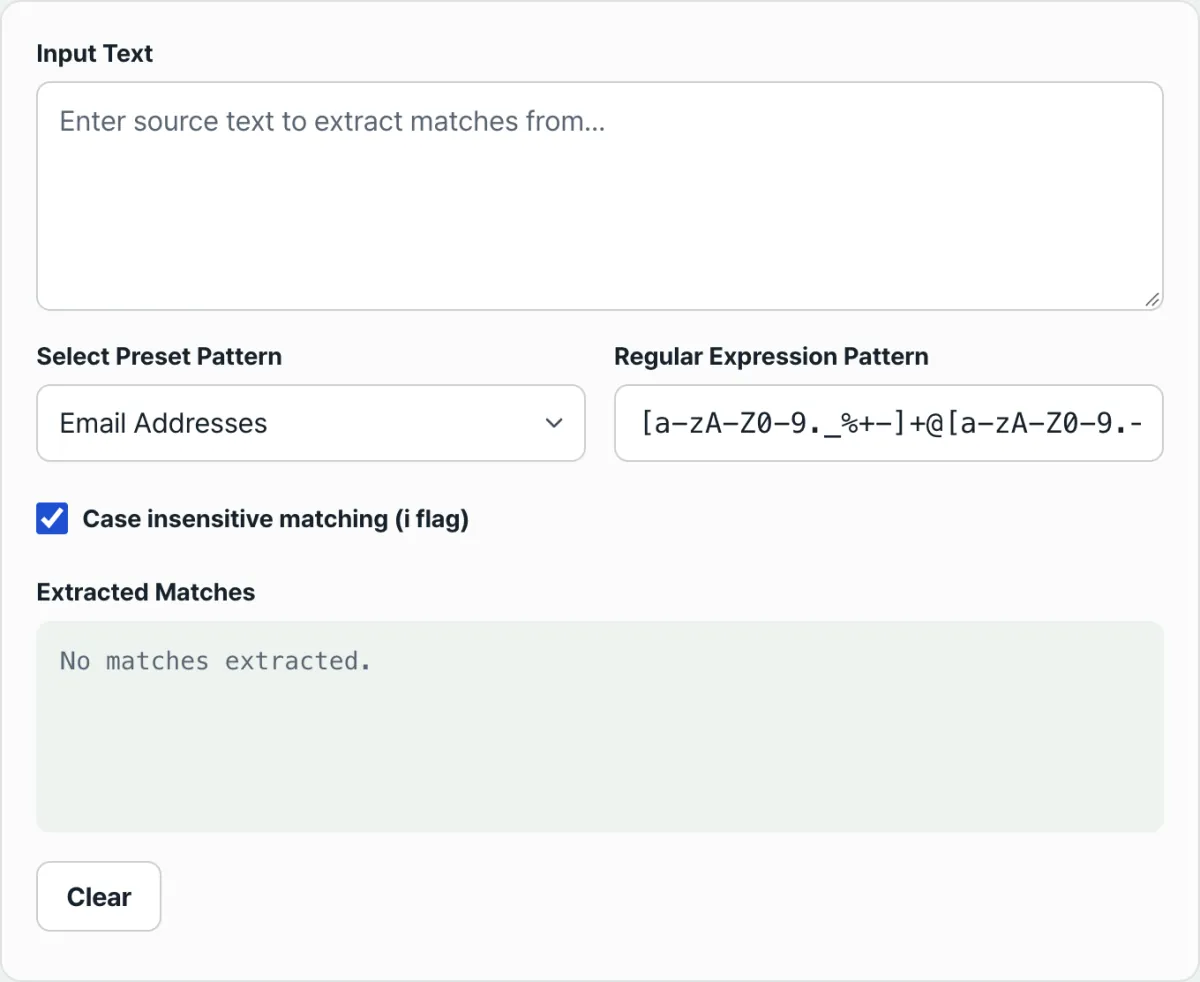
Try it in our tool. Instead of writing code in a console or dev tools to test the patterns above every time, paste your text into the Regex Text Extractor and pick a preset (email, URL, IP, phone number, number, or custom) — matches appear in a list right away, one per line.
Paste the source text into the input box, pick the target pattern you want to extract, and get a clean list of matches in 1 second — one row per item.
Pull Out Just the Part You Want with Capture Groups
If you want to extract only part of the full match rather than the whole thing, wrap that part in parentheses () to create a capture group.
const logText = "USER_ID: gim123, STATUS: SUCCESS";
// regex that captures just the ID value on its own
const idRegex = /USER_ID:\s*([a-zA-Z0-9]+)/;

const match = logText.match(idRegex);
if (match) {
  const fullMatch = match[0]; // "USER_ID: gim123" (the full match)
  const capturedId = match[1]; // "gim123" (first capture group inside the parentheses)
  console.log(capturedId); // cleanly extracted just "gim123"
}
Note. This capture group syntax is for when you're writing code directly in the JavaScript console. In the tool, you just pick a preset or paste a pattern into the field — you never have to handle capture groups yourself.
Where People Get Stuck
| Situation | Cause and fix |
|---|---|
| Only the first match shows up and the rest are missing | The g (global) flag is missing. Without it, the search stops after the first match even if there are hundreds in the document |
| Emails or URLs in all caps aren't matched | Case-insensitive mode (the i flag) is off. In the tool, you toggle it with a checkbox |
| An error appears when you enter a bad pattern | Usually unbalanced parentheses or a missing escape. The tool shows the error message as-is |
| You want to paste results into Excel | Use the copy-all button to copy the list as line-separated text, then paste — each match lands in its own cell |
Key Takeaways
- Email addresses, URLs, IPs, phone numbers, and numbers can mostly be extracted with one fixed regex pattern each.
- To search an entire document, the
gflag is required; add theiflag if you want case-insensitive matching. - If you only need part of a match, wrap it in parentheses to make a capture group and extract just that piece.
- Remember that the phone number preset is a general-purpose pattern, not one limited to Korean mobile numbers, and that the number preset also catches decimals — that way, results that look different from what you expected won't throw you off.
Paste the source text into the input box, pick the target pattern you want to extract, and get a clean list of matches in 1 second — one row per item.
Frequently Asked Questions
Why do I get only one result when I don't use the g flag?
Without the g flag, JavaScript's String.match() returns only the first match it finds in the document and stops searching. To collect every match in the document into a list, you need the g flag. When you choose a preset, the tool adds this flag automatically.
Can the phone number preset match only numbers starting with 010?
The default phone number preset isn't limited to Korean mobile numbers starting with 010 — it's a general-purpose pattern that broadly finds groups of 2–4 digits separated by hyphens, dots, or spaces. If you want only numbers starting with 010, choose the Custom preset and enter a pattern that requires that start.
Can I extract just a certain part of the matched text?
Yes. Wrap the part you want in parentheses in your regex and it becomes a capture group, which you can pull out separately from the full match. Note, though, that the tool's screen shows the full matched strings as a list, so extracting only a capture group is something you'd handle with a separate script, as in the example above.
This article was adapted from our Korean original. Read the Korean original