
SQL Formatter Rules: How Your One-Line Query Gets Sorted
Contents
An SQL formatter takes SQL that's all crammed onto one line and spreads it out clause by clause. This post explains exactly how that formatter arranges your query — the rules, nothing more. It's for anyone who keeps burning time tracing a one-line query copied from a log or ORM output with their eyes.
Here's the short version. The formatter doesn't change what your query means. It only touches whitespace, line breaks, and the case of keywords.
Summary ① Only words on a predefined list of SQL keywords get uppercased. Table names, column names, and quoted strings keep their original case. ② Major clauses like SELECT, FROM, WHERE, JOIN, GROUP BY, and ORDER BY each start on a new line. AND, OR, and ON conditions, items after a comma, and subqueries get indented one level. ③ Only whitespace, line breaks, and keyword case change, so the query means exactly the same thing when it runs.
Why one-line queries are hard to read
Queries from application logs, queries dumped by an ORM, queries pasted into Slack — they usually run straight across one line with no breaks. Something like select a,b,c from t1 join t2 on ... where ... and ... order by ....
In that shape, you can't see where the SELECT items end and the conditions begin. To count how many conditions follow WHERE, you have to scan the whole string from left to right.
Subqueries make it worse. Inside the parentheses, it's hard to tell another SELECT from a simple function call. Redrawing those boundaries in your head every single time is what wears you out.
The rules for formatting it by hand
What a formatter does is repeat a fixed set of mechanical rules. That means you can do the same thing yourself without a tool. Here's the order.
1. Uppercase the keywords only. Raise reserved words like SELECT, FROM, WHERE, JOIN, AND, ON, GROUP BY, and ORDER BY to uppercase. Leave table names, column names, function arguments, and quoted strings alone.
2. Break the line at every major clause. Start a new line whenever SELECT, FROM, WHERE, HAVING, LIMIT, GROUP BY, ORDER BY, or a JOIN variant (LEFT JOIN, INNER JOIN, and so on) appears.
3. Indent conditions and items one level. Conditions that start with AND, OR, or ON, and SELECT items that follow a comma, go one step in from the clause.
4. Indent subquery parentheses further, but keep function parentheses attached. If the inside of the parentheses is another SELECT, indent that content one more level. A function call like COUNT(*), on the other hand, stays attached to its name.
Apply these four rules to this one-line query.
select o.id, o.total, u.name from orders o join users u on u.id = o.user_id where o.total > 1000 and u.status = 'active' order by o.total desc;Follow the rules and you get this (two-space indent).
SELECT o.id,
  o.total,
  u.name
FROM orders o
JOIN users u
  ON u.id = o.user_id
WHERE o.total > 1000
  AND u.status = 'active'
ORDER BY o.total DESC;
A few things to check here. The 'active' string did not get uppercased. The aliases o and u and the column names are still lowercase, just as they were. The only things that went uppercase are reserved words: SELECT, FROM, JOIN, ON, WHERE, AND, ORDER BY, DESC.
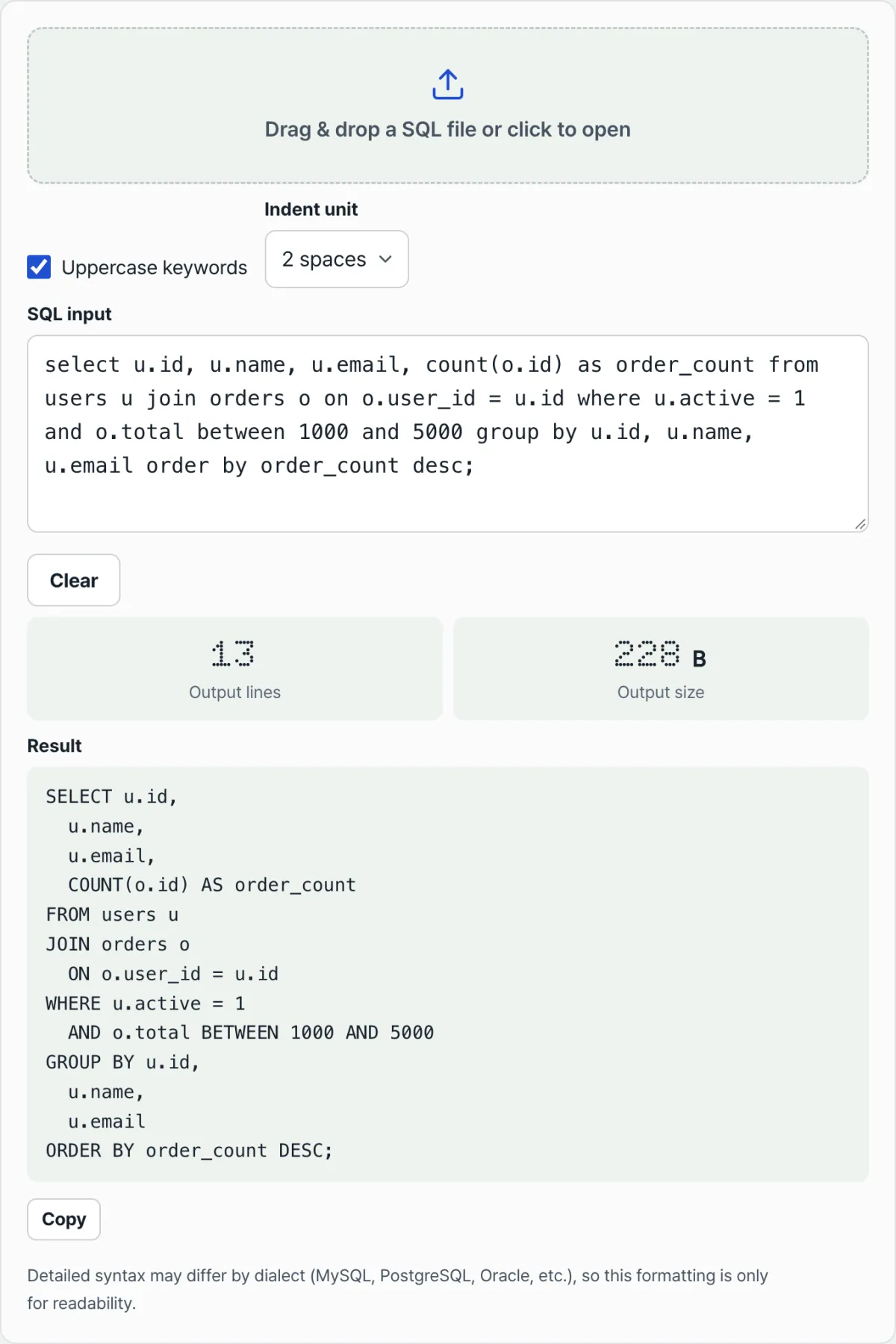
You can do it by hand, but once ten conditions pile up or subqueries nest, counting parenthesis depth gets old fast. Check it with our free SQL Formatter.
Just paste your query and it gets sorted: reserved words uppercased, each clause on its own line. Runs right in your browser, no install or sign-up.
How to read the formatted output
When you look at the result, remember one thing: only the shape changed. More lines don't mean a different query.
A line indented one level belongs to the clause directly above it. An AND indented under WHERE is an extra condition on that WHERE, and a SELECT that sits deeper after an opening parenthesis is a subquery.
Subquery parentheses add a level of depth, but function call parentheses stay attached to the name. So just by following the indentation, you can tell at a glance whether a parenthesis is a subquery or a plain function.
Alongside the result, the screen shows two numbers: output line count and output size in bytes. Those just describe the length of the formatted text. They have nothing to do with query performance or how many rows it processes.
Common misconceptions
The most common one is "formatting changes the query results." Formatting only changes whitespace, line breaks, and keyword case, so the database reads it the same way.
It's also worth knowing the limitation. SQL dialects differ in their details — MySQL, PostgreSQL, Oracle, and others. Special syntax the formatter doesn't recognize as a keyword won't be treated as a clause, so the formatting may look awkward. This tool is a readability aid, not a guarantee.
| Misconception | What actually happens |
|---|---|
| Formatting changes the query results | Only whitespace, line breaks, and keyword case change, so it runs the same |
| Every word that gets uppercased is a reserved word | Only words on the predefined keyword list are uppercased |
| Column and table names get uppercased too | Identifiers and quoted strings keep their original case |
| Every parenthesis creates indentation | Only subquery parentheses indent; function call parentheses stay attached to the name |
| Changing the indent changes the query | Two spaces, four spaces, and tabs differ only in visible whitespace, not meaning |
Recap
- Uppercasing applies only to a predefined keyword list. Table names, column names, and quoted strings stay as they were.
- Each major clause like SELECT, FROM, WHERE, JOIN, GROUP BY, and ORDER BY gets a new line, and AND, OR, and ON conditions plus items after a comma are indented one level.
- Subquery parentheses add indentation, while function call parentheses stay attached to the name, so you can tell them apart from depth alone.
- Comments and strings are preserved as-is, and multiple statements separated by semicolons are each formatted on their own.
- Only the shape changes, so the query means the same thing, and switching the indent unit (two spaces, four spaces, tabs) doesn't change that meaning either.
Just paste your query and it gets sorted: reserved words uppercased, each clause on its own line. Runs right in your browser, no install or sign-up.
Frequently Asked Questions
Does formatting change how my query runs?
No. Formatting only adjusts whitespace, line breaks, and keyword case, so the meaning the database sees stays the same. Dialect-specific syntax can still format awkwardly, though, so treat this as a readability tool, not a guarantee.
Do column names or strings get uppercased?
No. Uppercasing applies only to words on the predefined keyword list, like SELECT, FROM, WHERE, and JOIN. Table names, column names, function arguments, and quoted string literals keep their original case. If you uncheck the uppercase keywords box, reserved words stay as they were too.
Can I format multiple statements at once?
Yes. Each statement separated by a semicolon (;) is formatted on its own. Every statement breaks at its semicolons and gets its own clause-level line breaks. Comments (-- and /* */) and anything inside strings are preserved during formatting.
What changes if I switch the indent from two spaces to four?
Only the width of the whitespace before indented lines. You can pick two spaces, four spaces, or a tab, and the line breaks and the query's meaning stay the same either way. When you change the setting, the result recalculates right away, no separate Run button needed.
This article was adapted from our Korean original. Read the Korean original