
String Escape Explained: What Changes in JSON and JS Strings
Contents
If you paste text with quotes, backslashes, and line breaks straight into a JSON or JavaScript string, the string breaks partway through or throws a syntax error. Escaping replaces each of those characters with a notation that is safe inside a string. Unescaping does the reverse.
This article shows in a table exactly what each special character becomes in the output. It also covers the mistakes people make most often, from the angle of how to read the result.
Summary ① Escaping scans the original one character at a time. It turns a backslash into
\\, your chosen quote into\", a line break into\n, a tab into\t, and any other control character below 0x20 into\uXXXX. ② Unescaping runs the other way. It turns notations such as\n,\t, and\uXXXXback into the original characters. If the string still has quotes at both ends, turn on the option that strips them automatically, or the result will be off. ③ The most common mistakes are not handling backslashes first, which causes double conversion, and using a different quote in the input than the one you selected, which gives unexpected results.
Paste It In and the String Breaks at the Quote or Errors on the Line Break
Say you need to put a multi-line log message or API response text into a single value in a JSON config file. That text usually contains double quotes. Because it spans several lines, it also contains actual line breaks.
If you paste it as-is between "...", the double quotes in the text collide with the double quotes wrapping the string, and the string ends at that point. On top of that, regular strings in JSON and JavaScript don't allow actual line break characters inside the value, so every line break causes a syntax error.
Windows paths are another common case. If you put C:\new\test into a string as-is, \n and \t are read as a line break and a tab, so the value that gets printed differs from the original. Escaping is the step that converts these characters into a notation that is safe inside a string.
How to Escape a String by Hand
The idea is simple. Read the original from left to right, one character at a time, and replace only the characters that could break the string literal. Order matters.
- Pick the wrapping quote. What gets escaped depends on whether you'll put the result in a double-quoted literal, a single-quoted one, or a backtick one. The default is double quotes.
- Replace backslashes first. Change each backslash (
\) to\\. This has to come first so you don't process twice the backslashes you add later when escaping quotes. - Replace the selected quote. Put a backslash in front of the quote you picked. If you picked double quotes,
"becomes\". Leave the other kinds of quotes alone. - Replace line break characters with their notations. A line break becomes
\n, a carriage return\r, a tab\t, a backspace\b, and a form feed\f. - Handle the remaining control characters. Control characters below 0x20 that don't have a name above (null, vertical tab, ESC, and so on) become
\uXXXX:\ufollowed by four hexadecimal digits.
Here is how each original character maps to the output.
| Original character | Escaped result |
|---|---|
Backslash \ | \\ |
Selected quote (default ") | \" |
| Line break (LF) | \n |
| Carriage return (CR) | \r |
| Tab | \t |
| Backspace | \b |
| Form feed | \f |
| Any other control character below 0x20 | \uXXXX |
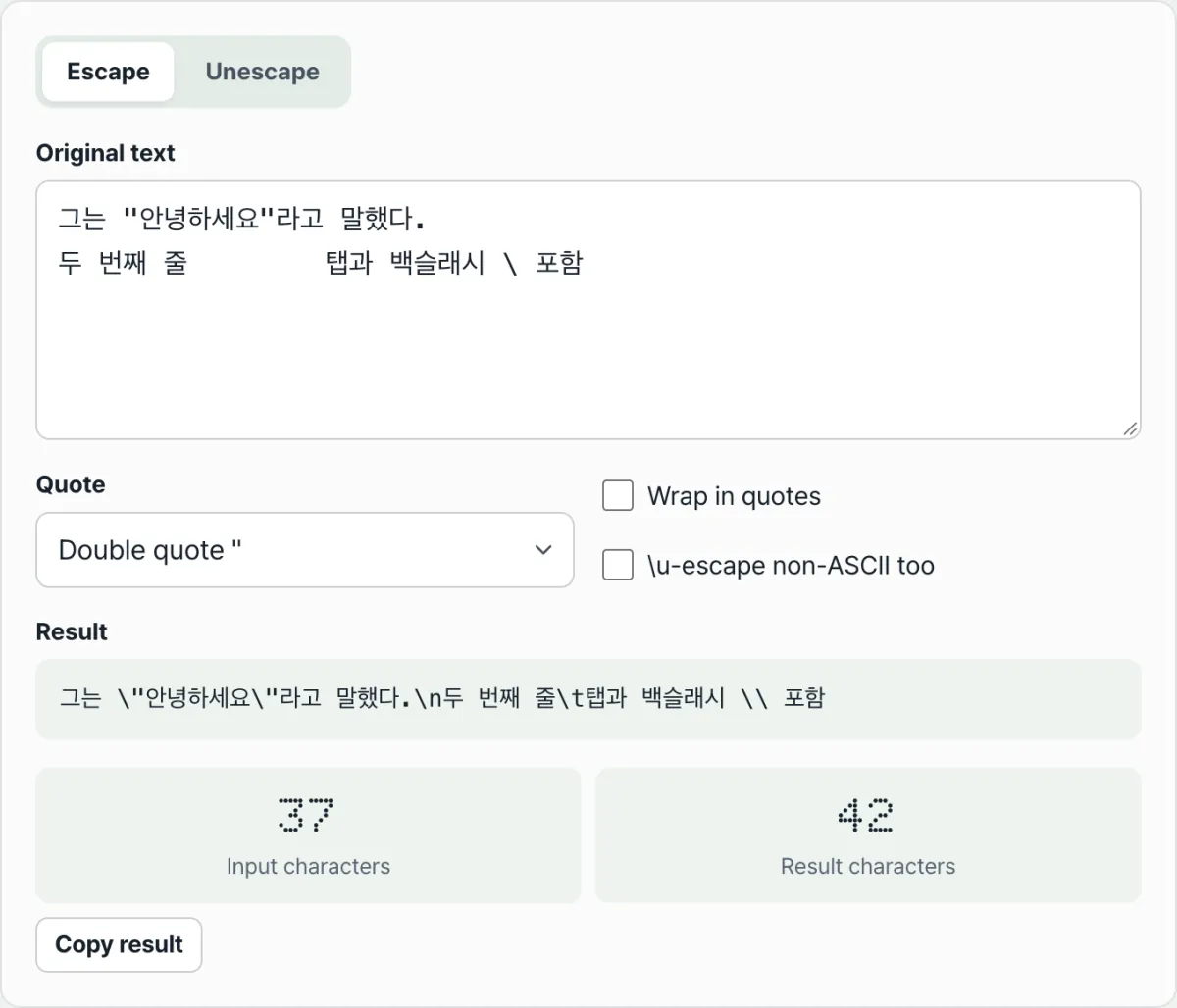
There are two more options. Turning on Wrap in quotes wraps the whole result in your selected quote once, so you get a literal you can paste right in. Turning on Escape non-ASCII as \u converts characters outside the ASCII range, such as Korean characters and emoji, to \uXXXX too. Characters above U+FFFF (most emoji) are split into two surrogate pairs (\uXXXX\uXXXX).
Unescaping retraces the rules in the other direction. When it hits a \, it looks at the next character. \n, \r, \t, \b, \f, \v, and \0 become the matching control characters. \xXX, \uXXXX, and \u{XXXXX} become the character for that code. Escaped quotes, backslashes, and slashes go back to the plain symbols. If the same quote wraps both ends of the string, that one pair is stripped.
There is one difference between the two directions. Escaping writes the vertical tab and the null character as \uXXXX escapes instead of \v and \0. Unescaping recognizes the \v and \0 notations and converts them back to the original characters.
Try it in String Escaper.
Escape or unescape text right in your browser with String Escaper. No install or signup, and the text you enter is never sent to a server.
How to Read the Result: Three Common Mistakes
Those are all the rules. When a result doesn't match what you expected, it usually comes down to one of the three cases below.
| Situation | Why the result is off | How to fix it |
|---|---|---|
| Backslashes handled late | The backslash in an earlier \" gets converted again to \\ | Escape backslashes first |
| Input quote ≠ selected quote | Only the selected quote is converted, and the other quotes stay as they are | Select the same quote as the literal that will wrap the result |
| Quotes left at both ends when unescaping | The leading and trailing " get mixed into the text, so the result is shifted by one character | Turn on automatic removal of surrounding quotes |
Backslash order. If you work by hand and convert the quotes first, the backslashes you just added get converted to \\ again in the next step. The tool scans the original only once, from left to right, and never re-reads the backslashes it added. That's why it doesn't double-convert.
Mismatched quote type. Suppose your text is going into a single-quoted literal, but you escape it in double-quote mode. The single quotes in the text stay as they are. If you paste that result inside '...', the string breaks at the leftover single quote. Start by checking that the quote you'll wrap the result in matches the quote you picked in the tool.
Surrounding quotes when unescaping. Say you're reversing a string wrapped in quotes, such as "A\tHello". If you don't strip those quotes, one quote character stays at each end of the result. With automatic removal of surrounding quotes turned on, the tool strips that one pair when the first and last characters are the same quote.
Wrap-Up
- Escaping reads the original one character at a time. It turns a backslash into
\\, the selected quote into\", a line break into\n, a tab into\t, and any other control character below 0x20 into\uXXXX. - When you escape by hand, handle backslashes first to avoid double conversion. The tool scans only once, so it avoids the problem automatically.
- What gets escaped depends on the quote you pick. Choose the same kind as the literal you'll put the result in, and the output will match what you expect.
- Unescaping works in the opposite direction, turning
\n,\uXXXX, and similar notations back into characters. Strip the surrounding quotes with the automatic removal option so the result isn't shifted. - With Escape non-ASCII as
\uturned on, Korean characters and emoji become\uXXXX, and characters above U+FFFF become surrogate pairs.
Escape or unescape text right in your browser with String Escaper. No install or signup, and the text you enter is never sent to a server.
Frequently Asked Questions
What's the difference between escaping and unescaping?
They work in opposite directions. Escaping turns plain, human-readable text into notation you can put inside a string literal (such as \n and \"). Unescaping turns that notation back into the original characters. Use the tabs at the top of String Escaper to switch between the two. Every time the input changes, the result and the input and result character counts are recalculated right away.
Can I convert non-ASCII characters and emoji to \u sequences?
Yes. Turn on the "Escape non-ASCII as \u" option, and characters outside the ASCII range, such as Korean text and emoji, are converted to the \uXXXX format. Characters above U+FFFF, which includes most emoji, are split into two surrogate pairs. If you turn the option off, these characters stay as they are.
I'm wrapping the string in single quotes. Why are my double quotes left as they are?
When the quote setting is set to double quotes, only double quotes get escaped. Single quotes in the text are left alone. If you plan to put the result inside '...', switch the quote setting to single quotes so that single quotes are escaped as \'. The key is to pick the same quote type as the literal you'll wrap the string in.
I unescaped my string and quotes are left at the start and end.
If your input is wrapped in quotes and "Strip surrounding quotes" is turned off, those quotes are treated as part of the text. They stay at the start and end of the result. If you turn the option on, the tool checks whether the first and last characters are the same quote (double quote, single quote, or backtick). If they are, it removes that one pair and then unescapes the rest.
This article was adapted from our Korean original. Read the Korean original