
Text to Binary: How Letters Become 0s and 1s (UTF-8)
Contents
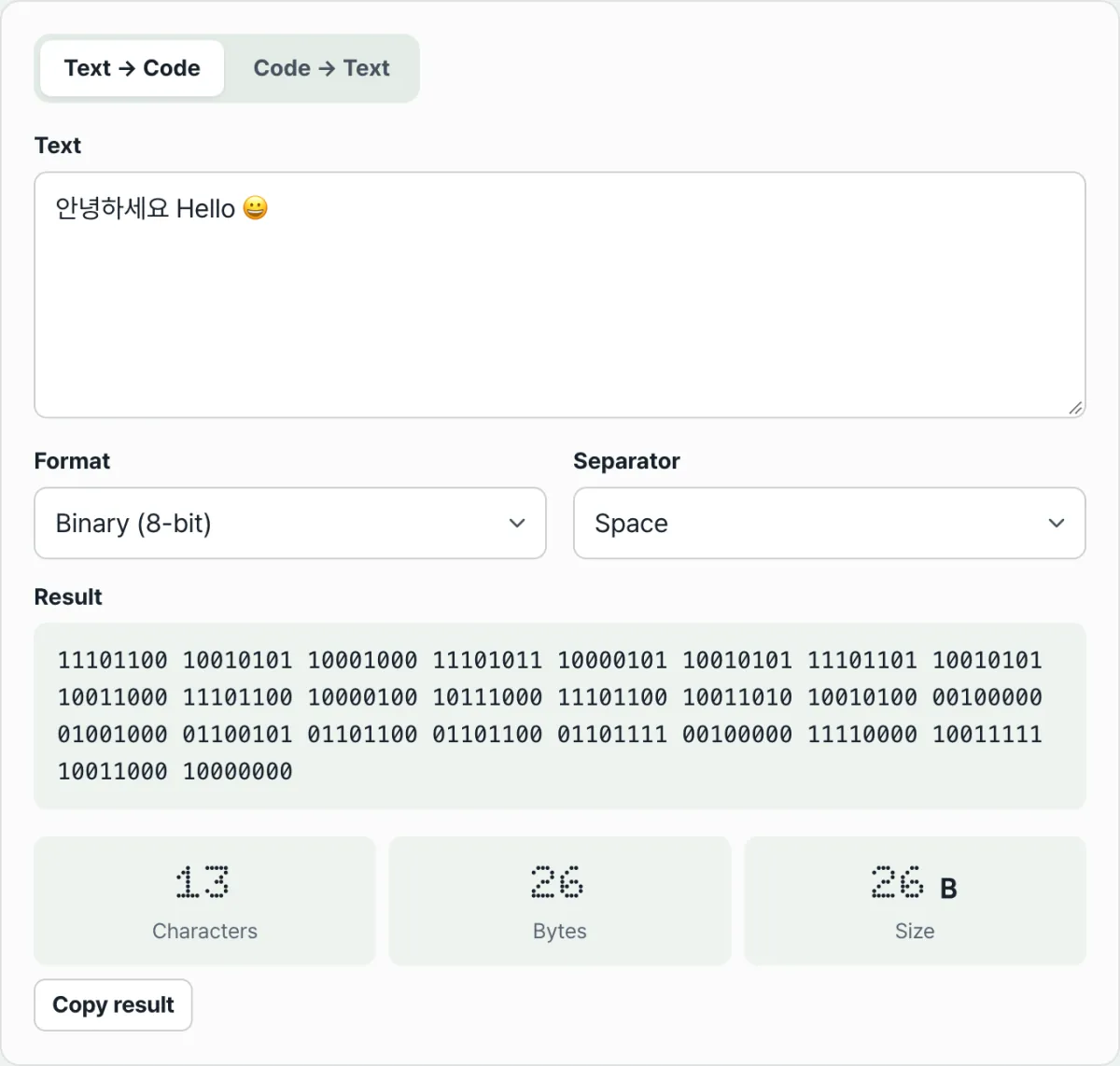
If you've ever typed a single character like "가" and wondered why it shows up as 24 zeros and ones, here's the answer: computers store text in bytes, which are groups of 8 bits. English letters take 1 byte, Korean characters usually take 3 bytes, and emoji take 4 bytes. So one character can split into several 8-digit binary numbers.
This article explains how text becomes 0s and 1s using the actual UTF-8 rules. It also covers the spots where people most often get stuck when converting that code back into text, sticking to facts you can verify yourself.
Summary ① A computer converts text into UTF-8 bytes, then shows each byte as an 8-digit binary number or a 2-digit hex number. ② English letters take 1 byte, Korean characters take 3 bytes, and emoji take 4 bytes, so one character can produce several 8-bit groups. ③ To restore text, you read the code in chunks of 8 binary digits or 2 hex digits. If the digit count is off or the byte combination is invalid, the conversion fails or shows �.
Why Is "안녕" Two Characters but 6 Bytes?
Type just the two characters "안녕" in a text editor and save the file as UTF-8. The file contains 6 bytes. There are clearly two characters, but the size is three times that.
This shows that "character count" and "byte count" are two different numbers. A computer doesn't count characters. It counts and stores bytes.
A single Korean character usually takes 3 bytes in UTF-8. So "안" is 3 bytes, "녕" is 3 bytes, and together that makes 6 bytes. Once you understand where that factor of 3 comes from, you'll also see why the binary output is such a long string of 0s and 1s.
How to Convert Text to Binary Without a Tool
You can do the whole process by hand. It takes three steps.
Step 1: Convert the character to bytes. Every character has an assigned number (its code point). Following the UTF-8 rules, the computer splits that number into 1 to 4 bytes. The English letter "A" has the number 65 and takes 1 byte. The Korean character "가" splits into 3 bytes.
Step 2: Write each byte as an 8-digit binary number. One byte is a value from 0 to 255. Write that value in binary, and if it has fewer than 8 digits, pad the front with 0s. "A" (65) is 1000001 in binary, but padded to 8 digits it becomes 01000001.
Step 3: If there are multiple bytes, join them together. "가" has three byte values: 234, 176, and 128. They become 11101010, 10110000, and 10000000. Joined together, that's 24 digits.
Hex Notation and How to Check the Values Yourself
Hex is simpler. Just write each byte as a 2-digit hex number. "A" is 41, and "가" is ea b0 80. One byte, which is 8 binary digits, maps to exactly 2 hex digits.
To check it yourself, run new TextEncoder().encode('가') in your browser's developer tools console. You'll get [234, 176, 128]. These values are ea, b0, and 80 in hex. In Python, '가'.encode('utf-8') gives you the same result.
The catch is that with longer text, you have to repeat this calculation one character at a time.
Try it with our tool.
Convert text to UTF-8 binary or hex in your browser, then restore the code back to text. No install or sign-up needed.
Where People Get Stuck When Restoring Text
The rules for turning binary or hex code back into text are fixed. The converter reads binary in chunks of 8 digits and hex in chunks of 2 digits, treating each chunk as one byte. That's why separators (spaces) are optional.
Problems come up when this chunking doesn't work. Here are the most common cases.
| Symptom | Cause | How to check |
|---|---|---|
| Binary won't convert to text | The total number of 0s and 1s isn't a multiple of 8 | Check that it's a multiple of 8 (one byte = 8 digits) |
| Hex won't convert | The digit count is odd | Check that it's an even number of digits (one byte = 2 digits) |
| Code with no spaces still works | It's automatically split into 8-bit or 2-digit chunks | Separators are optional |
| You see � instead of text | The byte combination isn't valid UTF-8 | Check that the original code wasn't cut off or mixed up |
| Hex is read as binary | It contains only 0s and 1s, so auto-detect assumes binary | Set the format to hex manually |
Let's look at the last two rows more closely. For example, if you enter just 10000000 in the binary input box, that byte can't stand alone. It doesn't restore to a valid character, and the replacement character � appears instead. It's a signal to double-check that your code is intact.
Also, auto-detect mode assumes binary whenever the input contains only 0s and 1s. So hex values like "01" or "10" can be mistaken for binary. In that case, set the format to hex manually. And one more note: a byte count larger than the character count isn't an error. It's the normal result of Korean characters and emoji being made up of multiple bytes.
Summary
- A computer converts text into UTF-8 bytes and shows each byte as an 8-digit binary number or a 2-digit hex number.
- English letters take 1 byte, Korean characters take 3 bytes, and emoji take 4 bytes, so one character splits into several groups and the byte count ends up larger than the character count.
- Restoring text means reading 8 binary digits or 2 hex digits at a time, so separators aren't required.
- If the total binary length isn't a multiple of 8, or the hex has an odd number of digits, the text won't restore and you'll see an error message.
- Byte combinations that aren't valid UTF-8 appear as the replacement character �.
Convert text to UTF-8 binary or hex in your browser, then restore the code back to text. No install or sign-up needed.
Frequently Asked Questions
Why does one Korean character become 24 binary digits?
Korean characters are usually stored as 3 bytes in UTF-8, and each byte is an 8-digit binary number. 3 bytes × 8 digits = 24 digits. An English letter is 1 byte, so it's 8 digits. An emoji is 4 bytes, so it's 32 digits.
Can I restore binary that has no spaces or separators?
Yes. Binary is split automatically into 8-digit chunks, and hex into 2-digit chunks. The total length does need to be a multiple of 8 for binary, or an even number of digits for hex. If the digit count doesn't fit, you'll see an error message.
I restored my code and got a � symbol (a box or question mark). Why?
The byte combination isn't valid UTF-8. For example, if a byte that can't stand alone is mixed in, the converter can't tell what the original character was, so it shows the replacement character �. Check that your original code wasn't cut off partway through or mixed with other values.
What's the difference between binary and hex?
They're two ways of writing the same bytes, so they carry the same amount of information. One byte is 8 digits in binary and 2 digits in hex. Hex is more compact to read, while binary shows every individual bit.
This article was adapted from our Korean original. Read the Korean original