
Typoglycemia: What Word Scrambling Does and Why You Can Read It
Contents
No matter how much you shuffle the letters in the middle of a word, people still read it just fine. That's called "Typoglycemia." This post is for anyone curious about the phenomenon and wanting to scramble their own sentences.
To get the conclusion out of the way: what this tool does is not "encryption." It's character substitution based on fixed rules. You can see with your own eyes what each of the four modes changes and how.
Summary ① Typoglycemia mode keeps the first and last letters of a word fixed and randomly shuffles only the middle letters (words of 3 letters or fewer stay as they are; both English and Korean are handled). ② Caesar/ROT13 mode shifts the alphabet by the slider value (1–25, default 13). Numbers, spaces, and punctuation are left alone. ③ Upside-down flip and math symbols aren't encryption — they swap characters for Unicode lookalikes, so they may display as broken depending on the environment.
Why scrambled letters still read fine: start here
Scrolling through social media, you've probably seen images where the letters in a paragraph are a jumbled mess but you read them without stopping. Some come with a caption like "If you can read this, you're a genius."
If you get curious and try to make one yourself, you hit two walls. First, rearranging letters word by word by hand is more of a hassle than you'd think. Second, it's confusing whether these transformations are "real ciphers" or just cosmetic changes.
The confusion grows when you run into ROT13, used to hide spoilers on forums, or Unicode variants where characters show up as boxes (□). Once you know exactly what this tool changes, that confusion clears up.
How to scramble text by hand, without a tool
All four transformations can be reproduced by hand once you know the principle.
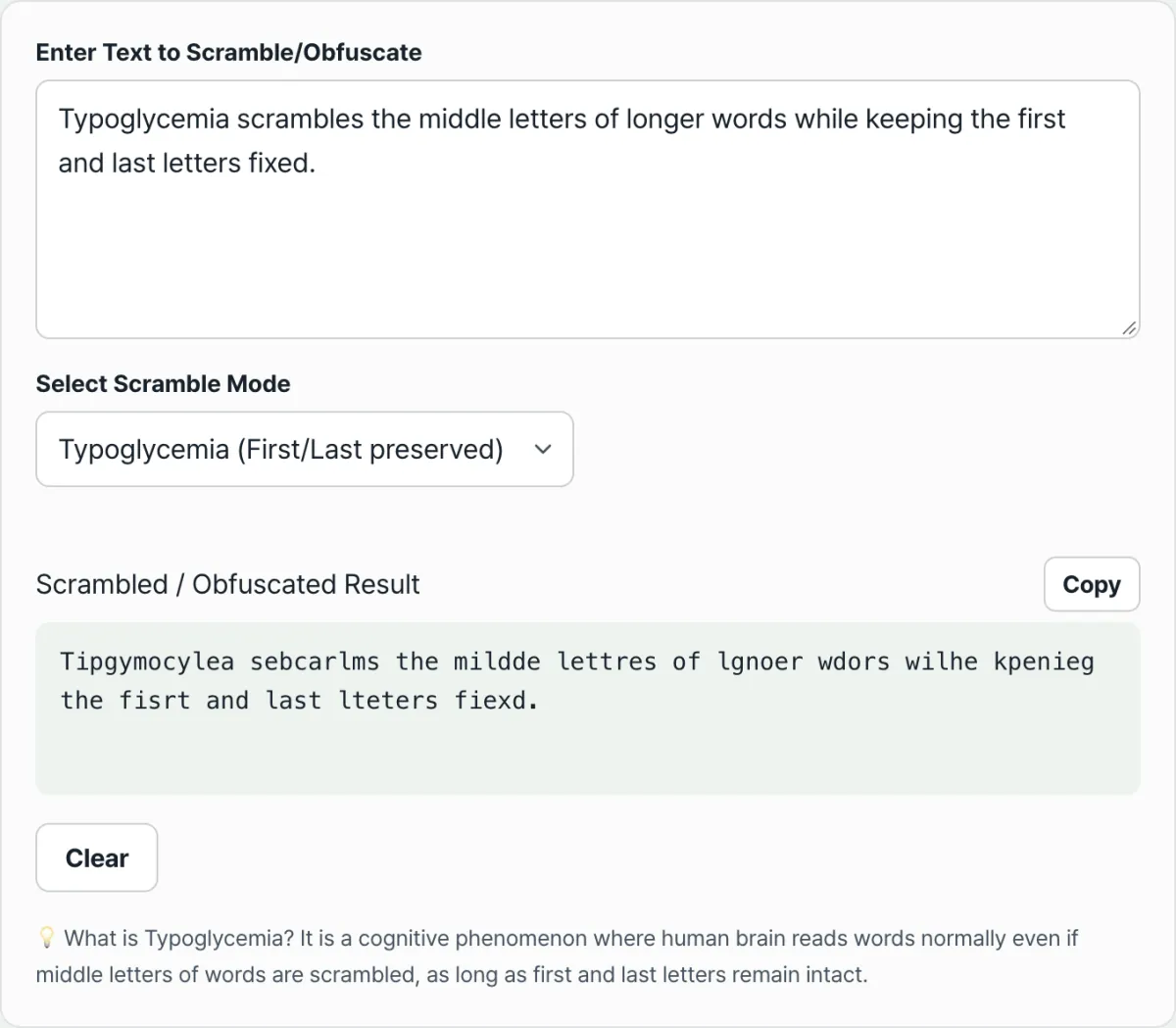
- Typoglycemia (shuffling middle letters). Pick a word, leave the first and last letters in place, and write the middle letters in a different order. Words with 3 letters or fewer (the, and, 나무, etc.) have no middle to change, so leave them alone. For example, with "letter" you fix l and r and rearrange the middle e·t·t·e into something like "ltteer."
- Caesar/ROT13 (shifting the alphabet). Line up the 26 letters from A to Z and shift each letter a set number of places. Past Z, you wrap back to A. If the shift is 13, that's ROT13. Since 13 is half of 26, A becomes N and B becomes O, and shifting once more brings you back to where you started. That's why the same operation both hides and reveals.
- Upside-down flip and math symbols. These two need a mapping table for every character. You swap 'a' for 'ɐ', 'b' for 'q', and other flipped-looking Unicode characters, then reverse the order — so doing it by hand means hunting down each mapping, which is practically unrealistic.
The problem is that even a slightly longer sentence makes this work balloon fast. The tool converts your text as you type, following the rules, and it reruns the random shuffle every time you edit.
Check it with our tool.
Four modes transform your text instantly. Everything runs in your browser only and is never sent to a server.
Common misconceptions and how to read the results
The most common misconception is treating these transformations as "security ciphers." A Caesar cipher has only shifts from 1 to 25, so you can just try all 25 of them. ROT13 returns to the original with the same operation in the first place, so keeping secrets isn't the point. It's for lightly hiding spoilers.
Upside-down flip and math symbols aren't encryption either. They're just substitution with similar-looking Unicode characters, so anyone who knows the rule can read them back, and math symbols can be restored to the original characters through Unicode normalization.
| Mode | What it changes | Reversing it | Is it a security cipher? |
|---|---|---|---|
| Typoglycemia | Order of middle letters in a word | Original order is discarded, so no automatic restore | No (readability experiment) |
| Caesar/ROT13 | Shifts the alphabet N places | Shift the other way (26−N) to restore | No (25 possible cases) |
| Upside-down flip | Reverses order + similar Unicode characters | Readable if you know the rule | No (lookalike substitution) |
| Math symbols | Substitutes similar Unicode characters | Restored via Unicode normalization (NFKC) | No (lookalike substitution) |
The second most common misconception is thinking the characters are "broken" when the result shows up as boxes (□) or question marks. Upside-down flip and math symbols use Unicode characters that are rarely used, and if the app or font you paste into doesn't have a glyph for that character, it shows a fallback symbol. The text itself isn't damaged — it's a font problem on the displaying side, and it looks normal in apps with broad Unicode support.
Third, the Typoglycemia result can sometimes come out identical to the original. The tool reshuffles once if the shuffle matches the original, but with a 4-letter word, where there are only 2 middle letters, reshuffling can produce the same arrangement again. It also helps to know that Korean is shuffled by syllable block, not by individual letters (jamo).
The bottom line
It comes down to five points.
- Typoglycemia mode keeps the first and last letters fixed and randomly shuffles the middle. Words of 3 letters or fewer stay as they are, and both English and Korean are handled.
- Caesar/ROT13 mode shifts the alphabet by the slider value (1–25, default 13). Numbers, spaces, and punctuation stay as they are.
- Upside-down flip and math symbol modes aren't ciphers — they're substitution with similar-looking Unicode characters.
- Results that look broken aren't damaged text. They're a display issue caused by the font lacking that glyph.
- None of the four modes is encryption, so use them for fun, experiments, and light hiding — not for keeping secrets.
Four modes transform your text instantly. Everything runs in your browser only and is never sent to a server.
Frequently asked questions
Can people really read Typoglycemia text?
It's a well-known reading phenomenon: many people read a sentence without much trouble as long as the first and last letters are in place, even if the middle is scrambled. That said, it isn't an absolute law — how readable it is depends on word length, how familiar the word is, and how the middle letters are arranged. Scramble your own sentences with this tool and you can see for yourself how far the readability holds.
Is ROT13 encryption? Why does the same button decode it?
ROT13 is a type of Caesar cipher that shifts each letter 13 places. Adding 13 twice gives 26, which goes all the way around the alphabet and back to where it started, so applying the same operation once more returns the original letters. A Caesar cipher has only 25 possible cases, so trying them one by one cracks it — which is why it's used by convention to lightly hide spoilers, not for security.
My result shows up as boxes (□) or question marks.
Upside-down flip and math symbol modes use Unicode characters that aren't commonly used. If the app or font you paste into doesn't have a glyph for that character, it displays a fallback symbol like a box or question mark. The text isn't ruined — it's a font problem on the displaying side — so it looks normal in an editor or app with broad Unicode support.
Does it scramble Korean too?
Typoglycemia mode handles Korean as well, but it shuffles by syllable block, not by individual jamo (ㅎ, ㅏ, etc.). For example, in "타이포글리세미아" the first syllable '타' and the last syllable '아' stay put, and only the middle syllables change order. Caesar, upside-down flip, and math symbol modes only transform Latin letters, so Korean passes through unchanged.
This article was adapted from our Korean original. Read the Korean original