
SQL Parameter Binding: How Values Fill Placeholders
Contents
If a SQL query contains placeholders like ?, :id, or @name, you can follow by eye how actual values get substituted to produce the final query once you know just four rules. Numbers and null, true, and false go in as-is without quotes. Strings get wrapped in single quotes. Characters inside quotes and comments are left untouched. That's the core.
This post covers how to apply those rules by hand and how to see the result right away. It's for developers trying to reproduce a ? query from a log, or anyone curious about how a driver fills in values.
Summary ① Positional placeholders (
?,$1) take values in order. Named placeholders (:name,@name,$name) match by name. JSON uses order for arrays and names for objects. ② Numbers andnull,true, andfalsego in without quotes. All other strings are wrapped in single quotes. PostgreSQL escapes'as'', while MySQL and SQLite escape it as\'. ③ A?or:nameinside a string literal ('...') or a comment (--,/* */) is not a real placeholder, so it stays as-is.
Why Values Don't Get Filled In the Way You Expect
Application logs and ORM debug output often print the query before values are filled in—something like WHERE id = ? or WHERE id = :id.
To reproduce the problem, you need the final query with actual values in place. But inserting them by hand invites mistakes: forgetting quotes around a string, or assuming a value was filled in when the name doesn't match.
Two situations in particular throw off the result. If you use named placeholders but the query also contains a ?, that ? will not be filled. If you use positional placeholders and the number of values doesn't match the number of placeholders, you'll end up with extra or missing slots. The rules make it clear why.
Rules for Substituting Values by Hand, Without a Tool
Binding happens in two steps: find the real placeholders, then write each value into its slot in the right format. Apply the rules in order, and you can build the final query by hand.
Step 1 — Decide on the placeholder style. The three styles map values differently.
- Positional:
?,$1,$2, ... are filled in value order.$1is the first value,$2is the second. - Named:
:name,@name, and$nameare paired with the value that has the same name. Order doesn't matter. - JSON: an array
[...]behaves like positional placeholders; an object{...}behaves like named placeholders.
Step 2 — Write values in the right format. Whether a value gets quotes depends on how it looks.
- Pure numbers (
25,-3,25.5) go in as-is, with no quotes. null,true, andfalse(case-insensitive) become the keywordsNULL,TRUE, andFALSE.- Everything else is treated as a string and wrapped in single quotes.
Step 3 — Escape quotes inside strings. If a value contains a single quote, each database handles it differently.
- PostgreSQL: replace
'with''(two single quotes).O'Brien→'O''Brien' - MySQL, MariaDB, and SQLite: replace
'with\'and backslash\with\\.O'Brien→'O\'Brien'
Step 4 — Leave string literals and comments alone. This is the easiest part to get wrong by hand.
If the query already has a question mark wrapped in quotes, like '?', or a question mark inside a comment, like -- note ?, it is not a placeholder. Everything inside '...', after -- to the end of the line, and between /* */ stays exactly as written.
For example, suppose you pass the positional value 5 to SELECT '?' AS mark FROM t WHERE id = ?. Leave the first '?' alone and fill only the second ? with 5. The result is SELECT '?' AS mark FROM t WHERE id = 5.
Check it in our free tool, the SQL Parameter Binding Previewer.
Runs right in your browser — no install, no login. Supports MySQL, PostgreSQL, and SQLite escape rules plus positional, named, and JSON input.
Common Misconceptions and How to Read the Results
Here's how values are written in the result, based on how they look as input.
| Input value | Result | Reason |
|---|---|---|
| 25 | 25 | Pure numbers take no quotes |
| null / TRUE / false | NULL / TRUE / FALSE | Recognized as keywords (case-insensitive) |
| administrator | 'administrator' | Strings are wrapped in single quotes |
| O'Brien (PostgreSQL) | 'O''Brien' | ' is escaped as '' |
| O'Brien (MySQL, SQLite) | 'O'Brien' | ' is escaped as \' |
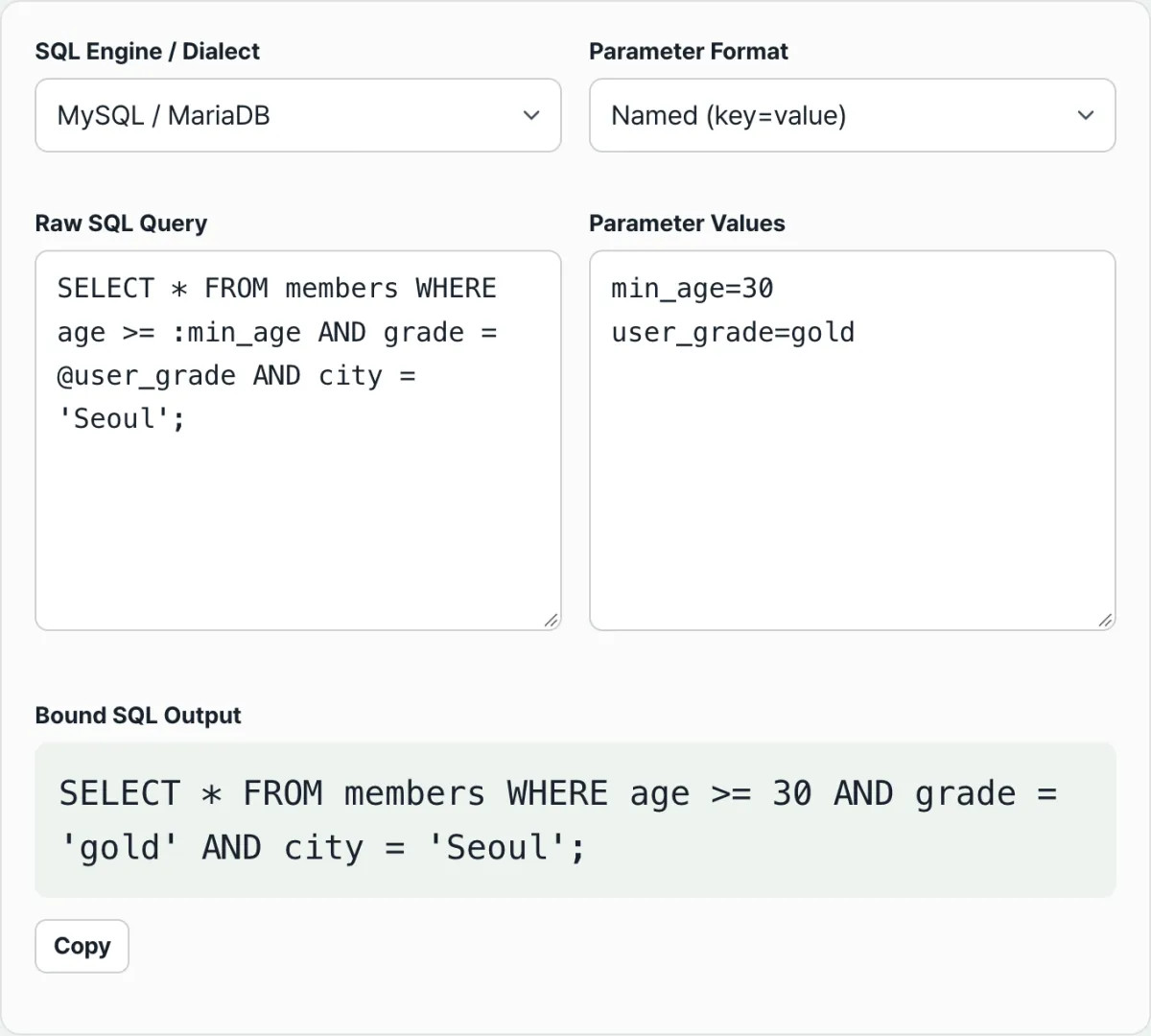
Named placeholders leave ? in place. Named placeholders look up values by name only. A ? has no name, so it isn't a target and stays as ?. The default example in the screen above is exactly this case—:min_age and @user_role get their values, but ? does not. If you mix positional and named slots in one query, pick one style and use it throughout.
When names don't match. With named placeholders, if the query has :user_id but the value is keyed as userId, the two don't match and :user_id stays as-is. If you see an unfilled name in the result, suspect a typo.
When the number of positional values is off. If there are fewer values than placeholders, the missing slots are filled with NULL. If there are more values than placeholders, the extra values are ignored. For example, if you pass only two values (1, hello) to VALUES (?, ?, ?), you get VALUES (1, 'hello', NULL).
When you want the string 'null'. Because the tool decides based on how the value looks, typing null produces the NULL keyword, not a string. Likewise, 007 has a leading zero but still has the form of a pure number, so it comes out as 007 with no quotes. The output may not match your intent, so it's safest to check the result with your own eyes.
One last thing not to misunderstand: just because this tool escapes quotes does not mean it prevents SQL injection. This is a composition simulator for inspecting the final query. In real server code, don't concatenate values into strings—use a PreparedStatement or your driver's native parameter binding.
Summary
- The three styles fill values by different criteria: positional by order, named by name, and JSON by order for arrays and by name for objects.
- How a value looks determines whether it gets quotes. Pure numbers and
null,true, andfalsego in as-is; everything else is wrapped in single quotes. - Quote escaping depends on the database. PostgreSQL uses
''; MySQL and SQLite use\'. - A
?or:nameinside a string literal or comment is not a placeholder, so it stays as-is. - The SQL Parameter Binding Previewer is a composition simulator for checking results. In real server code, the standard is to use a PreparedStatement or native parameter binding.
Runs right in your browser — no install, no login. Supports MySQL, PostgreSQL, and SQLite escape rules plus positional, named, and JSON input.
Frequently Asked Questions
Does a ? inside a string or comment get replaced with a value?
No. A ? or :name inside a single-quoted string literal '...', a single-line comment --, or a block comment /* */ isn't a real placeholder, so it stays as it is. The tool scans the query character by character and tracks whether the current position is inside a string or comment, so your query doesn't get mangled.
I'm in named-parameter mode, but the ? stays as it is.
That's expected. Named-parameter mode only fills placeholders whose names (:name, @name, $name) match a value. A ? has no name, so there's nothing to fill it with and it's left alone. To fill ?, switch to positional mode or make the placeholders in your query use one consistent style.
In positional mode, what happens if I have fewer values than placeholders?
The missing slots are filled with NULL, and if you have more values than placeholders, the extras are ignored. If you see an unexpected NULL in the resulting query, check that the number of value rows matches the number of ? and $n placeholders.
Can I just run the query this tool produces?
It's best to treat it as a combination simulator for learning, reproducing, and debugging. In a real application, the standard approach is to use PreparedStatement or the driver's native binding instead of concatenating values yourself.
This article was adapted from our Korean original. Read the Korean original