
Dividend Calculator: What You Actually Take Home After Taxes
Contents
If you invest in dividend stocks, a number like "4% annual dividend yield" alone won't tell you how much actually lands in your account. You need to account for dividend income tax, and if you're paid quarterly or monthly, you need to figure out how much comes in per payment.
This post walks through the math step by step, from pre-tax dividends to after-tax take-home, and from a single payment to the annual total.
Summary ① Multiply your pre-tax dividend (shares held × dividend per share) by the tax rate to get the dividend income tax. Subtract that from the pre-tax dividend and you have your after-tax take-home. ② Enter a "per-payment amount" and the calculator multiplies it by the dividend frequency to get the annual total. Enter an "annual total" and it divides by the dividend frequency to get the per-payment amount. ③ Quarterly dividends (4 times a year) and monthly dividends (12 times a year) split the same annual total into smaller pieces per payment, so confusing the two makes it easy to overestimate your dividend income.
Looking only at pre-tax dividend yield makes it easy to misjudge what you actually receive
Numbers like "4% dividend yield" that you see in brokerage apps or the news are mostly based on pre-tax amounts. If you multiply by your share count and treat the resulting annual dividend total as "the money I'll get," it won't match what actually hits your account.
Throw in dividend frequency and the confusion grows. Quarterly dividend stocks pay out the annual dividend in four installments, and monthly dividend stocks pay it out in twelve. If you mistake the "annual total" for the "per-payment amount," it's common to find each payment looks much smaller than you expected.
If you don't separate these two things, you'll overestimate your dividend income. Pre-tax vs. after-tax, and per-payment vs. annual — you need to calculate along both axes to get the right numbers.
How to calculate it yourself without a tool
Dividend math only needs basic arithmetic. Here's the order.
Find the pre-tax dividend
Step 1 — Pin down the annual dividend per share. First check whether the dividend per share shown in a disclosure or on your brokerage screen is "per payment" or "annual total." If it's per payment, multiply by the dividend frequency to get the annual dividend per share (for example: 500 won per payment × 4 times a year = 2,000 won per year). If it's already an annual total, use it as is.
Step 2 — Find the pre-tax dividend. Shares held × annual dividend per share = pre-tax annual dividend. With 100 shares × 2,000 won per year, the pre-tax annual dividend is 200,000 won. Divide that by the dividend frequency and you also get the pre-tax dividend per payment (200,000 won ÷ 4 payments = 50,000 won).
Find the after-tax take-home
Step 3 — Calculate the dividend income tax. Pre-tax dividend × tax rate (%) = dividend income tax. In Korea, the commonly used baseline dividend income tax rate is 15.4%, which is the 14% income tax plus 1.4% local income tax. 200,000 won × 15.4% = 30,800 won.
Step 4 — Find the after-tax take-home. Pre-tax dividend − dividend income tax = after-tax take-home. 200,000 won − 30,800 won = 169,200 won. Apply the same math to the per-payment amount and you get the after-tax figure per payment too.
Run these four steps for both annual and per-payment figures, and you'll have all four numbers: pre-tax, after-tax, annual, and per payment. If you hold several stocks, repeat the calculation for each one.
Check it with our tool.
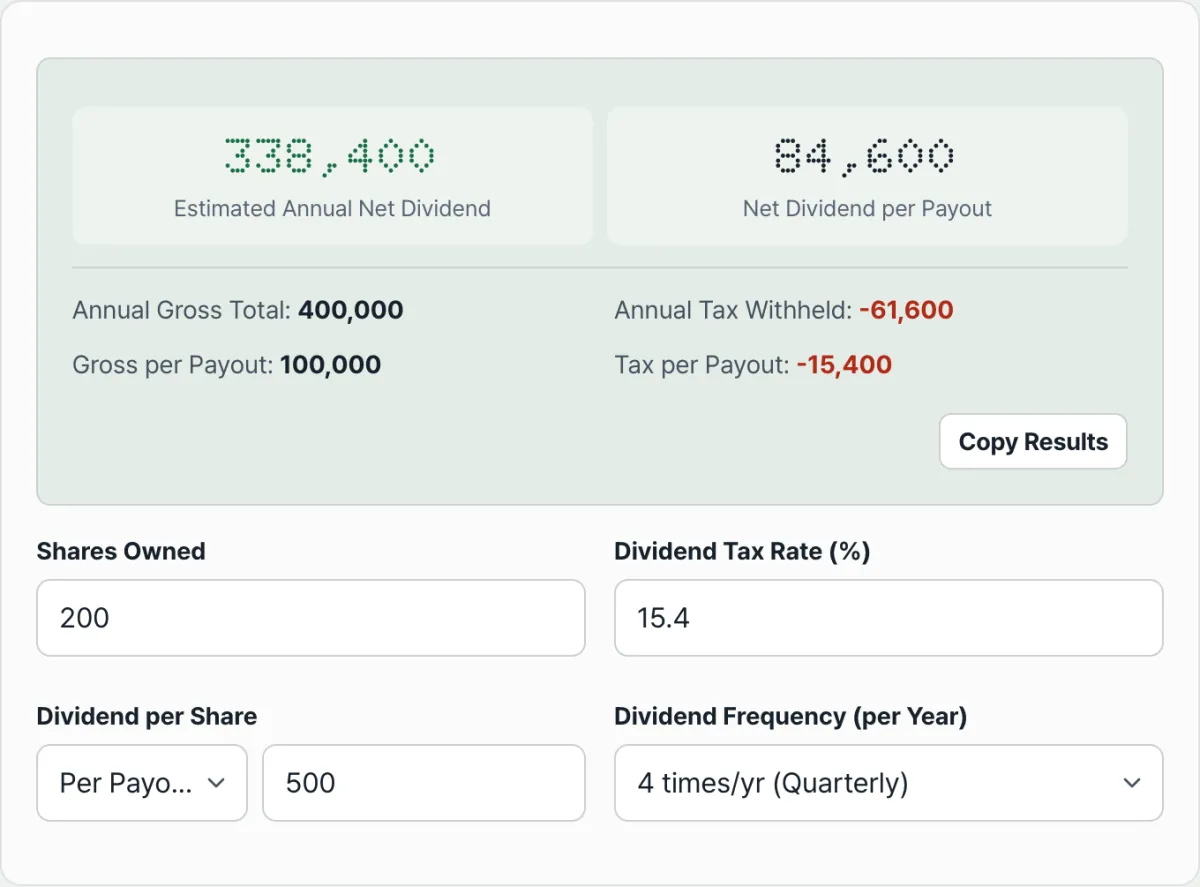
Just enter the number of shares you hold and the dividend per share, and you'll instantly see your annual and per-payment dividends, before and after tax. The math runs only inside your browser.
Common points of confusion
The math itself is simple, but people often misread the results because they misunderstand what the inputs mean.
| Point of confusion | What to check exactly |
|---|---|
| Whether dividend per share is per payment or an annual total | Check the basis stated in the disclosure or on your brokerage screen. If it's unclear, you can work backward by multiplying or dividing by the dividend frequency. |
| Pre-tax dividend yield vs. after-tax take-home | The "dividend yield" in news and brokerage materials is mostly pre-tax. The after-tax amount is that figure minus the tax rate. |
| Quarterly dividend per payment vs. annual total | The per-payment amount is the annual total divided by the dividend frequency. Judging a stock as low-yield based only on the per-payment amount makes you miss the annual total. |
This calculator applies the single tax rate you enter to the entire dividend. In reality, dividend income can be combined with other financial income, which changes the rate that applies. That depends on your overall income situation, so this post doesn't assert a specific rate.
You can also change the value in the tax rate field to calculate with a different rate.
The bottom line
- After-tax take-home is your pre-tax dividend (shares held × dividend per share) minus dividend income tax.
- "Per-payment amount" and "annual total" convert into each other by multiplying or dividing by the dividend frequency (1, 2, 4, or 12 times a year).
- Remember that quarterly and monthly dividends split the same annual total into smaller per-payment amounts.
- The "dividend yield" shown in news or brokerage screens is mostly pre-tax, so it can differ from the after-tax amount.
- The actual rate applied can vary depending on whether your dividend income is combined with other financial income, so it differs from situation to situation.
Just enter the number of shares you hold and the dividend per share, and you'll instantly see your annual and per-payment dividends, before and after tax. The math runs only inside your browser.
Frequently asked questions
Where does the 15.4% dividend income tax rate come from?
It's the default dividend income tax rate commonly used in Korea, made up of 14% income tax plus 1.4% local income tax. The calculator's tax rate field is pre-filled with this value, but if you want to apply a different rate, you can change it and recalculate.
Should I enter the "per-payment amount" or the "annual total"?
First check what basis the dividend per share in the brokerage disclosure or dividend notice uses, then select the matching option in the calculator. If you choose "per-payment amount," the calculator multiplies your input by the dividend frequency to get the annual total. If you choose "annual total," it divides by the dividend frequency to get the per-payment amount.
How is the math different for quarterly vs. monthly dividends?
The way you get the pre-tax annual total is the same, but the number of payments you divide it by is different. Quarterly dividends divide by 4 times a year, monthly dividends by 12 times a year, to get the per-payment amount. Even with the same annual total, the monthly dividend's per-payment amount comes out smaller than the quarterly one.
Is my stock information saved on a server?
No. All calculations happen instantly in your browser and are never stored or sent anywhere.
This article was adapted from our Korean original. Read the Korean original