
Stock Net Return: What You Actually Keep After Fees and Taxes
Contents
The return you get from subtracting buy price from sell price and the net return you get from the money that actually lands in your account are different numbers, even for the same trade. The commission you paid when buying adds to your cost, and when you sell, both the commission and the transaction tax come out of the proceeds.
If you've ever checked your return with simple math and then felt a gap between that and your actual gain or loss, this article breaks down where that gap comes from.
Summary ① The buy commission adds to your total buy cost, and the sell commission and transaction tax both come out of the sale proceeds. ② The commission rate applies to both the buy and the sell, but the transaction tax applies only to the sale amount. ③ Net return is the net sell proceeds minus total buy cost, divided by total buy cost.
Why sell price minus buy price doesn't match reality
When people check their return, they often only calculate "how much the sell price went up from the buy price." If you bought at 50,000 won and sold at 55,000 won, that's (55,000 - 50,000) / 50,000 = 10%.
That calculation leaves out three things: the commission you paid when buying, the commission you paid when selling, and the transaction tax you paid when selling. Comparing only the buy price and the sell price doesn't reflect any of these three costs.
All three are money that actually leaves your account or never reaches it. When you buy, the commission is added on top of the order amount. When you sell, the commission and transaction tax are deducted from the order amount before the rest reaches your account.
So the 10% from simple math and the return based on what you actually keep are different numbers for the same trade.
How to calculate net return without a calculator
Calculating net return takes three steps: get the total buy cost, get the net sell proceeds, and compare them.
Let's run through it with a buy price of 50,000 won, a sell price of 55,000 won, 100 shares, a 0.015% commission rate on both the buy and the sell, and a 0.18% transaction tax rate. These are example rates commonly used by Korean brokerage firms.
Step 1: Get the total buy cost.
Add the buy commission to the buy amount (buy price × quantity).
- Buy amount: 50,000 won × 100 shares = 5,000,000 won
- Buy commission: 5,000,000 won × 0.015% = 750 won
- Total buy cost: 5,000,000 won + 750 won = 5,000,750 won
Step 2: Get the net sell proceeds.
Subtract the sell commission and transaction tax from the sell amount (sell price × quantity). The transaction tax applies only to the sale amount.
- Sell amount: 55,000 won × 100 shares = 5,500,000 won
- Sell commission: 5,500,000 won × 0.015% = 825 won
- Transaction tax: 5,500,000 won × 0.18% = 9,900 won
- Net sell proceeds: 5,500,000 won − 825 won − 9,900 won = 5,489,275 won
Step 3: Get the net gain and net return.
Net sell proceeds minus total buy cost gives you the net gain. Divide that by the total buy cost to get the net return.
- Net gain: 5,489,275 won − 5,000,750 won = 488,525 won
- Net return: 488,525 won ÷ 5,000,750 won × 100 ≈ 9.77%
The return from simply subtracting buy price from sell price was 10%, but once commissions and transaction tax are included, the net return comes out to 9.77%. The 0.23 percentage point gap on the same trade happens because the buy commission adds to your cost, and the sell commission and transaction tax are both deducted from the proceeds.
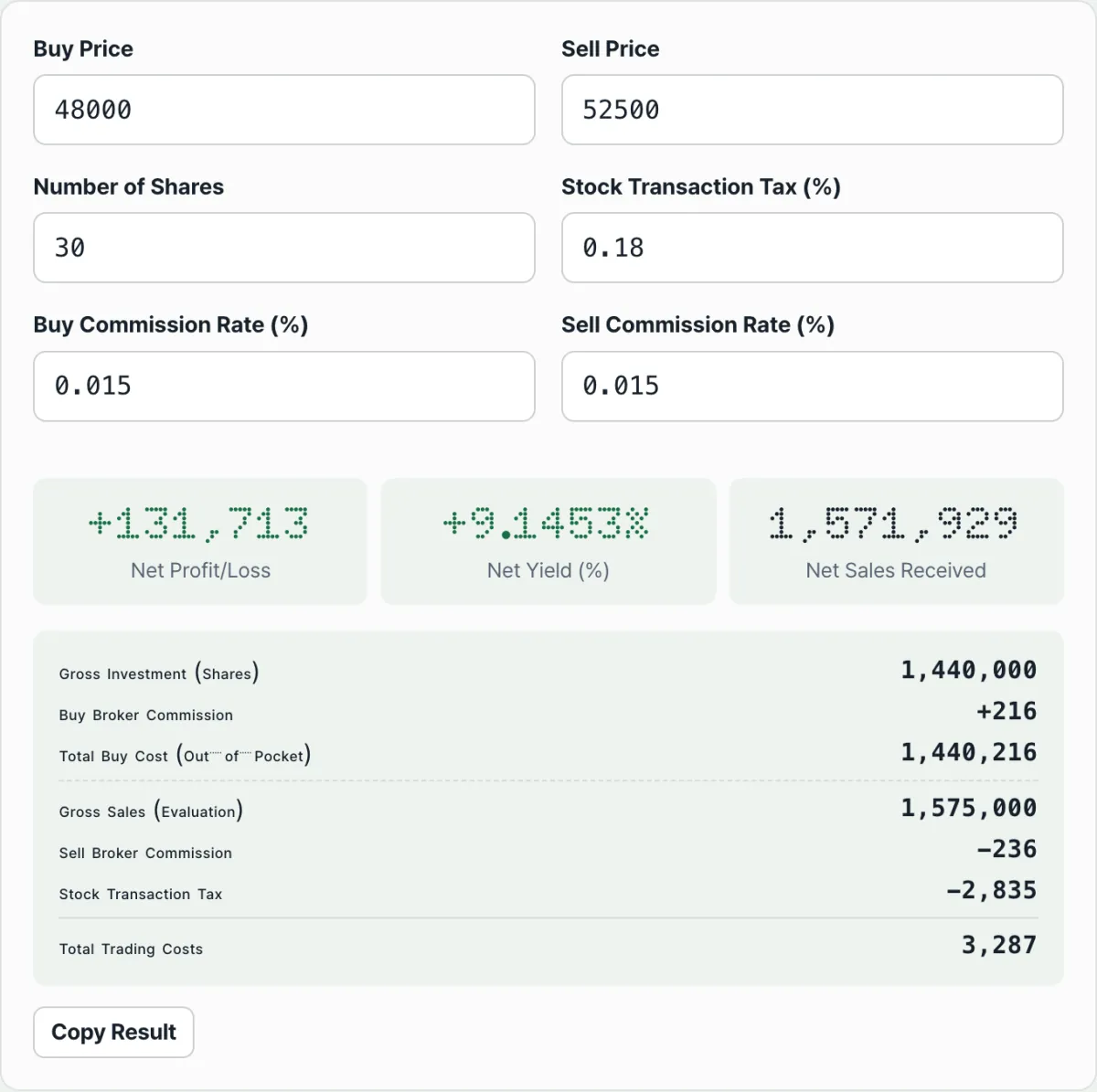
The math itself only takes three steps, but change the price or the quantity, or repeat the trade several times, and the multiplying and subtracting piles up. There's a tool that runs the same calculation for you — just enter the buy and sell prices, the quantity, the commission rate, and the transaction tax rate.
Check it with our tool.
Enter your buy and sell price, quantity, commission rate, and transaction tax rate, and it calculates your net profit or loss and net return right away. It runs only in your browser, and it's free with no login.
Common points of confusion
The most common confusion is over which cost applies at which point, and to which amount. The table below lays it out.
| Item | When it applies | Amount it's based on | Effect on the calculation |
|---|---|---|---|
| Buy commission | At purchase | Buy amount (buy price × quantity) | Added to total buy cost, making it larger |
| Sell commission | At sale | Sell amount (sell price × quantity) | Deducted from net sell proceeds |
| Transaction tax | At sale | Sell amount (sell price × quantity) | Deducted from net sell proceeds |
The commission rate applies to both the buy and the sell, but the transaction tax rate is multiplied only against the sale amount. At the buy stage, the transaction tax isn't part of the calculation at all.
Another common question is whether the net return (%) goes up when you buy more shares. It doesn't.
Both total buy cost and net gain grow in proportion to quantity, so their ratio — the net return (%) — doesn't depend on quantity at all. It's set only by the buy and sell prices and the rates. Change the quantity and only the absolute won amount of the net gain changes.
The short version
- Simple return reflects only the difference between buy price and sell price. Net return reflects the actual gain or loss after buy and sell commissions and transaction tax.
- The buy commission adds to your total buy cost, and the sell commission and transaction tax both come out of the net sell proceeds.
- The transaction tax applies only to the sale amount and isn't part of the calculation at the buy stage.
- Net return (%) is set by the buy and sell prices and the rates, regardless of how many shares you trade. Quantity only changes the absolute won amount of the net gain.
- Commission rates and transaction tax rates vary by brokerage and by point in time, so enter the rates you're actually charged to get an accurate result.
Enter your buy and sell price, quantity, commission rate, and transaction tax rate, and it calculates your net profit or loss and net return right away. It runs only in your browser, and it's free with no login.
Frequently asked questions
What's the difference between net return and the simple return of (sell price - buy price) / buy price?
The simple return compares only the buy price and the sell price, so it doesn't reflect buy and sell commissions or transaction tax.
Net return compares total buy cost (buy amount + buy commission) with net sell proceeds (sell amount − sell commission − transaction tax), so it's based on the gain or loss that actually stays in your account.
The gap between the two numbers depends on the commission rate and transaction tax rate. It has nothing to do with the trade amount or the number of shares.
Does the net return (%) go up if I trade more shares?
No. Total buy cost and net gain both grow in proportion to quantity, so the net return (%) — net gain divided by total buy cost — is set only by the buy and sell prices, the commission rate, and the transaction tax rate, regardless of quantity. What changes when you trade more shares is the absolute won amount of the net gain.
Why is the transaction tax only counted when selling?
In this calculation structure, the transaction tax is multiplied only against the sale amount (sell price × quantity). The transaction tax rate doesn't apply to the amount at the buy stage; it's counted once, against the total sale amount. That's why only the commission is added to the total buy cost, while both the commission and the transaction tax are deducted from the net sell proceeds.
How are the default commission and transaction tax rates set?
The defaults are example rates commonly used by Korean brokerage firms: a 0.015% commission rate and a 0.18% transaction tax rate. The terms for your own brokerage and product may differ, so enter the exact rates you're charged and you'll see the net return that matches your situation.
This article was adapted from our Korean original. Read the Korean original