
Mbps vs MB/s: Calculate Download Time for Large Files
Contents
When you see an ad for a carrier's gigabit internet plan, or when you download a massive online game patch on your PC (50 GB or more), two numbers tend to confuse you. There's a gap between the "500 Mbps ultra-fast internet" in the ad copy and the "62.5 MB/s" that shows up in your actual download window.
"Why does a '500-megabit' fiber line only download at 60 megs?", "Was I lied to by exaggerated marketing?" It's natural to wonder.
This article clearly explains the 8-to-1 gap between bits, the unit used to measure network bandwidth, and bytes, the unit used to store file sizes, plus the formula for estimating download completion time.
Summary ① The basic 8-to-1 gap: Network line speeds are standardized in bits, as Mbps (megabits per second), while actual file download speeds use bytes, as MB/s (megabytes per second), so the two units convert at a ratio of 8 to 1. ② MB/s conversion formula: Divide the Mbps figure by exactly 8 and you get the megabytes per second (MB/s) that will appear in your download window. ③ Download time formula: Divide the file size (MB) by the transfer speed (MB/s) to predict the seconds to completion with the formula
file size ÷ transfer speed = time (seconds). ④ With the download time calculator, you enter your internet bandwidth and the file size you want to download and, in one second, see the real transfer speed per second and the exact hours/minutes/seconds until it finishes.
1. Mbps vs MB/s: Why You Divide by 8
The difference between the lowercase b and the uppercase B after the slash in internet speed units comes from the difference between how data is transmitted and how it is stored.
- Mbps (Megabits per second): The number of bits transmitted per second. It's the standard speed unit the network equipment industry and internet service providers (ISPs) use to market and measure bandwidth specs.
- MB/s (Megabytes per second): The number of bytes written to a hard drive or SSD per second. It's the file speed unit operating systems like Windows and macOS show when you transfer an actual file.
Because the basic rule computers follow for handling data (digital encoding) is that 1 byte is 8 bits, if your internet speed is 800 Mbps, the file size your computer can actually download per second is 800 divided by 8, or 100 MB/s.
Speed conversion formula: Real download speed (MB/s) = internet line speed (Mbps) ÷ 8
Worked example (a 500 Mbps half-gigabit internet plan):
- Measured MB/s: 500 ÷ 8 = 62.5 MB/s Reading the result: Your carrier didn't lie. Because of the difference in unit standards, the real per-second download limit of a 500 Mbps plan lands exactly at 62.5 megabytes — a normal, expected result in network engineering.
2. The Formula for Estimating Large File Download Times
Here's how to work out mathematically the total hours/minutes/seconds it takes for a download to finish, by comparing the size of the content or game file you want with your current measured internet speed.
Example conditions: downloading a 50 GB game install file / 100 Mbps line (basic fiber speed)
File sizes are commonly converted in base 1024 (binary), following computer memory conventions, while network speeds are converted in base 1000 (decimal), following International System of Units conventions. Applying both as-is gives the following.
- Convert the file size to bytes:
- 50 GB × 1024³ = 53,687,091,200 bytes
- Convert to bits: × 8 = 429,496,729,600 bits
- Convert the internet speed to bits per second (bps):
- 100 Mbps = 100 × 1,000,000 = 100,000,000 bps
- Calculate the download time (seconds):
- Formula: time (seconds) = total data (bits) ÷ transfer speed (bps)
- Calculation: 429,496,729,600 ÷ 100,000,000 ≈ 4,294.97 seconds
- Convert to hours/minutes/seconds:
- 4,294.97 seconds ≈ 71 minutes 35 seconds ≈ 1 hour 11 minutes 35 seconds Reading the result: Downloading a 50 GB game on a basic 100 Mbps fiber line takes about 1 hour 11 minutes or more when full speed holds steady without dips.
How to Use the Download Time Calculator
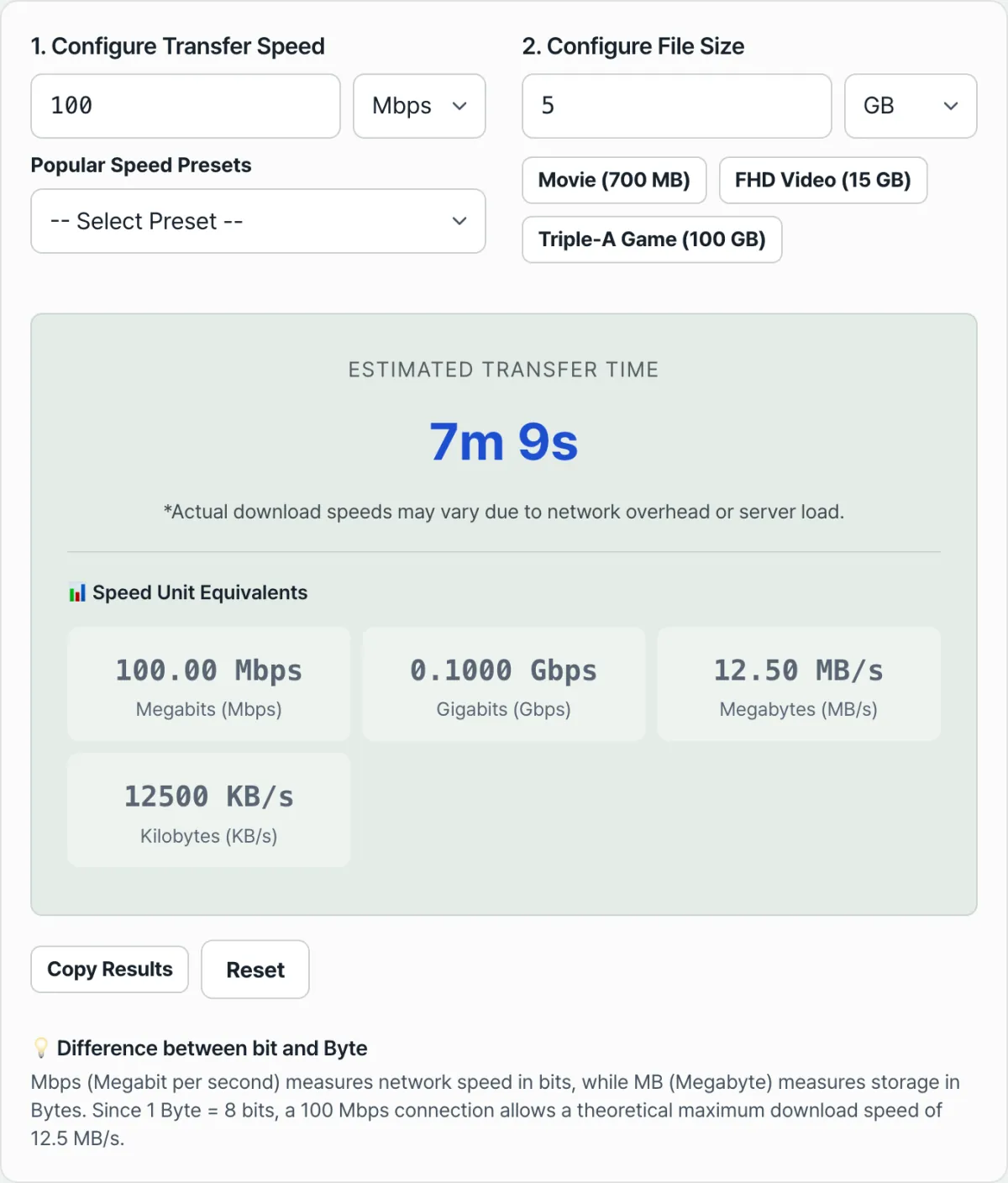
If you'd rather not do the tedious math yourself — the 8-to-1 bit conversion, converting gigabytes to megabytes, then turning seconds back into an hours/minutes/seconds clock — let a dedicated speed conversion planner do it in one click.
Free · no sign-up · instant download time estimate for any file size and bandwidth
Using the tool is very straightforward.
- File size: Enter the size of the file you want to download and pick the unit (GB, TB, MB, etc.).
- Network speed: Enter the bandwidth figure for your internet plan and set the speed unit (Mbps, Gbps, etc.) — or just type in the measured speed from a speed test site.
- As soon as you enter them, the results dashboard shows the real download rate per second (MB/s) and the final time it will take (converted into hours, minutes, and seconds) in a real-time visual summary card.
Wrapping Up
Once you clearly understand the difference between Mbps and MB/s, you can predict your bandwidth budget far more precisely when signing up for a plan or renting large-scale cloud storage.
Running the download speed calculator before you sign up for internet service and self-diagnosing the speed tier you actually need helps you avoid paying for bandwidth you'll never use.
Free · no sign-up · instant download time estimate for any file size and bandwidth
Frequently Asked Questions
A speed test shows 500 Mbps, so why does Steam or a direct-download service only hit 20 MB/s?
Because your download speed depends not only on the size of your own connection (bandwidth) but even more on the sending server's transfer capacity.
If the other side's server bandwidth narrows when users flood a global server like Steam, or if the overseas gateway of your Korean ISP (KT, SK, LG U+) is badly congested, your speed can be capped below 20 MB/s even if you have a 1 Gbps gigabit line at home.
This bottleneck isn't a problem with your computer, so a useful workaround is to switch your download server region to a different, less busy server instead of an overseas one.
How fast is Gbps (gigabits per second)?
It's the high-capacity transfer unit used for gigabit internet plans and data center backbones.
- 1 Gbps (Gigabits per second): Equal to 1,000 Mbps, which converts to a theoretical maximum of about 125 MB/s.
- If you choose TB (terabytes) as the file size unit in the calculator, you can immediately see how long a very large backup or a big database would take to download at that speed.
This article is based on the actual calculation logic of the Data Transfer Speed and Download Time Calculator (the 1 byte = 8 bits conversion and the file size versus transfer speed formula).
This article was adapted from our Korean original. Read the Korean original