
JSON to YAML Conversion: Arrays, Indentation, and Quote Rules
Contents
To put JSON data into a Kubernetes manifest or a Docker Compose file, you have to rewrite it as YAML. If you don't know what arrays and nested objects actually look like after conversion — or how the number of indent spaces affects the result — you can't verify the output by eye. This post covers the conversion rules themselves and how to read the result.
Summary ① A JSON array becomes a dash (-) list in YAML, and a nested object becomes an indentation level. ② Choosing 2 or 4 spaces is only a readability setting; the data structure itself doesn't change. ③ Strings that look like numbers need quotes to keep their value, and stripping those quotes can change the value.
Why convert JSON to YAML
Kubernetes manifests and Docker Compose files use YAML. API responses and config values pulled from a database, on the other hand, are often JSON. To make the two formats line up, you have to rewrite the JSON in YAML syntax.
The catch is that the two formats express structure differently. JSON uses braces, brackets, and commas. YAML uses indentation and dashes.
Just deleting the braces doesn't give you YAML. The parts that were arrays have to become dash lists, and the parts that were nested objects have to become indentation levels.
If your config is only a few lines, rewriting it by hand is fine. But as the number of items grows, it gets easy to lose track of how many spaces each level needs. In YAML, indentation is the syntax, so being off by one space puts a value in a different level.
How to convert it yourself without a tool
The conversion rules come down to three. Let's apply them one at a time to the JSON below.
{
  "name": "myapp",
  "port": 8080,
  "tags": ["web", "prod"],
  "database": { "host": "localhost", "port": 5432 }
}
Rule 1 — Join key and value with a colon and a space. "name": "myapp" becomes name: myapp. In most cases you can drop the double quotes that wrapped the string value.
Rule 2 — A nested object goes on a new line, indented one level. "database": { "host": "localhost", "port": 5432 } becomes the following.
database:
  host: localhost
  port: 5432
You leave just the colon after the key name, drop to a new line, and list the keys inside it indented one level. The braces disappear.
Rule 3 — An array lists each item on its own line with a dash (-) in front. "tags": ["web", "prod"] becomes the following.
tags:
  - web
  - prod
Instead of brackets and commas, each item gets a new line and a dash. If an array contains objects, you put the object's first key right after the dash and line up the remaining keys at the same indentation.
Applying all three rules gives this result.
name: myapp
port: 8080
tags:
  - web
  - prod
database:
  host: localhost
  port: 5432
There's one more rule here. YAML automatically reads unquoted values as other types, such as numbers or null. So a string that could also be read as a number, like 1.0, has to keep its quotes — write it as '1.0' so it stays a string.
Strings that contain a colon and a space (: ) inside the value also need quotes. A colon plus a space is the character sequence YAML uses to separate key from value, so leaving it inside a value can cause a syntax error.
If you follow these three structural rules and the quoting judgment, you can convert by hand. But as the number of items grows, checking by hand how many spaces you used and which strings need quotes gets tedious.
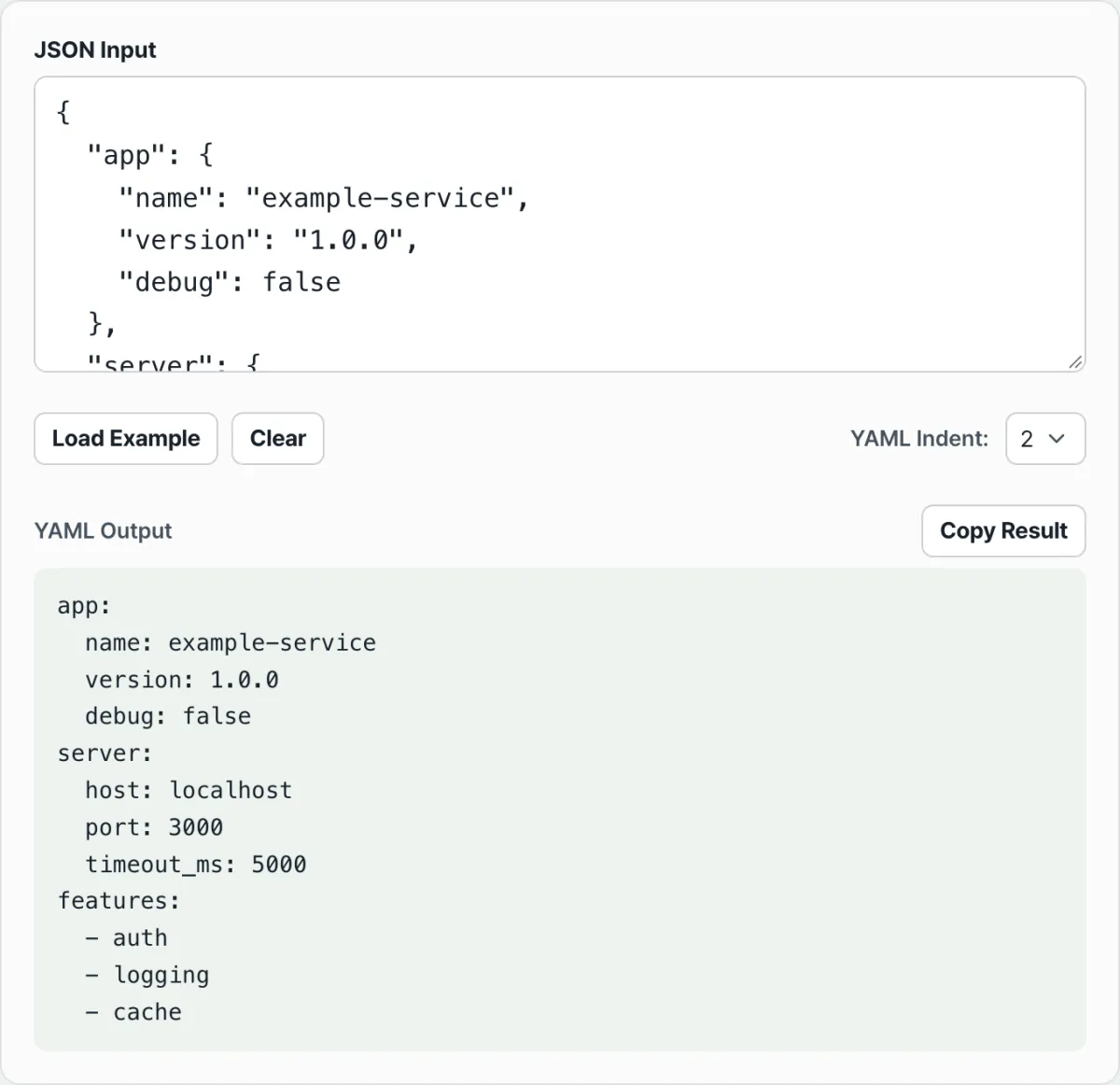
Check it with our free tool.
Your JSON converts in real time with js-yaml. Pick 2-space or 4-space indentation and use it free, no sign-up.
Common confusion when pasting the converted result
The conversion itself follows the rules, but problems often show up when you move the result into a real config file or clean it up by hand. Most of them come down to two things: indent characters and quote handling.
| Situation | Why it's a problem | Result |
|---|---|---|
| Using the Tab key for indentation | The YAML spec does not allow tab characters for indentation | The parser throws a syntax error |
| Removing the quotes from a string that looks like a number | If you remove the quotes from '1.10', it gets read as a number instead of a string | The value becomes 1.1, and the trailing 0 disappears |
| Indenting sibling items at the same level by different amounts | YAML only treats siblings as the same level if they're indented by the same number of spaces | They get read as a different level than you intended, or you get an error |
| Pasting a 4-space result as-is into an existing file that uses 2 spaces | It's still valid syntax, but it doesn't match the indentation the file has been using | The levels get hard to tell apart by eye the next time you edit it |
Whether you pick 2 spaces or 4, the hierarchy the data represents is the same. The space count only changes the visual gap on screen; the values and structure you get when you parse the JSON again are identical. That said, if you plan to append to an existing file, matching the space count that file already uses will save you confusion later.
Empty objects ({}) and empty arrays ([]) are worth a note too. Both are shown as-is on a single line, with no indentation level. If you see only {} or [] where you expected child items, the conversion isn't broken — it means the original JSON had no values there to begin with.
Recap
- A JSON array becomes a dash (-) list, and a nested object becomes an indentation level.
- Choosing 2 or 4 spaces only changes the visual gap; the parsed data structure is the same.
- Strings that look like numbers need quotes to keep their value. Removing the quotes can change them.
- In YAML, indentation is the syntax, so tab characters cause errors, and items at the same level must use the same number of spaces.
- The more items you have, the easier it is to make a mistake by hand, so it's safer to give the result a quick visual review after converting.
Your JSON converts in real time with js-yaml. Pick 2-space or 4-space indentation and use it free, no sign-up.
Frequently asked questions
Should I use 2 spaces or 4 spaces?
Either works, since the data structure and values are the same. Kubernetes and Docker Compose examples often use 2 spaces, so if you plan to append to an existing file, matching the space count that file uses will keep you from getting confused when you edit it later.
Which values get quoted automatically in the converted YAML?
Quotes are added automatically to strings that could also be read as numbers (such as 1.0 or 007), and to strings that contain a colon and a space and could otherwise be read with a different meaning. The rule is to look at the shape of the value and decide whether it needs to stay a string.
How are objects inside an array shown?
The object's first key follows right after the dash, and the rest of that object's keys are listed on the lines below, lined up at the same indentation as the first key. For example, - name: web is followed on the next line by image: nginx, aligned with it.
What happens if the JSON I enter is malformed?
Instead of YAML output, you get an error message saying the parse failed. This usually happens when braces or brackets don't match up or a comma is in the wrong place, and no converted result appears until the error is resolved.
This article was adapted from our Korean original. Read the Korean original