
How to Decode a JWT: Structure and Expiration Times
Contents
A JWT (JSON Web Token) string isn't encrypted — it's encoded. The first two of its three dot-separated parts (header and payload) are just base64url-encoded JSON text, so anyone can decode them and read the contents without a secret key.
This article shows you how to see that structure for yourself, and how time values like exp and iat are stored as numbers and turned back into dates.
Summary ① A JWT is a string of three parts — header.payload.signature — joined by dots (.), where header and payload are each base64url-encoded JSON. ② base64url decoding doesn't break encryption; it just reverses encoding, so anyone can read the header and payload without a secret key. ③ Time values like exp and iat are Unix timestamps counting seconds since 1970-01-01 00:00:00 (UTC). Multiply by 1000 to get a JavaScript date in milliseconds.
When do you run into this?
A login API often responds with a single long string in a field like access_token. Starting with eyJhbGci..., it looks like unreadable ciphertext, so it's easy to assume there's no way to check what's inside.
In reality, that string contains your values as-is: a user identifier (sub), permission info, and when the token was issued (iat) and when it expires (exp). When you're chasing problems like "I keep getting logged out" or "permissions are being applied weirdly," you need to open up the token and look at the values to narrow down the cause.
How to decode a JWT yourself, without a tool
A JWT is a single string of three parts — header.payload.signature — separated by dots (.). Here's what each part holds and how it's encoded.
| Part | What it contains | Encoding | Does it parse directly as JSON? |
|---|---|---|---|
| Header | Token type (typ) and signing algorithm (alg) | base64url | Yes |
| Payload | Claims like sub, iat, exp | base64url | Yes |
| Signature | The result of signing header+payload with a secret key | base64url | No (raw bytes, not JSON) |
The signature is the only part that doesn't parse as JSON because the value isn't JSON text to begin with — it's the raw bytes produced by the signing algorithm. It's base64url-encoded like the header and payload, but decoding it won't give you readable text.
base64url differs slightly from standard base64. So it can be used directly in URLs and file paths, "+" becomes "-", "/" becomes "_", and the trailing "=" padding is usually omitted. So to decode, you first have to reverse those substitutions.
Run the code below in your browser's developer tools (F12) console and you can inspect the header and payload yourself with no extra tools.
function base64UrlDecode(str) {
  str = str.replace(/-/g, "+").replace(/_/g, "/");
  while (str.length % 4) str += "=";
  const binary = atob(str);
  return decodeURIComponent(
    binary.split("").map(c => "%" + c.charCodeAt(0).toString(16).padStart(2, "0")).join("")
  );
}

const [header, payload] = token.split(".");
console.log(JSON.parse(base64UrlDecode(header)));
console.log(JSON.parse(base64UrlDecode(payload)));
The reason for going through decodeURIComponent and charCodeAt is that the atob() result holds UTF-8 bytes as raw characters. If the payload contains non-ASCII characters, such as a name written in Korean, calling JSON.parse directly on the atob() result can produce garbled characters.
Once you have the payload, you can convert exp and iat to dates yourself. Both are in seconds, so multiply by 1000 to get milliseconds and pass that to a Date object.
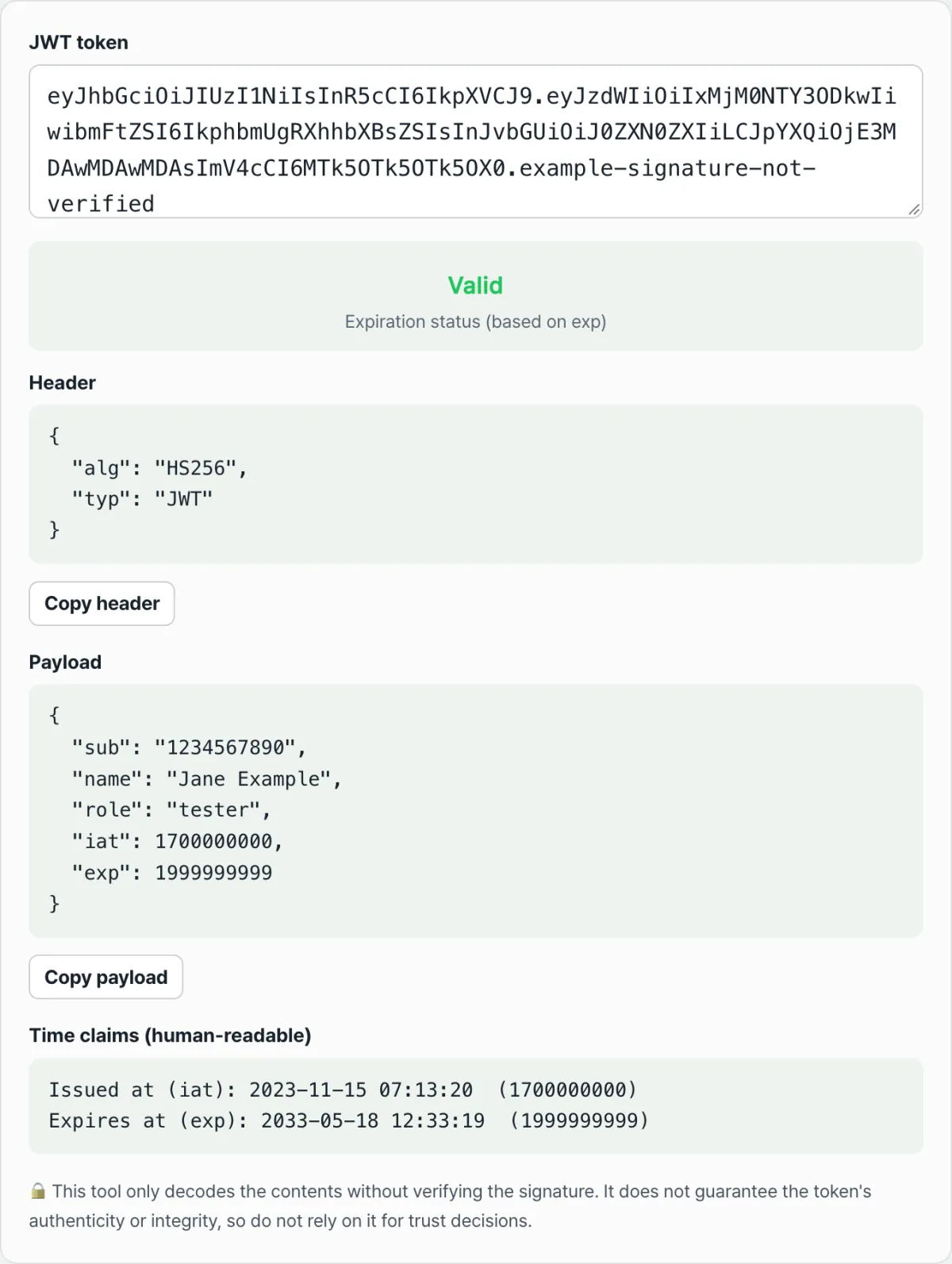
new Date(payload.exp * 1000).toLocaleString();Check it with our tool.
Decoding happens only in your browser and nothing is sent to a server. It does not verify the signature.
Points that are easy to confuse
Decoding and signature verification are two different jobs. The table below breaks them apart.
| Decoding | Signature verification | |
|---|---|---|
| What it does | Reverses base64url and reads it as JSON | Recomputes the signature with the secret/public key and compares |
| What you need | Just the token string | The secret key or public key used for signing |
| What you learn | The contents written in header and payload | Whether that content has been tampered with since it was issued |
In other words, decoding is "reading the contents" and signature verification is "checking whether those contents were tampered with." The two jobs need different materials and serve different purposes, and reading the header and payload doesn't mean the signature has been verified.
exp, iat, nbf, and auth_time are all Unix timestamps in seconds. JavaScript's Date works in milliseconds, so if you pass the value straight into new Date() without multiplying by 1000, you'll get a nonsensical date somewhere around January 1, 1970.
Not every token includes iat, exp, nbf, and auth_time. Issuers include only the claims they need, so a token without exp isn't an error in itself.
Recap
- A JWT is a string of three parts — header.payload.signature — joined by dots, and only the header and payload are base64url-encoded JSON.
- The signature isn't JSON but the raw bytes produced by the signing algorithm, so decoding it won't give you readable text.
- base64url decoding only reverses encoding, so anyone can read the header and payload without a secret key — this is not encryption.
- Time values like exp and iat are Unix timestamps in seconds, so you have to multiply by 1000 to get a JavaScript date.
- Decoding and signature verification are different jobs, and decoding alone can't tell you whether a token has been tampered with.
Decoding happens only in your browser and nothing is sent to a server. It does not verify the signature.
Frequently asked questions
Can I decode the signature and verify it that way?
No. The signature is the raw byte value produced by signing the header and payload together with a secret key, so it isn't JSON, and base64url decoding it won't give you meaningful text. To check whether the signature is valid, you need a separate verification step that recomputes the signature with the secret key (or public key) used at issuance and compares the results.
What happens with a token that has no exp value?
If the exp claim isn't there at all, that means there's no criterion for judging expiration. Only when exp is present can you compare it with the current time and show valid or expired, and tokens without exp are left out of that comparison.
Is the token I enter sent to a server?
No. The whole decode process that turns the header and payload into JSON runs inside your browser, and the token string you enter is not sent to or stored on a server. Keep in mind, though, that the payload was never encrypted to begin with, so if you screenshot or share the screen, its contents are exposed too.
What do iat, nbf, and auth_time each mean?
iat (issued at) is the time the token was issued, and nbf (not before) is the time from which the token becomes valid — it isn't valid before that. auth_time is the time the user actually completed authentication (login), and it's used alongside the others in setups where the login time and the token issuance time can differ.
This article was adapted from our Korean original. Read the Korean original