
Loan Refinance Comparison: The Real Interest Savings Formula
Contents
When benchmark rates fall or your credit score improves, it's worth looking at refinancing — swapping your existing loan for one with a lower rate. But a lower headline rate doesn't always mean you win. You need to check whether the savings still hold up after subtracting the early payoff penalty on your old loan and the fees that come with taking out a new one. This post explains how to run that math.
Why the rate gap alone isn't enough
A rate that's 1–2 percentage points lower looks like an instant win, but the early payoff penalty and the fees on a new loan can wipe out that gap. If you refinance soon after taking out the original loan, the penalty tends to be large — sometimes bigger than the interest you save.
How to calculate whether refinancing pays off
Your net savings comes from four numbers:
- The total interest you'd still pay on your current loan if you kept it to maturity
- The total interest you'd pay on the new loan over that same period
- The early payoff penalty charged when you pay off the current loan
- The fees for setting up the new loan (registration tax, stamp tax, guarantee fees from the guaranteeing institution, notary/legal fees, and so on)
Net savings = remaining total interest on the current loan − total interest on the new loan − early payoff penalty − fees
If this number is above 0, refinancing wins on total cost. If it's 0 or below, the penalty and fees outweigh the interest savings, so you actually lose money.
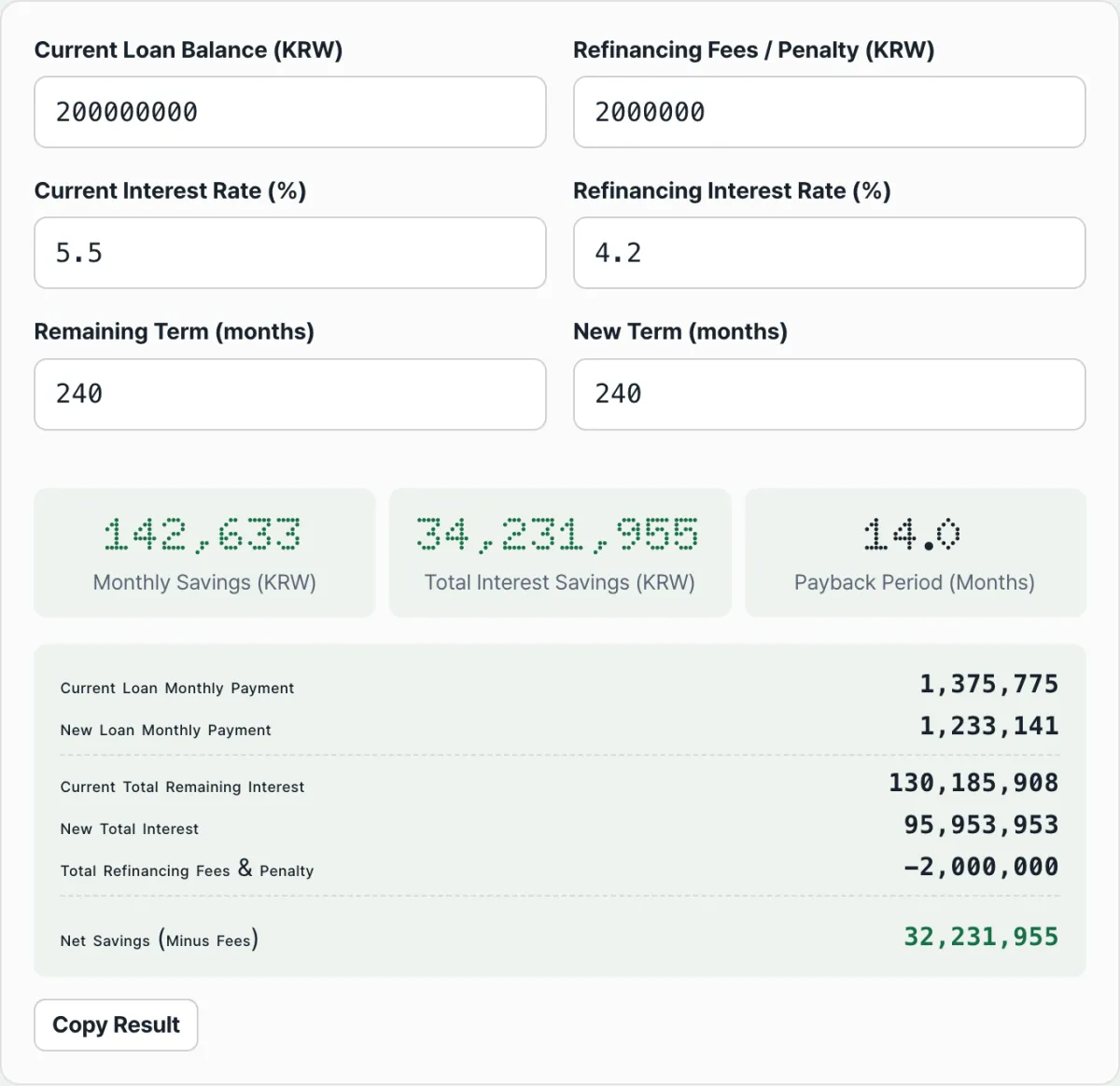
To do this by hand, you'd need to work out the total interest under equal principal-and-interest payments for both loans and compare them. That's tedious, so the calculator below lets you enter the balance, rates, terms, and fees and compare all four numbers at once.
Enter your current loan balance and rate along with the new rate to see right away whether refinancing pays off after the prepayment fee.
A worked example
Say you have a loan balance of 100 million won with 24 months left (equal principal-and-interest payments), at 6.5%, and you refinance to 4.5%. The new loan also runs 24 months.
- Current loan (6.5% a year, 24 months): about 6,911,000 won in remaining interest
- New loan (4.5% a year, 24 months): about 4,755,000 won in total interest
- Early payoff penalty (assume 0.8% of the balance): 800,000 won
- New loan fees (assume registration tax, stamp tax, and the rest add up): 150,000 won
Net savings = 6,911,000 − 4,755,000 − 800,000 − 150,000 = about 1,206,000 won
In this case, even after paying 950,000 won in penalty and fees combined, the interest savings are larger, leaving about 1.2 million won in net savings.
A note on the results This calculation uses an equal principal-and-interest model based on the rates and terms you enter. Actual approval and payments depend on each lender's terms — whether you qualify for preferential rates, your debt service ratio (DSR) limit, whether a grace period is available, and so on. Confirm the real contract terms with the lender or the refinancing platform. The results are for reference only, and your actual savings will depend on your own loan terms and timing.
Common stumbling blocks
| Situation | Effect on the calculation |
|---|---|
| Setting the new loan term longer than the old one | Monthly payments go down, but total interest goes up, so net savings shrink and can even turn negative |
| Refinancing after the penalty-free period has passed | The early payoff penalty is 0 won, so net savings go up. Check your loan contract for that date |
| Leaving out fees | Forget registration tax, stamp tax, guarantee fees, or legal fees, and your net savings will look bigger than they really are |
The takeaway
You can't judge a refinance on the rate gap alone. You need all four numbers — remaining interest on the current loan, total interest on the new loan, the early payoff penalty, and fees — to know your real net savings. Enter your loan terms in the calculator and you can compare all four at once.
Enter your current loan balance and rate along with the new rate to see right away whether refinancing pays off after the prepayment fee.
Frequently asked questions
How does the calculator figure monthly payments and total interest?
It uses equal principal-and-interest payments, where you pay the same amount every month. If your actual loan uses a different structure, such as equal principal payments or interest-only with a lump sum at maturity, the results may not match your real payment schedule, so treat them as a rough guide.
What do I need to enter in the calculator?
Enter your current loan balance, the early payoff penalty and other fees, the rate on your current loan and the rate on the new one, and the months remaining on the current loan plus the term of the new loan. You'll then see your monthly payment savings, total interest savings, and how long it takes to recover the fees, all at once.
When does the calculator say the cost recovery period can't be recovered?
If you're paying a penalty or fees and your monthly payment after refinancing goes up or stays the same, there's no way to earn those costs back, so it shows as unrecoverable. In that case, it's worth revisiting the rate or term on the new loan.
Does the calculator store my loan balance and rate?
No. Everything you enter is calculated inside your browser and is never sent to a server or saved. Even sensitive details like your real loan balance and rate stay on your device.
This article was adapted from our Korean original. Read the Korean original