
Password entropy: why length beats special characters
Contents
When you type in a password and the screen tells you it's "strong" or "weak," there's often a number behind that verdict: entropy (in bits). Our tool grades passwords with that same number.
This post shows you how that number is calculated — and why adding a few more characters raises it more than slipping in one special character. Every step is written out so you can check it yourself with nothing more than a calculator.
Summary ① Entropy bits = length × log2(number of character types). Every bit you add doubles the number of possible combinations. ② Character variety sits inside the log2, so going from 26 types to 95 types adds only 1.87 bits per character. Length is a multiplier, so each extra character adds a full 4.70 to 6.57 bits. ③ This number is an upper bound based on the assumption that every character was picked at random. If common words or years are mixed in, the real guessing difficulty is lower.
Where does a "strong" verdict come from?
You've probably had the same password accepted by one site and bounced back as "weak" by another. That happens because each service judges differently. Some look for common dictionary words or keyboard patterns. Others slice a single calculated number into ranges and assign a grade.
The number used to cut those ranges is entropy. It's measured in bits, and it expresses "about how many guesses would it take to hit this password?" as a power of 2.
The catch is that many screens just show "strong" without the underlying number. Once you know the number, you can also see what to change to raise it.
Calculating entropy bits: all you need is a calculator
The formula is one line.
Entropy (bits) = length × log2(number of character types)
"Number of character types" means: which character set do we assume this password was drawn from? Lowercase only gives you 26. Add uppercase and it's 52. Add digits and it's 62.
Bits per character is already fixed
The log2 value depends only on the character types, so you can precompute it and leave yourself just a multiplication.
| Characters used | Types | Bits per character |
|---|---|---|
| Digits only | 10 | 3.32 |
| Lowercase only | 26 | 4.70 |
| Lowercase + digits | 36 | 5.17 |
| Upper + lowercase + digits | 62 | 5.95 |
| Upper + lowercase + digits + symbols | 95 | 6.57 |
Our tool counts 26 lowercase letters, 26 uppercase letters, 10 digits, and 33 symbols. Use all four and you get 26+26+10+33 = 95 types.
You can also verify this by pasting these into the console in your browser's developer tools (usually F12).
Math.log2(26) * 12   // → 56.40   lowercase only, 12 characters
Math.log2(95) * 8    // → 52.56   all four types, 8 characters
Adding length vs. adding character types: which wins?
This is the key part. Take an 8-character password and compare the two directions.
Adding character types. Eight lowercase characters is 8 × 4.70 = 37.6 bits. Mix in uppercase, digits, and symbols and you get 8 × 6.57 = 52.6 bits — about 15 bits more.
Adding length. Keep it lowercase only and go from 8 characters to 12: 12 × 4.70 = 56.4 bits, about 18.8 bits more. That's more bits than an 8-character password using every character type available.
The reason is where each factor sits in the formula. Character variety is inside the log2, so widening 26 to 95 (a factor of 3.65) buys you only 6.57 − 4.70 = 1.87 bits per character. Length is the multiplier outside, so every character you add contributes its full bits-per-character value.
Character variety has a ceiling; length doesn't
A standard keyboard has a bit over 100 typeable characters. In other words, bits per character stops climbing near 6.57. Length, on the other hand, can keep growing as long as the service allows it.
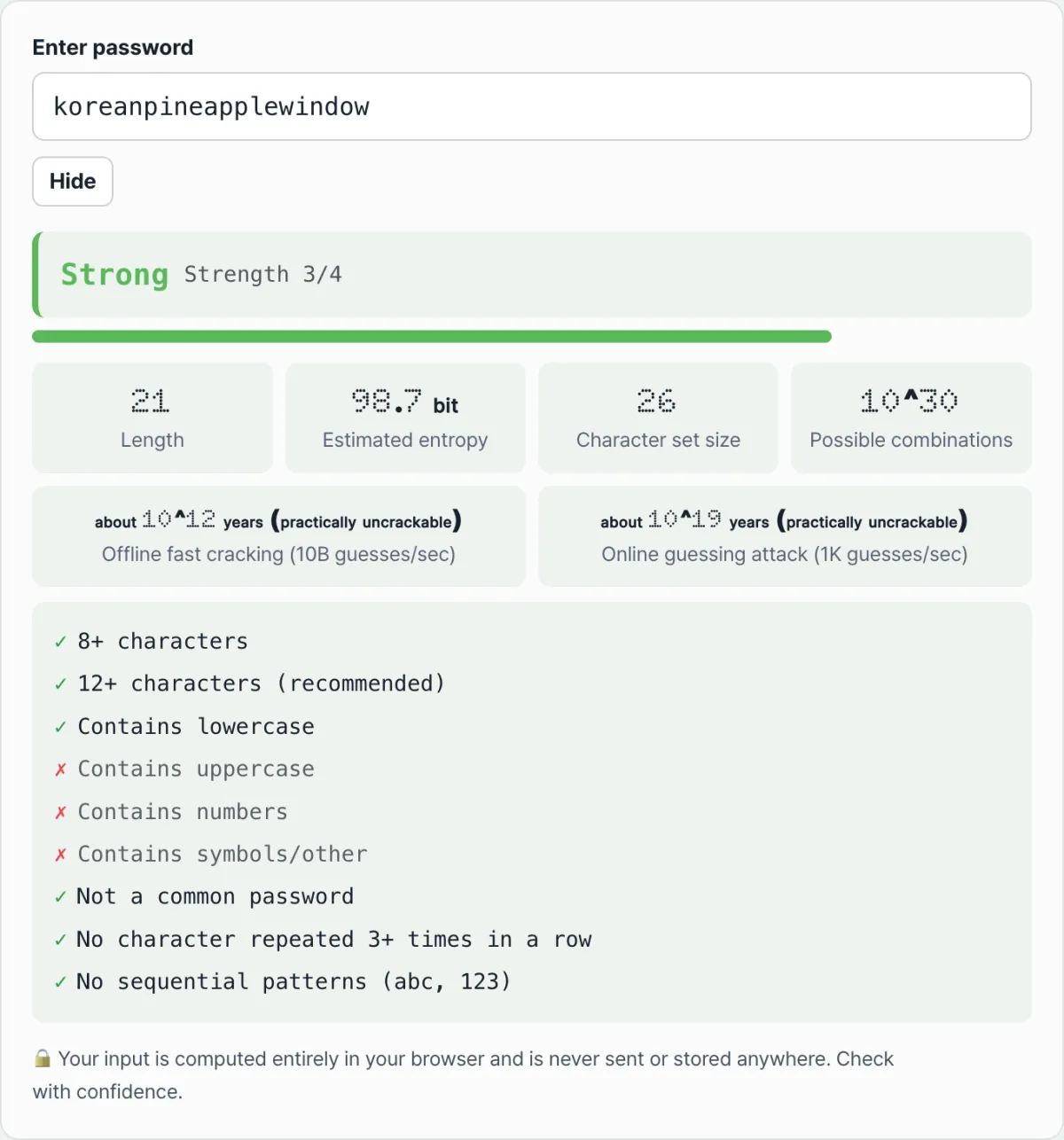
Check it with our tool. Instead of reading the table and doing the multiplication, just type in a password and you'll see the character count, number of character types, estimated entropy, and possible combinations all on one screen.
It runs entirely inside your browser with no install or sign-up, and the password you type is never sent to or stored on a server.
When bits go up, how much longer does it take?
Divide the number of combinations by the attack speed and you get the estimated crack time. Our tool uses three assumptions.
- Average attempts = total combinations ÷ 2 (on average you hit it around halfway)
- Offline fast cracking: 10 billion guesses per second
- Online guessing attack: 1,000 guesses per second
Under those assumptions, an 8-character password using all four types (52.6 bits) comes out to about 3.8 days offline, while a 12-character lowercase-only password (56.4 bits) comes out to about 55 days.
A 3.85-bit difference turns into more than a 14-fold difference in time. That's because every bit you add doubles the time it takes. This is what people actually mean when they say "length wins exponentially."
The ranges our tool uses
Our tool slices the calculated entropy into five ranges.
| Estimated entropy | Label |
|---|---|
| Under 28 bits | Very weak |
| 28 to 36 bits | Weak |
| 36 to 60 bits | Fair |
| 60 to 128 bits | Strong |
| 128 bits and up | Very strong |
One exception: if the password shows up on a well-known password list, it drops to the lowest grade regardless of bits, and if the same character repeats three times in a row or there's a sequential pattern like abc or 123, it drops one level.
What this number doesn't tell you
Entropy is a strong indicator, but it isn't everything. Three things remain true even when the number is high.
First, it's a randomness assumption. This calculation assumes every character was drawn at random from the character set. Names, words, and birth years that a person chose come from a far smaller pool of candidates, so the real guessing difficulty is lower than the bits shown. That's why our tool calls the value "estimated entropy."
Second, the attack speed is an assumption. Ten billion guesses per second is just one scenario, and actual speeds vary a lot depending on how a service stores passwords. So you can't use this number to declare a particular service safe or unsafe.
Third, bits can't stop reuse. If a password you used elsewhere as-is gets leaked, the attacker doesn't need to guess. Bits only describe how hard it is to guess by trying.
Some standards ask for length instead of composition rules
NIST's digital identity guideline SP 800-63B (Revision 4) in the United States specifies that verifiers must not impose composition rules such as mixing character types, requires a minimum of 15 characters when a password is the only authentication factor and a minimum of 8 when it's part of multi-factor authentication, and recommends allowing at least 64 characters.
The takeaway
- Entropy bits = length × log2(number of character types). Each additional bit doubles both the combinations and the time.
- Character variety is inside the log2, so widening 26 → 95 adds only 1.87 bits per character.
- Length is the multiplier, so each character adds 4.70 to 6.57 bits — and there's no ceiling.
- That's why 12 lowercase-only characters (56.4 bits) beats 8 characters mixing all four types (52.6 bits).
- This value is an upper bound based on a randomness assumption, so you still need to handle common words and reuse separately.
It runs entirely inside your browser with no install or sign-up, and the password you type is never sent to or stored on a server.
Frequently Asked Questions
How many bits of entropy do I need to be safe?
There's no absolute threshold that works in every situation. That's because the calculation itself rests on assumptions about attack speed. Our tool labels 60 bits and above as "Strong" and 128 bits and above as "Very Strong," and it separately shows checklists for 8+ characters and 12+ characters (recommended). Rather than chasing a number, it's more reliable to secure length.
Do I have to include special characters?
In the math, special characters contribute only about 1.87 bits per character, so their impact is limited — and NIST SP 800-63B says not to impose composition rules like mixing character types. That said, if a service you're signing up for requires special characters, you have to follow that rule. Even then, add only the minimum needed to satisfy the rule and put the rest of your effort into length, which raises the bits more.
Is the "about 10^12 years" the tool shows a real time?
No. It's the time calculated to cover half of all combinations, based on the assumption of 10 billion attempts per second. It's useful for comparing the difficulty of one password against another, but it doesn't guarantee an actual attack would take that long. It depends entirely on how a service stores passwords and what lockout policy it uses.
Doesn't using Korean characters in a password raise the bits a lot?
Our tool adds 100 to the character-type count whenever a password contains characters outside the ASCII range, so the displayed bits definitely go up. However, some services don't allow Korean input or handle it differently, which can block login entirely, and it can be hard to type on other devices or keyboards. In practice, increasing length is the safer choice.
This article was adapted from our Korean original. Read the Korean original