
Stock Average Cost Calculator: Averaging Down Formula
Contents
When you buy a stock in several separate purchases, calculating your average cost per share as a simple average of the purchase prices gives you a number that doesn't match reality. Average cost is a quantity-weighted average, so it leans toward the price where you bought more shares. This post covers the formula behind average cost and the formula for how many shares at what price you need to buy to reach a target average cost.
Summary ① Average cost is the quantity-weighted average of (price × quantity) divided by total shares. Averaging only the prices gives a different number. ② The number of extra shares you need to reach a target average cost is solved as x = current shares × (target average cost − current average cost) ÷ (new purchase price − target average cost). ③ If the new purchase price equals the target average cost, the division is undefined. If it's higher than the target, the result is negative and the target is unreachable.
When average cost mistakes happen
When you buy in stages instead of all at once, it's common to do the average cost in your head or estimate it and end up with a number that doesn't match the real one.
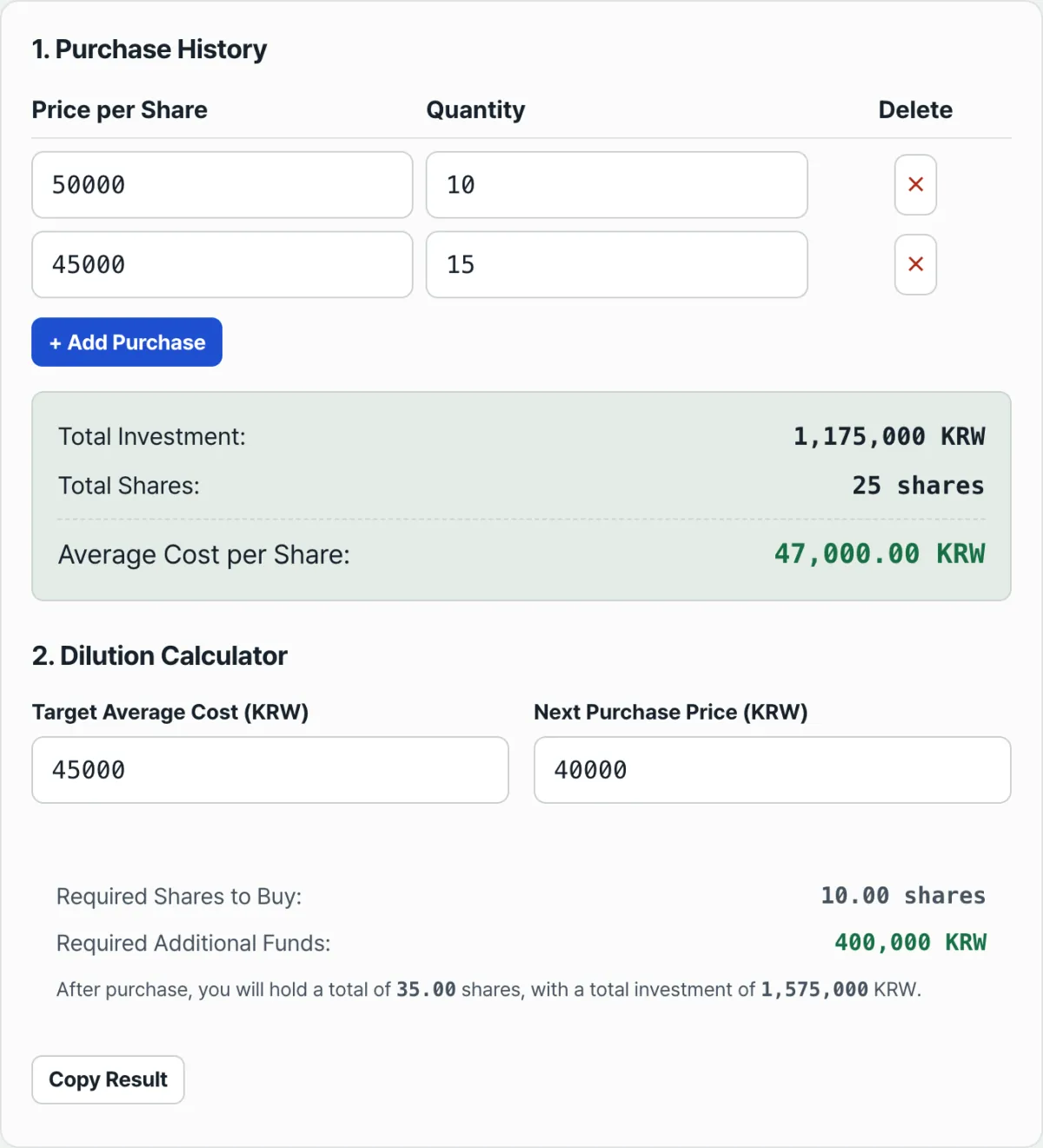
For example, say you bought a stock in two lots: 10 shares at 50,000 won, then 15 shares at 45,000 won. If you simply add the two prices and divide by 2, you get 47,500 won. But the actual average cost is 47,000 won — a 500 won difference.
The difference comes from the second lot (15 shares) being larger than the first (10 shares). The price of the larger lot should carry more weight in the average, but a simple average ignores that weight.
The gap widens as you add more purchases and the price spread grows. For a stock you bought in three or four lots, the difference between the simple average and the real average cost can be even bigger.
Calculating average cost and extra shares without a tool
1) Average cost: divide total invested amount by total shares
Here's how to work out average cost by hand.
- For each purchase, multiply price × quantity to get the purchase amount.
- Add up the purchase amounts from all purchases to get the total invested amount.
- Add up the quantities from all purchases to get total shares.
- Total invested amount ÷ total shares is your average cost.
Plugging in the earlier example, the first purchase is 50,000 × 10 = 500,000 won and the second is 45,000 × 15 = 675,000 won. Total invested is 1,175,000 won and total shares are 25, so the average cost is 1,175,000 ÷ 25 = 47,000 won.
2) Extra shares to hit a target average cost: deriving the formula
Let the target average cost be T, the current average cost be A, the shares you hold be Q, the price you'll pay for new shares be P, and the number of new shares be x. After the additional purchase, the average cost is (Q×A + x×P) ÷ (Q+x). You just solve for the x that makes this equal to the target T.
(Q×A + x×P) ÷ (Q+x) = T
Q×A + x×P = T×Q + T×x
x×(P−T) = T×Q − Q×A
x = Q×(T−A) ÷ (P−T)
If your current average cost is 47,000 won on 25 shares, you want to bring the target down to 46,000 won, and the new purchase price is 44,000 won, then x = 25×(46,000−47,000)÷(44,000−46,000) = 25×(−1,000)÷(−2,000) = 12.5 shares. The extra amount you need to invest is 12.5×44,000 = 550,000 won.
In this expression, if the denominator (new purchase price − target average cost) is 0, the division doesn't work. And if the result x comes out negative, that target average cost can't be reached at all. Both cases are covered again in the next section.
Check it with our tool.
Enter your purchase prices and share counts to get your average cost and total investment instantly, along with the extra shares you need to reach your target average cost.
Common calculation mistakes
| Mistake | Wrong calculation | Correct calculation |
|---|---|---|
| Averaging only the prices | (50,000+45,000)÷2 = 47,500 won | (50,000×10+45,000×15)÷25 = 47,000 won |
| Leaving fees and taxes out of average cost | Adding up only price×quantity | Enter the actual cost per share including fees to get an accurate figure |
| New purchase price is higher than the target average cost | Plugging it into the formula without checking the result | Check the signs of the numerator and denominator first so the result means something |
This calculator uses only the purchase prices and quantities you enter. Costs that come up separately, like brokerage fees or securities transaction tax, are not added automatically. If you need an average cost based on actual spending, include the fees in the price you enter.
If the new purchase price equals the target average cost, the denominator of the formula becomes 0 and the division can't be performed. The calculator shows this case as an error.
If the target average cost is set higher than your current average cost, or the new purchase price is higher than the target average cost, the result (x) comes out negative. That means no amount of buying gets you to that target, and instead of showing a negative share count, the calculator reports a "target not reachable" error.
The result isn't always a whole number. The 12.5 shares in the example above is one case. Real purchases happen in whole shares, so depending on how you round the decimal, your actual average cost may land close to the target rather than exactly on it.
The short version
- Average cost is the quantity-weighted average of (price×quantity) divided by total shares, and it differs from a simple average of the prices alone.
- The number of extra shares needed to reach a target average cost is solved as x = current shares×(target average cost−current average cost)÷(new purchase price−target average cost).
- If the new purchase price equals the target average cost, the denominator is 0 and you get an error. If it's higher than the target, the result is negative and it's reported as unreachable.
- The calculator only reflects the price×quantity you enter, so if you need an accurate average cost that includes fees and taxes, work them into the price before entering it.
- The more purchases you make and the wider the price spread, the bigger the gap between a simple average and your real average cost.
Enter your purchase prices and share counts to get your average cost and total investment instantly, along with the extra shares you need to reach your target average cost.
Frequently asked questions
Do I have to buy below my current average cost to lower it?
Mathematically, yes. In a weighted average, the new price has to be below your existing average cost for the overall average to go down.
If the new price is higher than your existing average cost, your average cost goes up instead. This is just describing how the math works — it's not a recommendation on whether to buy.
Why do I get a "target not reachable" error?
There are two cases. If the new purchase price equals the target average cost, the denominator of the formula is 0 and the division can't be done. If the relationship between the target average cost, your current average cost, and the new purchase price doesn't work out and the result (x) is negative, that combination can't reach the target. The calculator shows an error message for both cases.
How many purchase entries can I add?
By default, the calculator shows two rows: a price of 50,000 won with 10 shares, and a price of 45,000 won with 15 shares. Use "Add purchase" to add more rows and enter your full purchase history.
Should I include fees and taxes in the inputs?
The calculator multiplies the price and quantity you enter as-is to get the total invested amount. If you want to see an average cost based on actual spending including fees and taxes, enter the price with the fees added in yourself. The calculator doesn't automatically calculate and add a fee rate.
This article was adapted from our Korean original. Read the Korean original