
AES-256 Encryption vs SHA-256 Hashing: The Difference
Contents
- Hashing and encryption go in different directions
- What “AES-GCM 256-bit” actually means
- The core mechanics: PBKDF2 key derivation and the AES-GCM pipeline
- Comparing hash, encryption, and encoding
- 5 common mistakes when using encryption tools
- A 5-step workflow for encrypting text safely
- 7 practical encryption and hashing tips
- Final decision tree: which security method should you use?
- Cheat sheet of key cryptography and security terms
- Frequently asked questions
Once you turn a string into a hash, the mathematical path back to the original text is closed forever. A hash is a kind of “digital fingerprint,” so you can only check whether the value you entered matches the stored value; you cannot restore the original. Encryption, on the other hand, is a two-way transformation: as long as you know the password (key), you can turn the ciphertext back into the original text at any time.
If you don’t clearly understand the difference between the two, you can end up with critical security incidents—such as encrypting data for storage and later being unable to decrypt it, or storing passwords in a decryptable form and suffering a breach.
Key takeaways ① Hash functions (such as SHA-256) are one-way digest functions that can never be decrypted; they are used to verify whether a password matches. ② Encryption (such as AES-256-GCM) is a two-way security technology that uses a password and key to create ciphertext and later restore the original text. ③ The result string differs every time, even when you encrypt the same sentence with the same password, because a new random initialization vector (IV) and salt are generated each time.
Hashing and encryption go in different directions
A hash function always outputs a fixed-length hash value, regardless of the input length (64 hexadecimal characters for SHA-256). There is no formula that reverses the original text from this hash value. That’s why hashes are used to store user passwords in a database or check whether a file has been altered.
Encryption, by contrast, scrambles the original data using a specific encryption key and a mathematical substitution and diffusion algorithm. Enter the correct key, and the reverse process restores the original text exactly.
So if you need to send secret text to someone and have them read it, you must use symmetric-key encryption (AES).
What “AES-GCM 256-bit” actually means
- AES (Advanced Encryption Standard): A global standard symmetric-key block encryption algorithm established by the U.S. National Institute of Standards and Technology (NIST).
- 256-bit key length: This means the key used for encryption is 256 bits long (2^256 possible combinations). Even if every supercomputer in the world today were put to work, brute-forcing the key would be impossible.
- GCM (Galois/Counter Mode): A top-tier mode of operation that not only provides confidentiality (encryption) but also generates an integrity authentication tag (Auth Tag) to verify that not even one byte of the data was tampered with along the way.
Free · encrypted in your browser, nothing sent to a server · AES-256-GCM
The core mechanics: PBKDF2 key derivation and the AES-GCM pipeline
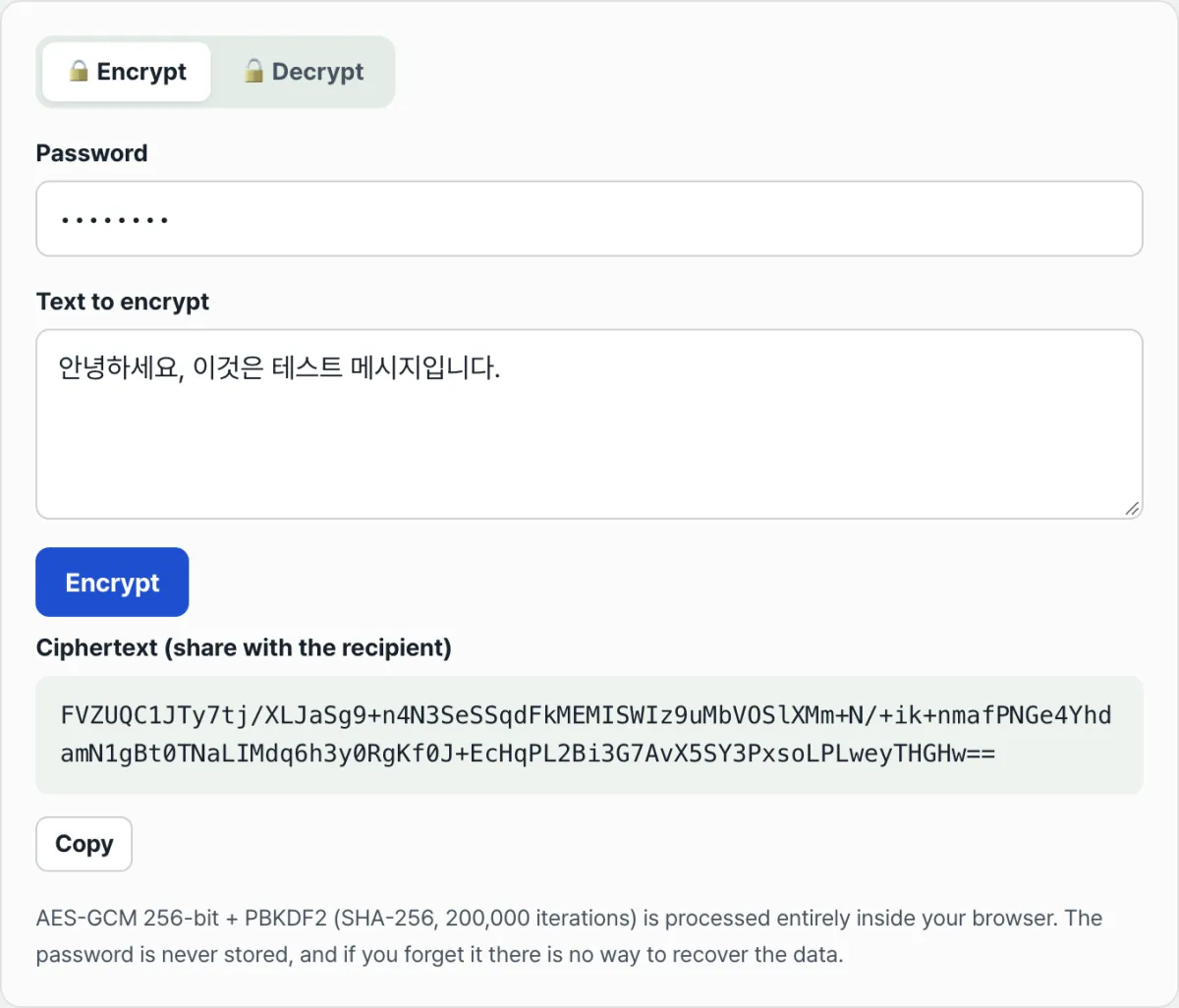
The browser’s Web Crypto API turns your password into a 256-bit key and encrypts data through these mathematical steps.
1. PBKDF2 (Password-Based Key Derivation Function 2)
Passwords people type (for example, ‘MySecretPass123!’) do not have cryptographically sufficient entropy:
- Salt (16 bytes): A new 128-bit cryptographically secure random number (CSPRNG) is generated each time you encrypt.
- Repeated hashing (iteration count, 100,000 or more): The salt and password are hashed with SHA-256 100,000 times to neutralize rainbow table attacks and brute force and derive a 256-bit master key.
2. AES-GCM encryption and authentication tag generation
- Initialization vector (IV / Nonce, 12 bytes): A unique 96-bit random number is generated for every encryption, so the same plaintext still produces different ciphertext each time.
- GHASH based on the Galois Field: Along with encrypting the data, it calculates a 128-bit authentication tag (Authentication Tag), so if the ciphertext is tampered with, an error (Ciphertext Tampered) is raised immediately during decryption.
Comparing hash, encryption, and encoding
| Comparison factor | One-way hash | Symmetric-key encryption (AES) | Encoding (Base64/URL) |
|---|---|---|---|
| Transformation direction | One-way (cannot be decrypted) | Two-way (can be decrypted) | Two-way (anyone can reverse it) |
| Password/key required? | ❌ Not required | ⭕ Secret key required | ❌ Not required |
| Primary purpose | Data integrity verification, password storage | Secure transmission and storage of sensitive confidential information | Data compatibility and transfer between systems |
| Common algorithms | SHA-256, SHA-512, bcrypt, Argon2 | AES-256-GCM, AES-CBC, ChaCha20 | Base64, Hex, URL Encoding |
| Example output | Fixed 64-character length (SHA-256) | Variable-length ciphertext + IV + Salt | A string 33% longer than the original |
5 common mistakes when using encryption tools
- Losing the password: The decryption key is not stored on any server, so if you forget the password, no one can recover the data.
- Mistaking Base64 encoding for encryption: Base64 is just string formatting. Put it into a decryption tool and it comes out as plaintext in 0.1 seconds.
- Using a short, weak password: Easy words like 1234 or password are cracked immediately by a dictionary attack.
- Reusing a fixed IV (initialization vector): In GCM mode, reusing the same key and IV exposes the plaintext through XOR operations between ciphertexts.
- Using an insecure site that sends plaintext to a server: Sites that send your original text to a web server to encrypt it carry a high risk of interception and logging.
A 5-step workflow for encrypting text safely
- Step 1 (Enter the original text and password): Enter the confidential note you want to encrypt and a strong password to lock it (at least 10 characters, using letters, numbers, and special characters).
- Step 2 (Real-time local encryption in the browser): The Web Crypto API runs PBKDF2 and AES-256-GCM immediately in local memory.
- Step 3 (Copy the ciphertext string): Copy the Base64 ciphertext, which securely packages the salt, IV, and ciphertext.
- Step 4 (Send the ciphertext by messenger or email): Paste the ciphertext into KakaoTalk, Slack, or email and send it to the recipient.
- Step 5 (Share the password through a separate channel and decrypt): Tell the recipient the password through another channel (phone call, in person, etc.), then view the original text in the Decrypt tab.
7 practical encryption and hashing tips
- Follow the two-channel rule for KakaoTalk/Slack: Even if you send the ciphertext through a messenger, you must send the password separately by phone call or text message to maintain complete confidentiality.
- Verify client-side zero-knowledge: Open the Network tab in the F12 developer tools and check that not a single byte of the text goes to an external server.
- Use a password manager (1Password, Bitwarden): Generate the password you’ll use for encryption with a random number generator at 16 characters or more, and store it safely.
- Check for whitespace when decryption fails: When copying the ciphertext, check whether unintended spaces or line breaks were included at the beginning or end.
- Store personal data notes (resident registration numbers, bank account numbers) permanently: Encrypt them with AES-256 before uploading them to a cloud notes app, and they remain safe even if hacked.
- Check for file tampering by comparing SHA-256 hashes: Compare the SHA-256 hash of a downloaded installer with the hash on the official website to prevent malware infection.
- Use bcrypt/Argon2 for password hashing: When developing a web server, use bcrypt or Argon2id for storing user passwords; they impose a heavier computational load than plain SHA-256 and are safer.
Final decision tree: which security method should you use?
- Scenario A (you need to send a secure account or password to someone in a messenger app) ➔ AES-256-GCM text encryption
- Scenario B (storing user passwords in a database when people sign up for your website) ➔ Argon2id or bcrypt one-way hashing (Salt required)
- Scenario C (checking whether a downloaded file is corrupted or has been tampered with) ➔ Compare SHA-256 / MD5 checksum hashes
- Scenario D (sending a binary image or PDF file through a JSON API) ➔ Base64 encoding (not for security)
Cheat sheet of key cryptography and security terms
- AES-256-GCM: 256-bit symmetric-key encryption with Galois integrity authentication — the standard used by governments and financial institutions worldwide.
- SHA-256 (Secure Hash Algorithm 256): a one-way hash function that reduces input of any length to a 256-bit (32-byte) fingerprint.
- Salt: random data added to a password so that the same password produces a different hash or ciphertext each time.
- IV (Initialization Vector): a unique, one-time random value mixed into the first block during block encryption.
- Web Crypto API: a high-performance, hardware-accelerated cryptography interface built into modern web browsers.
Frequently asked questions
I forgot the password I used to encrypt something. Can you recover it for me?
No, that's not possible. Our tool doesn't store any data or passwords on a server, and by the mathematical nature of AES-256 encryption, nothing can be decrypted without the correct password — not even by the US Department of Defense or a supercomputer.
I encrypted the same text with the same password, but the result is different every time. Why?
That's normal and expected. Each time you encrypt, your browser generates a new random Salt and Initialization Vector (IV) and mixes them in, so the ciphertext comes out different every time. This also blocks pattern-analysis attacks at the source.
When I encrypt in my browser, is my company's confidential data sent to a web server?
Not at all. All encryption and decryption runs offline inside the CPU and memory of your own browser, so internal security documents and personal information stay safe.
This article was adapted from our Korean original. Read the Korean original