
Unicode Escape Conversion: \uXXXX, U+ Code Points & HTML Entities
Contents
Turning Korean text or emoji into codes like \uXXXX, and turning those codes back into the original characters, runs on the same principle. You read the character as a single integer called a "code point," and the only difference is which notation you use to write that integer down.
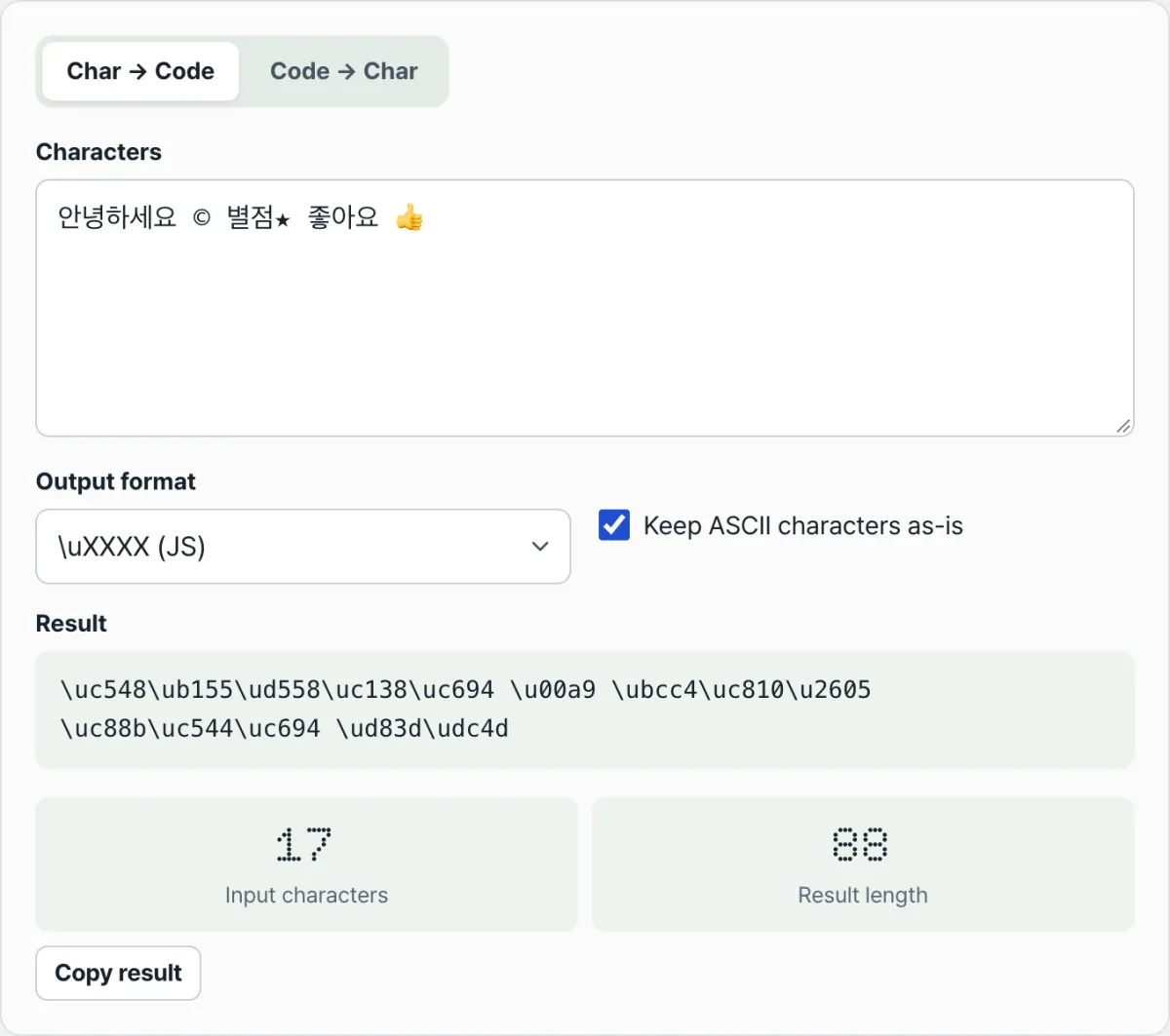
This article explains what \uXXXX, \u{...}, U+XXXX, HTML decimal and hex entities, and named entities each mean and how they differ, and shows what a single character looks like in each format, using Korean text, ©, ★, and 👍 as examples.
Summary ① All six formats are just different ways of writing a character's code point (a single integer), so they point to the same character and differ only in notation. ② Emoji above U+FFFF split into two surrogate halves (
\ud83d\udc4d) only in the\uformat; every other format writes the code point as is. ③ Only about 30 named entities (©and so on) are built in, so characters without a name show up as numeric entities (★) instead.
When Korean Shows Up as \uc548\ub155 in Code
You've probably seen Korean text in a JSON file, a log, or JavaScript source printed as unfamiliar codes like \uc548\ub155. The opposite happens too: you need a copyright symbol in HTML, you'd rather not paste © directly, so you go looking for something like © or ©.
This doesn't mean the character is broken. It just means the same character was written in a form machines read easily instead of one people read easily. The Korean letter that \uc548 stands for looks like one character on screen, but inside the computer it's a character with the number U+C548, and \uc548 is simply that number written in JavaScript syntax.
The problem is that there's more than one notation. \uXXXX, \u{...}, U+XXXX, &#DDD;, &#xHH;, and &name; can all point to the same character and only look different. That's where you get stuck asking, "What does this mean, and how do I turn it back?"
How to Convert by Hand, Without a Tool
Every conversion starts with getting the character's code point. Run "©".codePointAt(0) in your browser's developer console and you get 169. To see that decimal number in hex, run (169).toString(16) and you get "a9".
With just those two numbers (169 in decimal, a9 in hex), you can write all six formats by hand.
\uXXXX(JS): pad the hex value to four digits and put it after\u→\u00a9\u{...}(ES6): put the hex value inside the braces as is →\u{a9}U+XXXX: write the hex value as four uppercase digits →U+00A9&#DDD;(HTML decimal): put the decimal value in as is →©&#xHH;(HTML hex): put the hex value in →©&name;(named entity): if the character has a defined name, use it →©
Apply the same method to ©, ★, and 👍 and you get the table below. Once you know the code point, the rest is mechanical: follow the notation rule and write it out.
| Format | © (U+00A9) | ★ (U+2605) | 👍 (U+1F44D) |
|---|---|---|---|
\uXXXX (JS) | \u00a9 | \u2605 | \ud83d\udc4d |
\u{...} (ES6) | \u{a9} | \u{2605} | \u{1f44d} |
U+XXXX | U+00A9 | U+2605 | U+1F44D |
&#DDD; (decimal) | © | ★ | 👍 |
&#xHH; (hex) | © | ★ | 👍 |
&name; (named) | © | ★ | 👍 |
Going the other way needs the same numbers. Pull a9 out of \u00a9, read it as hex, and you get 169; run String.fromCodePoint(169) and © comes back. © is also just decimal 169, so the result is the same.
That's the whole process by hand. But once you have several characters, or a mix of formats, typing them into the console one at a time and reassembling the result gets tedious. That repetitive work is exactly what this converter does for you.
Check it with our free tool.
A free converter that runs right in your browser, with no install and no sign-up. It works both ways: characters to codes, and codes back to characters.
Common Points of Confusion
When an Emoji Splits into Two Pieces
Convert 👍 to \uXXXX and it comes out as \ud83d\udc4d, in two pieces. That's not an error. \uXXXX can only hold four hex digits (up to U+FFFF), so characters above that are defined to be expressed as a pair. That pair is called a surrogate pair.
So the same emoji comes out in one piece in the \u{1f44d}, U+1F44D, and 👍 formats, because those formats write the code point as is. Paste any of them into the restore tab and you get the single 👍 back.
Characters That Don't Change, and Names That Don't Exist
English letters, digits, and basic symbols staying as they are is also normal. The "Keep ASCII characters as is" option is on by default, so characters in the range 0x20–0x7E (space through tilde) pass through unchanged and only special characters get converted. Turn that checkbox off and even A becomes \u0041.
It also helps to know that hex casing differs by format. Only the U+ format is uppercase (U+00A9); \u, \u{...}, and &#x come out lowercase (\u00a9, ©). The value is the same, so there's no need to mistake a casing difference for a different character.
Not every special character has a &name; entity either. Only about 30 common ones are built in, so © comes out as ©, but a character with no name, like ★, is automatically replaced with a numeric entity such as ★. That's also why the "Input characters" and "Result length" numbers on screen differ: 👍 is one character as input but twelve characters as \uXXXX output.
Recap
Here's the short version.
- All six formats write the same code point in different ways. Same meaning, different shell.
- Conversion starts with the code point. Get the integer with
"character".codePointAt(0), then write it out following each format's rule. \uonly holds four digits (up to U+FFFF), so emoji above that split into two surrogate halves. The other formats write the code point as is.- "Keep ASCII characters as is" is on by default, so English letters, digits, and basic symbols stay put and only special characters change.
- There are only about 30 named entities, so when a character has no name the converter automatically shows it as a numeric entity.
A free converter that runs right in your browser, with no install and no sign-up. It works both ways: characters to codes, and codes back to characters.
Frequently Asked Questions
I converted an emoji to \u format and it split into two pieces. Is that an error?
No. \uXXXX can only represent four hex digits (up to U+FFFF), so characters above that are written as a surrogate pair of two \u values (\ud83d\udc4d). The \u{1f44d}, U+1F44D, and 👍 formats stay in one piece, and if you paste any of them into the restore tab you get the single 👍 back.
Why don't English letters and numbers change?
Because the "Keep ASCII characters as is" option is on by default. Characters in the 0x20–0x7E range (space, English letters, digits, basic symbols) are left alone and only special characters are converted. Turn the option off and even A becomes \u0041.
Can I restore code that mixes several formats at once?
Yes. The restore tab recognizes \u{...}, \uXXXX, \xXX, U+XXXX, &#xHH;, &#DDD;, and named entities individually. For example, \uc548\ub155 © U+1F44D restores in a single pass to a Korean greeting, ©, and 👍.
Do all special characters have a &name; entity?
No. Only about 30 common names are built in. © comes out as © and € as €, but a character with no assigned name, like ★, is replaced with a numeric entity such as ★. So for characters without a name, the converter shows the numeric entity instead.
This article was adapted from our Korean original. Read the Korean original