
Degree ↔ Radian Conversion and the 6 Trig Functions on the Unit Circle
Contents
JavaScript trig functions like Math.sin() and Math.cos() take a radian value as their argument, not degrees. People, though, think in degrees (°), so every time you write code for a 2D canvas rotation or a game character's facing direction, you end up converting degrees to radians and back again.
This post covers those conversion formulas, the definitions of the six trigonometric functions including sin, cos, and tan, and the actual values of special angles like 30°, 45°, and 60°.
Summary ① Degrees (°) and radians (rad) convert to each other with a formula built on pi (π). ② sin, cos, and tan, plus their reciprocals csc, sec, and cot, are called the six trigonometric functions. ③ At angles like 90° and 270°, where the denominator becomes 0, the tan and sec values are undefined.
Why You Keep Converting: People Use Degrees, Computers Use Radians
Say you're building a character that looks toward the mouse cursor. You get the direction with Math.atan2(mouseY - charY, mouseX - charX). This function returns a radian value between -π and π regardless of the sign of the coordinates, but to show the angle on screen or match it against other calculations, you have to convert it back to degrees.
Do that conversion by hand every time and it's easy to apply the formula wrong, or to miss the spot where the math breaks at a particular angle like 90° or 270°.
Degree–Radian Conversion Formulas and the Six Trigonometric Function Definitions (Manual Calculation)
The conversion formulas between degrees and radians are defined with pi (π, about 3.14159) as follows.
- Radians = degrees × (π ÷ 180)
- Degrees = radians × (180 ÷ π)
For example, 90° is 90 × (π ÷ 180) ≈ 1.5708 radians.
Using the coordinates (x, y) on a unit circle with a radius of 1, the six trigonometric functions are defined as follows.
- Sine (sin): sin θ = y (the ratio of height to the hypotenuse)
- Cosine (cos): cos θ = x (the ratio of the base to the hypotenuse)
- Tangent (tan): tan θ = y ÷ x = sin θ ÷ cos θ (where x ≠ 0)
- Cosecant (csc): csc θ = 1 ÷ sin θ
- Secant (sec): sec θ = 1 ÷ cos θ
- Cotangent (cot): cot θ = 1 ÷ tan θ
Below is JavaScript code that computes the six trigonometric functions for an input angle in degrees.
function calculateTrigonometry(degreeVal) {
  // 1. Convert degrees -> radians
  const rad = degreeVal * (Math.PI / 180);

  // 2. Compute the six trigonometric functions
  const sin = Math.sin(rad);
  const cos = Math.cos(rad);
  const tan = Math.abs(cos) < 1e-10 ? Infinity : Math.tan(rad);

  const csc = Math.abs(sin) < 1e-10 ? Infinity : 1 / sin;
  const sec = Math.abs(cos) < 1e-10 ? Infinity : 1 / cos;
  const cot = Math.abs(tan) < 1e-10 ? Infinity : 1 / tan;

  return {
    degree: degreeVal,
    radian: rad.toFixed(6),
    sin: sin.toFixed(4),
    cos: cos.toFixed(4),
    tan: tan === Infinity ? "Undefined (∞)" : tan.toFixed(4),
    csc: csc === Infinity ? "Undefined (∞)" : csc.toFixed(4),
    sec: sec === Infinity ? "Undefined (∞)" : sec.toFixed(4),
    cot: cot === Infinity ? "Undefined (∞)" : cot.toFixed(4),
  };
}
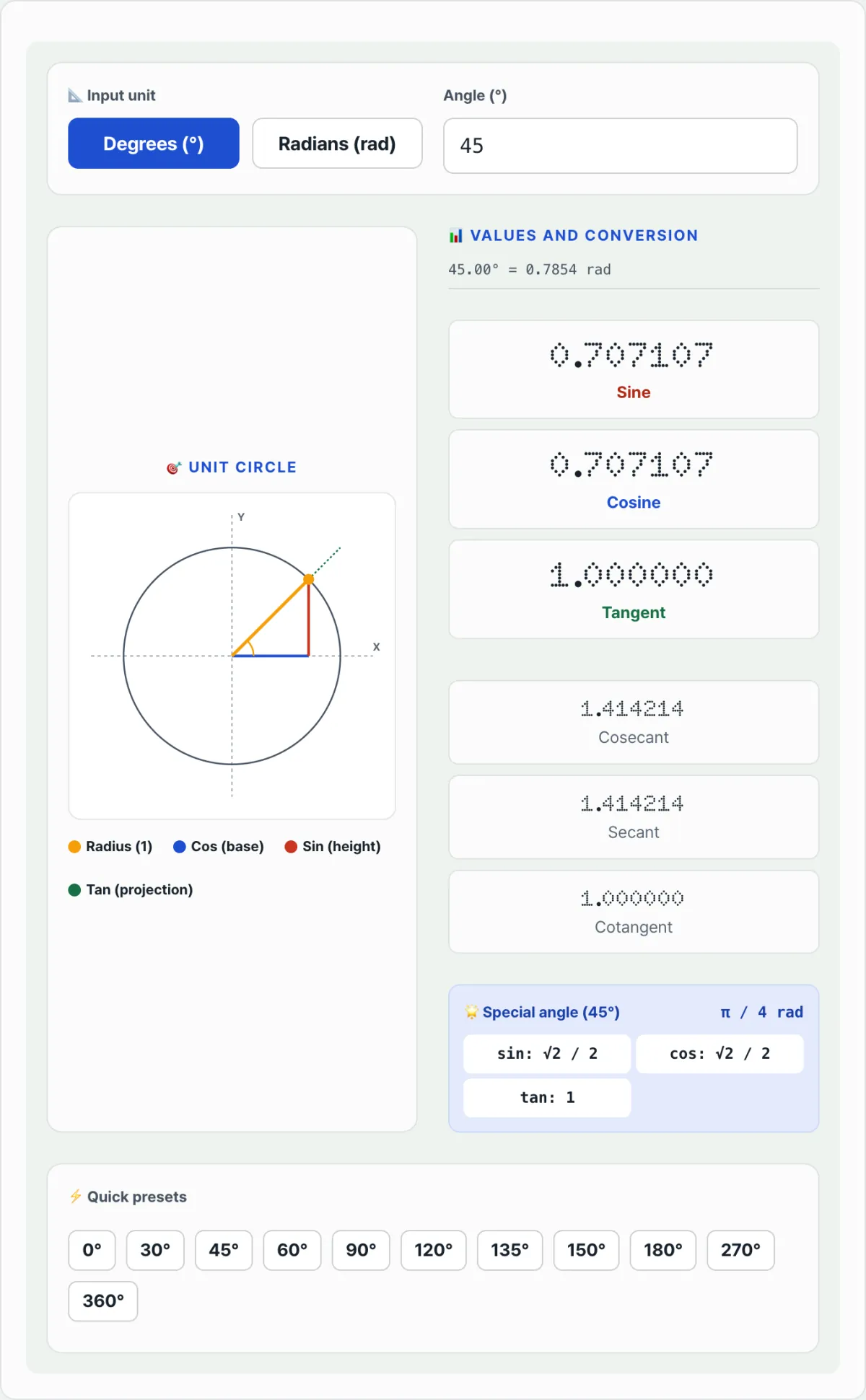
Note You don't have to look up a trig table every time or switch your scientific calculator to radian mode by hand. Enter an angle into the Trigonometric Ratio & Radian Converter and you'll see the X and Y coordinates on the unit circle and the six trigonometric function values in a real-time SVG graphic.
You can work the formulas and code out yourself, but if you want to compare several angles quickly or see the unit circle coordinates with your own eyes, a calculator is faster. Check it with our tool.
Enter an angle and see its X, Y coordinates plotted on the unit circle, with live values for all six trig functions.
Special Angles and Edge Cases That Trip People Up
Special angles you use often, like 30°, 45°, and 60°, have exact fraction and surd values in addition to the decimal approximations.
| Angle | sin | cos | tan |
|---|---|---|---|
| 30° | 1/2 | √3/2 | √3/3 |
| 45° | √2/2 | √2/2 | 1 |
| 60° | √3/2 | 1/2 | √3 |
| 90° | 1 | 0 | Undefined |
At 90° or 270°, cos θ converges on 0, so tan θ = sin θ ÷ cos θ turns into division by zero. If your code doesn't filter that region ahead of time with an exception like "undefined," the Infinity value can show up on screen as-is or throw off later calculations.
Summary
- JavaScript trig functions take radians, so an input angle in degrees has to be converted first with "radians = degrees × (π ÷ 180)".
- sin, cos, and tan, plus their reciprocals csc, sec, and cot, are called the six trigonometric functions.
- At angles like 90° and 270°, where cos θ or sin θ becomes 0, the tan, sec, csc, and cot values are undefined, so you need separate exception handling.
- Special angles like 30°, 45°, and 60° have exact fraction and surd values, not just decimal approximations.
If you'd rather skip writing the math and edge-case handling yourself and just want to enter an angle to see the unit circle coordinates and the six trigonometric function values right away, use the tool below.
Enter an angle and see its X, Y coordinates plotted on the unit circle, with live values for all six trig functions.
Frequently Asked Questions
What is the special angle detection feature?
For whole-number angles used often in geometry or design work, such as 30, 45, and 60 degrees, it shows the exact trigonometric ratio as a rational fraction or a surd symbol (for example, √3 / 2) in addition to the decimal approximation.
Why do tangent or cosecant values show as "Undefined"?
Tangent is undefined at 90° and 270°, where cos θ = 0. Cosecant is undefined at 0°, 180°, and 360°, where sin θ = 0. In each case the denominator is 0, so the math can't be computed. The tool shows "Undefined (infinity)" in those ranges to prevent errors.
Can I enter radian values as fractions of pi?
Yes. Type a fraction that includes pi, like "pi / 4" or "pi / 6", right into the input field and it's recognized and calculated automatically.
This article was adapted from our Korean original. Read the Korean original