
UTM Parameters Explained: source, medium, and campaign rules
Contents
When you share a link in several places and then open your traffic report, you sometimes find the same campaign split across naver and Naver, or summer_sale and summer sale. Nothing is broken — UTM parameters send the string you typed exactly as you typed it.
On the receiving end, that string becomes the item name. So one capital letter or one space splits an item into two.
Summary ① utm_source is "where it came from," utm_medium is "what kind of link it is," and utm_campaign is "which group it belongs to." ② Values are case-sensitive strings.
Naverandnavercan be recorded as different values. ③ If a value has a space, it becomes+in the link, and Korean text becomes%XX. Sticking to lowercase and underscores (_) makes that wobble go away.
UTM parameters are a convention, not a standard
UTM is just an ordinary query parameter stuck on the end of a URL. It isn't a format any server enforces — it's closer to a convention where analytics tools read names starting with utm_ and sort them into traffic sources. The name itself comes from Urchin (Urchin Tracking Module), an early web analytics tool.
Two things follow from that. First, there's no validator catching typos or case differences. Second, nothing defines what the values mean, so the people using them have to set the rules and follow them.
That's why the real problem with UTMs isn't "what value should I use" but "did I write the same value the same way every time."
What the big three each capture: source, medium, campaign
The most common mix-up is telling source and medium apart. Split them like this and they don't overlap.
| Parameter | Question it answers | Example values |
|---|---|---|
utm_source | Where it came from (service or site name) | naver, google, newsletter |
utm_medium | What kind of link it is (channel type) | cpc, email, social, banner |
utm_campaign | Which group it belongs to (campaign name) | summer_sale_2026 |
It's easier to decide if you remember that utm_source takes a proper noun and utm_medium takes a common noun naming a type. For the same newsletter, the sender is the source and "email" as a format is the medium.
utm_campaign is the label that ties several links into one. For links in the same campaign, the campaign value must be identical down to the last character — even if source and medium differ — so they land in one group.
The other two: utm_term and utm_content
utm_term is where you put the search keyword, and utm_content is where you tell links within the same campaign apart. Label an inline link textlink and a top banner banner_top, and you can tell which placement a click came from.
Both are optional, so leaving them blank still works fine. Some analytics tools also read extra parameters like utm_id, but those five are the core set everyone uses.
How to build one by hand
UTM is just a query parameter with no special syntax, so you can build links by hand as long as you follow four rules.
1) Start with a question mark, and use & if one already exists. If the base URL has no ?, put ? before the first parameter. If it already has one, use &. If you use ? twice, everything after the second one is treated as part of a value.
2) Chain name=value pairs with &.
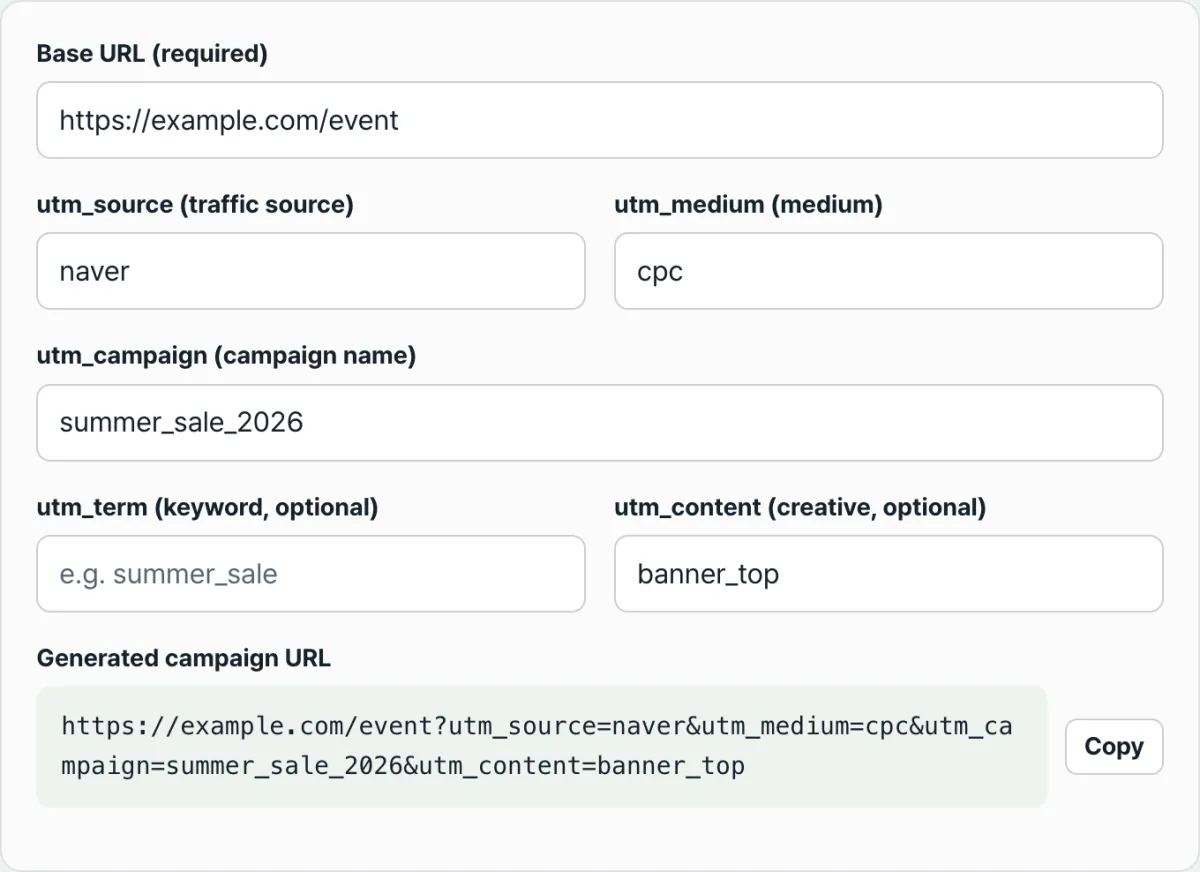
https://example.com/event?utm_source=naver&utm_medium=cpc&utm_campaign=summer_sale_20263) If there's a #, put parameters before it. For a URL like https://example.com/event#top, the correct result is https://example.com/event?utm_source=naver#top. Anything after the # becomes part of the anchor string, not a parameter.
4) Spaces and Korean text get converted. URLs can't contain spaces, so they become + or %20, and Korean characters become %XX for each UTF-8 byte. The value still gets through, but in your reports it stays a string that's hard to read.
You can check whether a link is put together correctly by opening it in a browser. Type this into the developer tools console (usually F12) and you'll see the value that was actually read.
new URLSearchParams(location.search).get("utm_source")The trouble starts when you have more links. Type out five fields by hand over and over and sooner or later you drop an &, or write Naver one time and naver the next.
Check it with our tool. Fill in the fields and it builds a link immediately, with the order and separators handled for you.
Links are built right in your browser, with no install and no signup, and the URL you enter is never sent to a server.
The tool parses the base URL you enter as an actual URL, then appends the parameters. That cleans up a few things automatically.
- Enter just
example.com/eventwithouthttps://and it addshttps://. - If the base URL already has a parameter like
?a=1, it leaves it alone and appends after it. - If a UTM value with the same name already exists, it's replaced with the new value.
- Spaces before and after a value are trimmed.
- If it isn't a valid URL format, the result field shows a message saying "Not a valid URL format" plus an example, and no link is generated.
If any of utm_source, utm_medium, or utm_campaign are blank after the link is built, a message below the result tells you by name which fields are empty.
The notation traps that split your stats
Write the same value differently and the link still opens fine, but the data piles up separately. There are three places this happens most.
| What you typed | How it appears in the link |
|---|---|
naver | utm_source=naver |
Naver | utm_source=Naver (a different string from the one above) |
summer sale | utm_campaign=summer+sale |
여름 세일 | utm_term=%EC%97%AC%EB%A6%84+%EC%84%B8%EC%9D%BC |
Letter case. Values are passed through as strings, so if the receiving side stores them case-sensitively, Naver and naver become different items. Other tools normalize everything to lowercase, so either way it's safest to stick to lowercase from the start.
Spaces. If a value contains a space, it becomes + or %20 in the link. The link works, but it's harder to compare by eye, and pasting it into a messenger app such as KakaoTalk or WhatsApp or into a document can cut the link off at the space. If you need to separate words, use an underscore (_) or hyphen (-).
Korean text. Write 여름세일 and the link carries a long string starting with %. The value gets through, but the link gets longer and is easy to truncate when copying, so campaign names are easier to handle in lowercase English letters.
Wrapping up
- UTM is a convention, not an enforced standard. Nothing filters out typos, so consistency in notation is the whole game.
- source = where, medium = in what form, campaign = which group. Those three are the base set, and term and content are optional.
- Values are case-sensitive strings, so
Naverandnavercan split. Lock them to lowercase. - Spaces become
+and Korean text becomes%XX. Separate words with underscores or hyphens. - When building links by hand, just watch
?,&, and keeping parameters before the#.
Links are built right in your browser, with no install and no signup, and the URL you enter is never sent to a server.
Frequently Asked Questions
How should I split values between utm_source and utm_medium?
Put a proper noun like a service or site name in source, and a common noun describing the link's form in medium. For example, if you send a link in a newsletter, source is the name of the channel that sent it and medium is email. If you put the same value in both, you won't be able to tell "where it came from" apart from "what form it took" later.
Does capitalization break the link?
The link still opens fine. The problem is the tracking. Values are passed through as literal strings, so mixing Naver and naver can split one traffic source into two separate entries. Some tools lowercase values before storing them, but rather than relying on that behavior, it's safer to standardize on lowercase from the start.
Can I use spaces or Korean characters in campaign names?
The link still works if you do. But spaces turn into + or %20, and Korean characters turn into strings like %EC%97%AC..., which makes the link long and hard to read. There's also more risk of it getting cut off during copy and paste, so a combination of lowercase English letters and underscores is recommended.
Do I have to include utm_term and utm_content?
They're optional, so you can leave them empty. Our tool also skips any parameter with an empty value and leaves it out of the link. That said, if you use several placements within one campaign, like a top banner and a link in the body text, putting a placement name such as banner_top or textlink in utm_content lets you tell which link was clicked.
This article was adapted from our Korean original. Read the Korean original